1
Q
Provider Configuration
- By default, resources use a default provider configuration inferred from the first word of the resource type name.
- For example, a resource of type aws_instance uses the default (un-aliased) aws provider configuration unless otherwise stated.
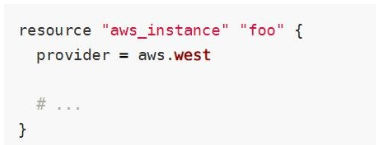
- To select an aliased provider for a resource or data source, set its provider meta-argument to a <provider>.<alias> reference:</alias></provider>
A
2
Q
Handling Multiple AWS Profiles in Terraform
- You can optionally define multiple configurations for the same provider, and select which one to use on a per-resource or per-module basis.
- The primary reason for this is to support multiple regions for a cloud platform.
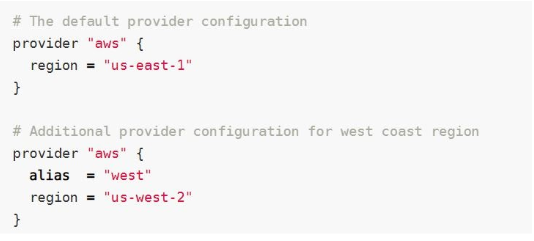
- To include multiple configurations for a given provider, include multiple provider blocks with the same provider name, but set the alias meta-argument to an alias name to use for each additional configuration. For example:
- The provider block without alias set is known as the default provider configuration.
- When an alias is set, it creates an additional provider configuration.
- For providers that have no required configuration arguments, the implied empty configuration is considered to be the default provider configuration
A
3
Q
Sensitive Parameter
- With the organization managing its entire infrastructure in terraform, it is likely that you will see some sensitive information embedded in the code.
- When working with a field that contains information likely to be considered sensitive, it is best to set the Sensitive property on its schema to true
- Setting the sensitive to “true” will prevent the field’s values from showing up in CLI output and in Terraform Cloud
- It will not encrypt or obscure the value in the state, however.
A

Terraform Associate Certification
flashcards
Decks in class (7)
# Cards



