VPC
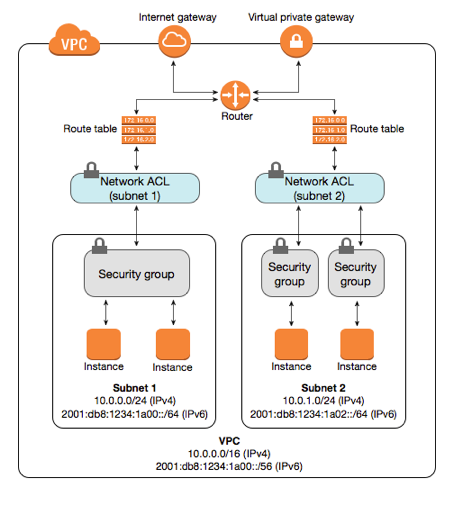
- Think of a VPC as a logical datacenter in AWS
- Consists of IGW’s (access to Internet) or Virtual Private Gateways (access to on-premises data center through VPN and Direct Connect connections), Route Tables, Network Access Control Lists, Subnets, Security Groups
- 1 Subnet = 1 Availability Zone (subnets do not span Availability Zones). Each subnet has a CIDR range.
- Security Groups are Stateful, Network Access Control Lists are Stateless
VPC
- Think of a VPC as a logical datacenter in AWS
- Consists of IGW’s (access to Internet) or Virtual Private Gateways (access to on-premises data center through VPN and Direct Connect connections), Route Tables, Network Access Control Lists, Subnets, Security Groups
- 1 Subnet = 1 Availability Zone (subnets do not span Availability Zones). Each subnet has a CIDR range.
- Security Groups are Stateful, Network Access Control Lists are Stateless
- A network address translation (NAT) server provides outbound Internet access for EC2 instances in private subnets
VPC
- When you create a VPC, a default route table, Network Access Control List (NACL) and a default security group are also created.
- It won’t create any subnets not will it create a default internet gateway.
- Amazon always reserves 5 IP addresses within your subnets.
- You can only have 1 Internet Gateway per VPC
- Security groups cannot span VPC
What is a Route Table?
Route tables determine where network traffic is directed.
- Each subnet in your VPC must be associated with a route table.
- Your VPC automatically comes with a main route table that you can modify.
- You can create additional custom route tables for your VPC.
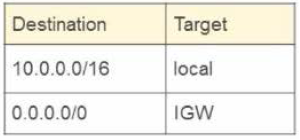
- Each route in a table specifies a destination CIDR and a target.
Common routes:
- Internet gateway (IGW)
- Virtual private gateway (VGW)
- Network address translation (NAT)
- VPC peering
What is a Route Table?
Route tables determine where network traffic is directed.
- Each subnet in your VPC must be associated with a route table.
- Your VPC automatically comes with a main route table that you can modify.
- You can create additional custom route tables for your VPC.
- Each route in a table specifies a destination CIDR and a target.
Common routes:
- Internet gateway (IGW)
- Virtual private gateway (VGW)
- Network address translation (NAT)
- VPC peering
VPC Peering
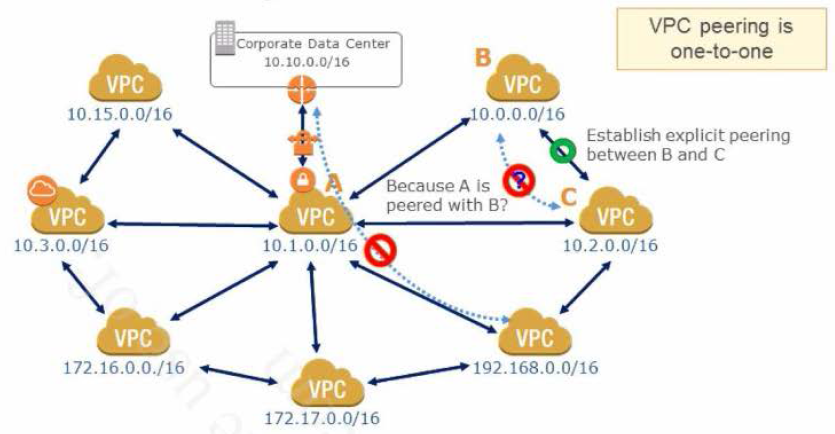
- Allows you to connect one VPC with another via a direct network route using private IP addresses
- Instances behave as if they were on the same private network
- You can peer VPC’s with other AWS accounts as well as with other VPCs in the same account
- VPCs reside in the same region
- Peering is in a star configuration, i.e. 1 central VPC peers with 4 others.
- You cannot create a VPC peering connection between VPCs that have matching or overlapping CIDR blocks
- Transitive Peering is NOT supported!
- Only one between any two VPCs!
VPC Peering
- Allows you to connect one VPC with another via a direct network route using private IP addresses
- Instances behave as if they were on the same private network
- You can peer VPC’s with other AWS accounts as well as with other VPCs in the same account
- VPCs reside in the same region
- Peering is in a star configuration, i.e. 1 central VPC peers with 4 others.
- You cannot create a VPC peering connection between VPCs that have matching or overlapping CIDR blocks
- Transitive Peering is NOT supported!
- Only one between any two VPCs!
VPC Diagram - Step 1
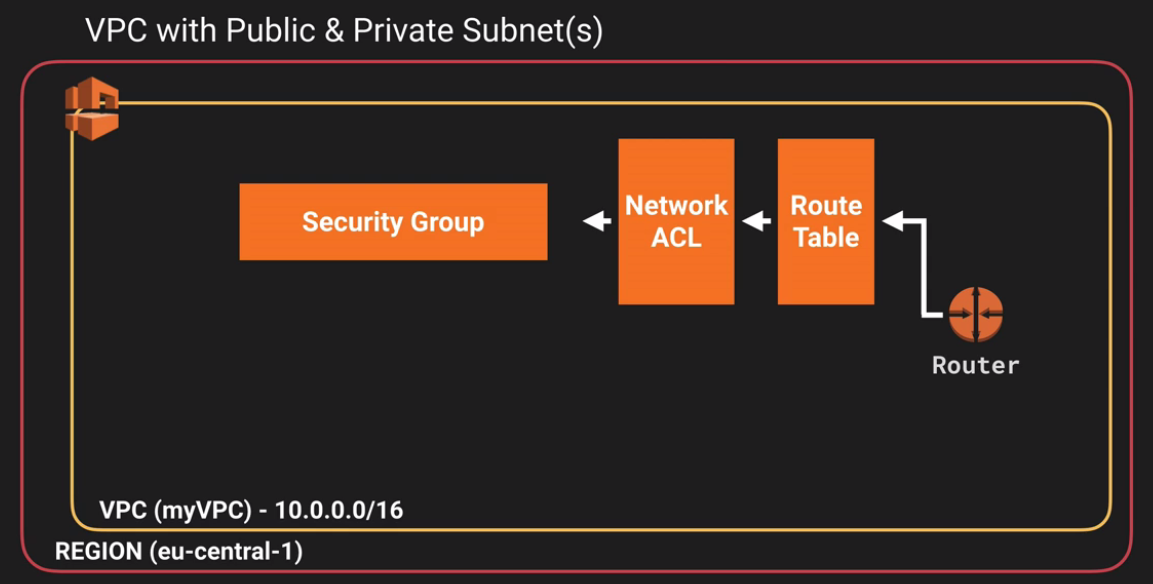
- Create a VPC
- Define CIDR block (IP ranges)
- By default, default Network ACL and default Route Table are created
VPC Diagram - Step 1
- Create a VPC
- Define CIDR block (IP ranges)
- By default, default Network ACL and default Route Table are created
VPC Diagram - Step 2
- Create subnets (public & private) inside the VPC (subnets do not span Availability Zones). Each subnet has a CIDR range
- Create an Internet Gateway. IGW allows subnets to route to public Internet
- Create a custom route table (for public subnet)
- Attach the Internet Gateway to our custom route
- Adjust our public subnet to use the newly defined route
- Provision an EC2 instance with an Elastic IP address (needs this or an ELB to have access to Internet!)
- Create Security Group
- Allow inbound connections to 10.0.1.0/24 and 10.0.2.0/24 on HTTP and HTTPS
- Allow outbound connections on HTTP and HTTPS for all traffic
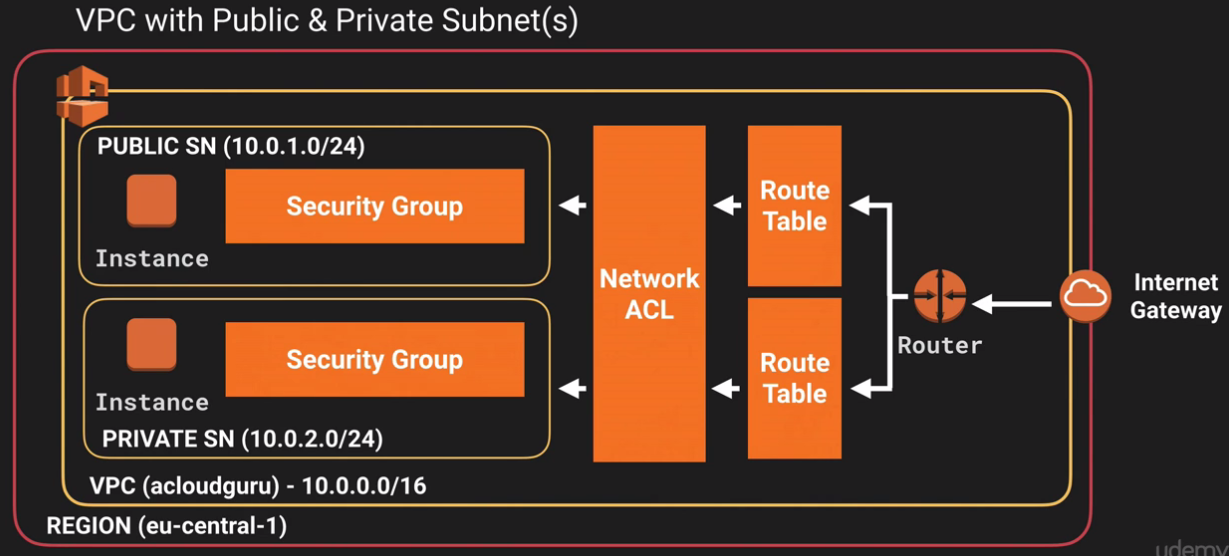
VPC Diagram - Step 2
- Create subnets (public & private) inside the VPC (subnets do not span Availability Zones). Each subnet has a CIDR range
- Create an Internet Gateway. IGW allows subnets to route to public Internet
- Create a custom route table (for public subnet)
- Attach the Internet Gateway to our custom route
- Adjust our public subnet to use the newly defined route
- Provision an EC2 instance with an Elastic IP address (needs this or an ELB to have access to Internet!)
- Create Security Group
- Allow inbound connections to 10.0.1.0/24 and 10.0.2.0/24 on HTTP and HTTPS
- Allow outbound connections on HTTP and HTTPS for all traffic
VPC Diagram - Step 3 - NAT Instance
- Provisioned our NAT instance inside our public subnet
- Disabled Source/Destination Check
- Set up a route on our private subnets to route through the NAT instance
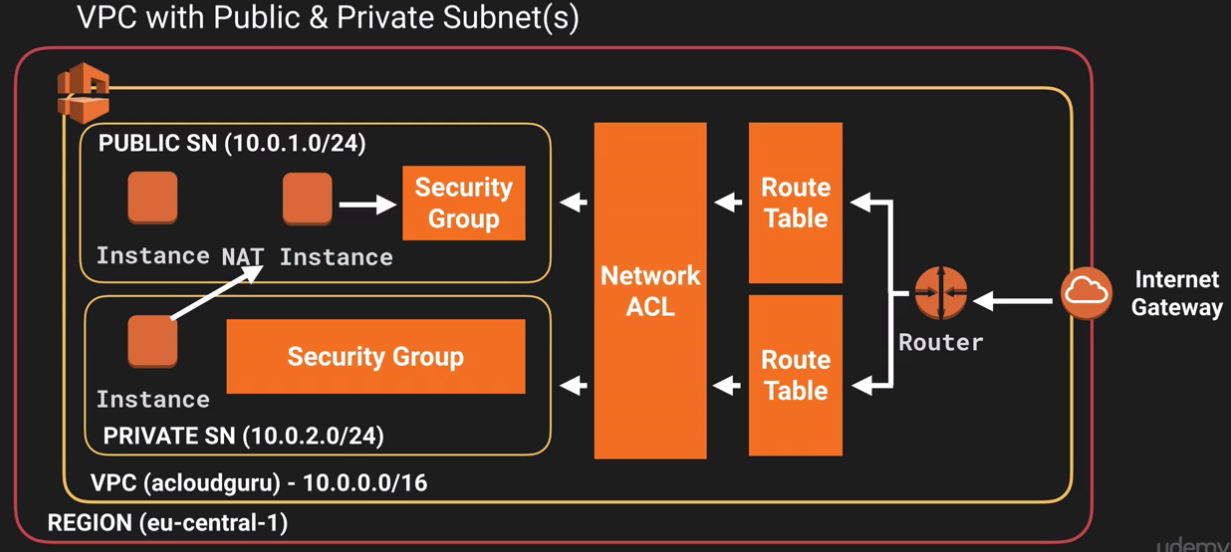
VPC Diagram - Step 3 - NAT Instance
- Provisioned our NAT instance inside our public subnet
- Disabled Source/Destination Check
- Set up a route on our private subnets to route through the NAT instance
VPC Diagram - Step 3 - NAT Gateway
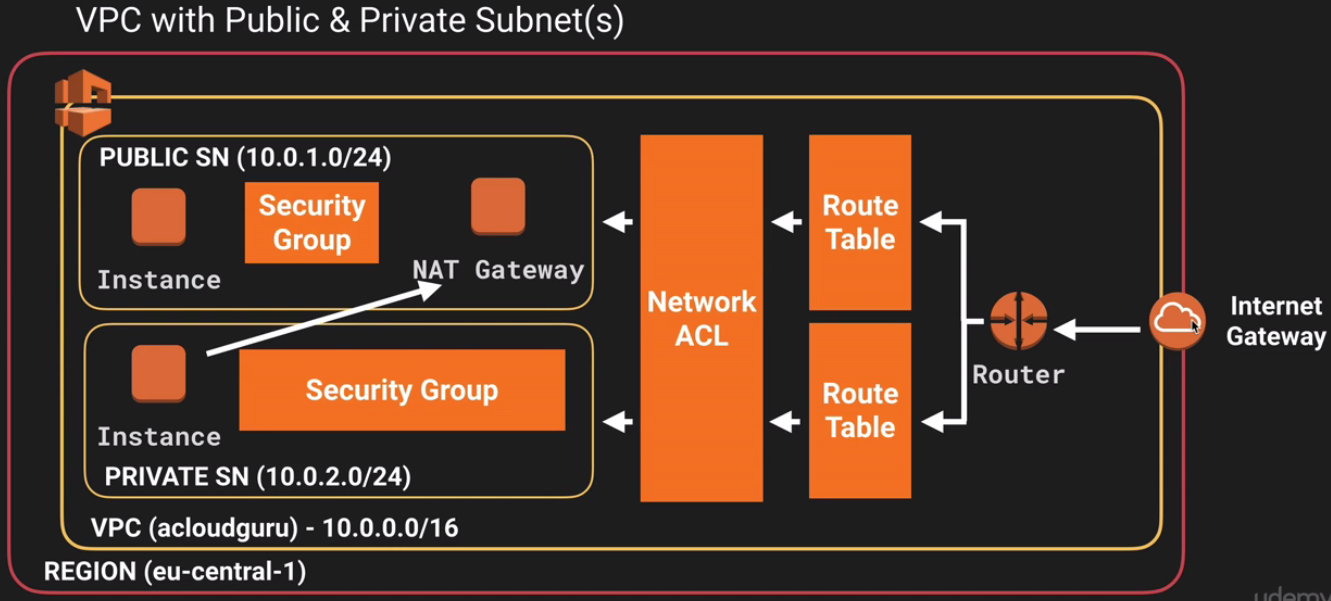
VPC Diagram - Step 3 - NAT Gateway
VPC - NAT instances
- A network address translation (NAT) server provides outbound Internet access for EC2 instances in private subnets
- When creating a NAT instance, disable Source/Destination Check on the instance
- NAT instance must be in a public subnet
- There must be a route out of the private subnet to the NAT instance, in order for this to work
- NAT needs a public IP address
- The amout of traffic that NAT instances supports, depends on the instance size. If you are bottlenecking, increase the instance size
- You can create high availability using Autoscaling Groups, multiple subnets in different AZ’s and a script to automate failover
- NAT instances are always behing a Security Group
VPC - NAT instances
- When creating a NAT instance, disable Source/Destination Check on the instance
- NAT instance must be in a public subnet
- There must be a route out of the private subnet to the NAT instance, in order for this to work
- NAT needs a public IP address
- The amout of traffic that NAT instances supports, depends on the instance size. If you are bottlenecking, increase the instance size
- You can create high availability using Autoscaling Groups, multiple subnets in different AZ’s and a script to automate failover
- NAT instances are always behing a Security Group
VPC - NAT Gateways
- Redundant inside the AZ
- Preferred by the enterprise
- Starts at 5Gb and scales currently up to 45Gbps
- No need to patch
- Not associated with security groups
- Automatically assigned a Public IP address
- Remember to update your route tables
- No need to disable Source/Destination Checks
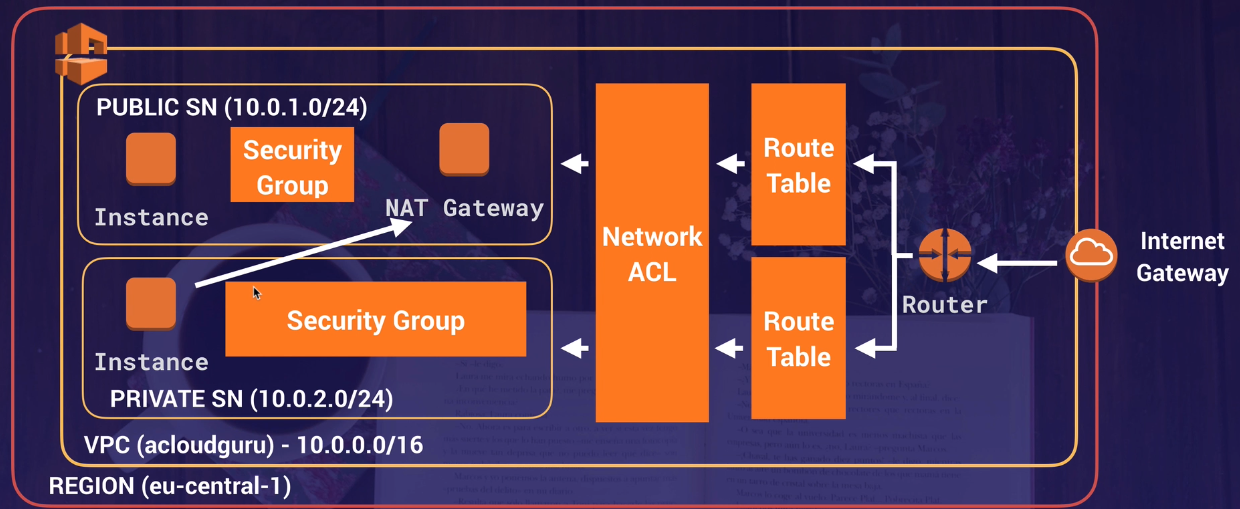
VPC - NAT Gateways
- Scale automatically up to 10Gbps
- No need to patch
- Not associated with security groups
- Automatically assigned a Public IP address
- Remember to update your route tables
- No need to disable Source/Destination Checks
VPC - NAT Gateways
If you have resources in multiple Availability Zones and they share one NAT gateway, in the event that the NAT gateway’s Availability Zone is down, resources in the other Availability Zones lose internet access. To create an Availability Zone-independent architecture, create a NAT gateway in each Availability Zone and configure your routing to ensure that resources use the NAT gateway in the same Availability Zone.
VPC - Network ACL’s
- Your VPC automatically comes with a default network ACL and by default it allows all outbound and inbound traffic
- You can create a custom Network ACL. By default, each custom Network ACL denies all inbound and outbound traffic until you add rules
- Each subnet in your VPC must be associated with a network ACL. If you don’t explicitly associate a subnet with a Network ACL, the subnet is automatically associated with the default Network ACL
- Block IP addresses with Network ACL, not Security Groups
- You can associate Network ACL with multiple subnets. However a subnet can be associated with only one Network ACL at a time. When you associate a Network ACL with a subnet, the previous association is removed
- A Network ACL contains a numbered list of rules that is evaluated in order, starting with the lowest numbered rule
- A Network ACL has separate inbound and outbound rules, and each rule can either allow or deny traffic
- Network ACLs are stateless; responses to allowed inbound traffic are subject to the rules for outbound traffic (and vice versa)
VPC - Network ACL’s
- Your VPC automatically comes with a default network ACL and by default it allows all outbound and inbound traffic
- You can create a custom Network ACL. By default, each custom Network ACL denies all inbound and outbound traffic until you add rules
- Each subnet in your VPC must be associated with a network ACL. If you don’t explicitly associate a subnet with a Network ACL, the subnet is automatically associated with the default Network ACL
- You can associate Network ACL with multiple subnets. However a subnet can be associated with only one Network ACL at a time. When you associate a Network ACL with a subnet, the previous association is removed
- A Network ACL contains a numbered list of rules that is evaluated in order, starting with the lowest numbered rule
- A Network ACL has separate inbound and outbound rules, and each rule can either allow or deny traffic
- Network ACLs are stateless; responses to allowed inbound traffic are subject to the rules for outbound traffic (and vice versa)
VPC - Security Groups vs Network ACL
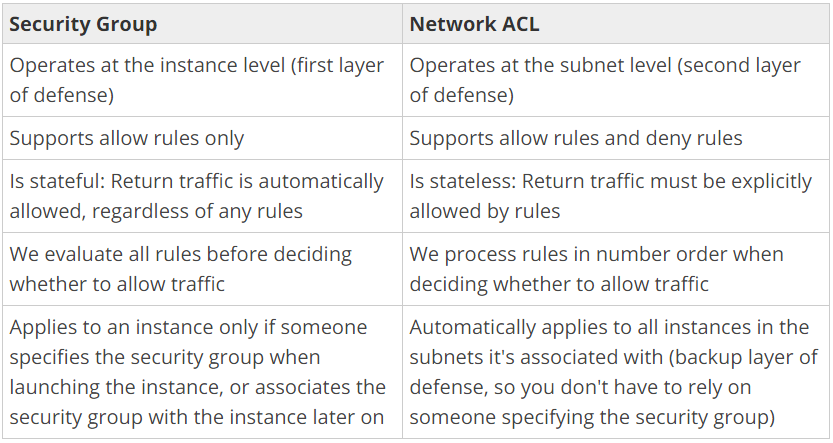
VPC - Security Groups vs Network ACL
Security Group Network ACL Operates at the instance level (first layer of defense) Operates at the subnet level (second layer of defense) Supports allow rules only Supports allow rules and deny rules Is stateful: Return traffic is automatically allowed, regardless of any rules Is stateless: Return traffic must be explicitly allowed by rules We evaluate all rules before deciding whether to allow traffic We process rules in number order when deciding whether to allow traffic Applies to an instance only if someone specifies the security group when launching the instance, or associates the security group with the instance later on Automatically applies to all instances in the subnets it’s associated with (backup layer of defense, so you don’t have to rely on someone specifying the security group)
Elastic IP
- is a static IP address designed for dynamic cloud computing
- is associated with AWS account, and not a particular instance
- can be remapped from one instance to an other instance
- is charged for non usage, if not linked for any instance or instance associated is in stopped state or if you have assigned more than 1 EIP to one instance
Elastic IP
- is a static IP address designed for dynamic cloud computing
- is associated with AWS account, and not a particular instance
- can be remapped from one instance to an other instance
- is charged for non usage, if not linked for any instance or instance associated is in stopped state or if you have assigned more than 1 EIP to one instance
VPC Flow Logs
VPC Flow Logs is a feature that enables you to capture information about the IP traffic going to and from network interfaces in your VPC. Flow log data is stored using Amazon CloudWatch Logs. After you’ve created a flow log, you can retrieve and view its data in Amazon CloudWatch Logs.
VPC Flow Logs
- You cannot enable flow logs for VPC that are peered with your VPC unless the peer VPC is in your account.
- You cannot tag a flow log.
- After you have created a flow log, you cannot change its configuration; for example, you can’t associate a different IAM role with the flow log.
VPC Flow Logs
Not all IP Traffic monitored;
- Traffic generated by instances when they contact the Amazon DNS server. If you use your own DNS server, then all traffic to that DNS server is logged.
- Traffic generated by a Windows instance for Amazon Windows license activation.
- Traffic to and from 169.254.169.254 for instance metadata.
- DHCP traffic.
- Traffic to the reserved IP address for the default VPC router.
VPC - NAT vs Bastions
- A NAT Gateway or NAT instance is used to provide internet traffic to EC2 instances in private subnets
- A Bastion is used to securely administer EC2 instances (using SSH or RDP) in private subnets (from public subnet).
- You cannot use a NAT Gateway as a Bastion host
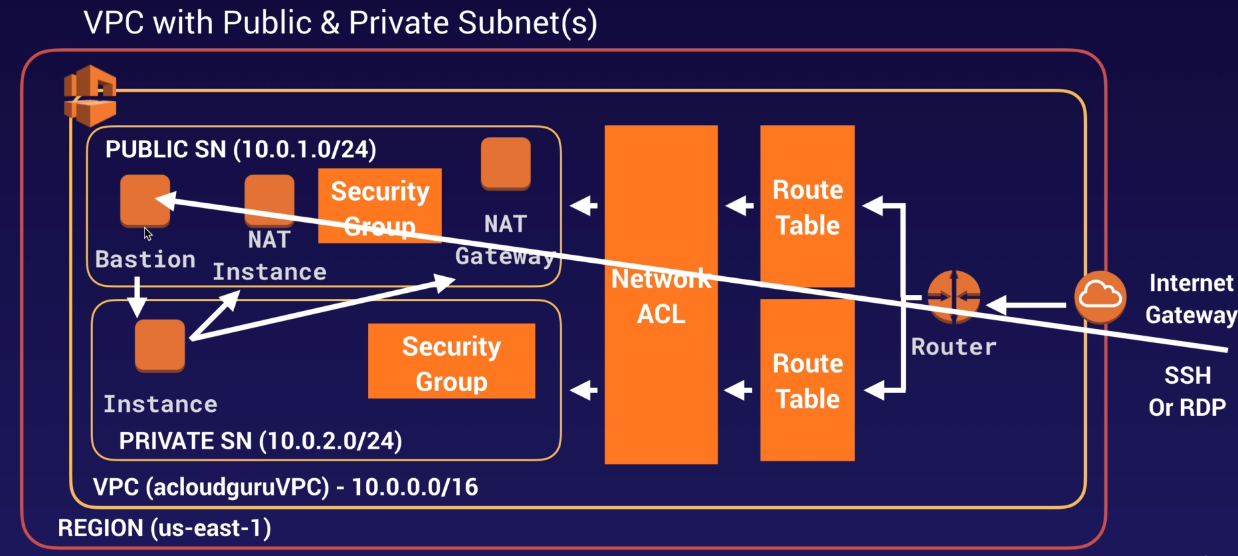
VPC - NAT vs Bastions
- A NAT is used to provide internet traffic to EC2 instances in private subnets
- A Bastion is used to securely administer EC2 instances (using SSH or RDP) in private subnets (from public subnet).
Direct Connect vs VPN
- Direct Connect directly connects your data center to AWS
- Useful for high throughput workloads (i.e. lot of network traffic)
- Or if you need a stable and reliable secure connection
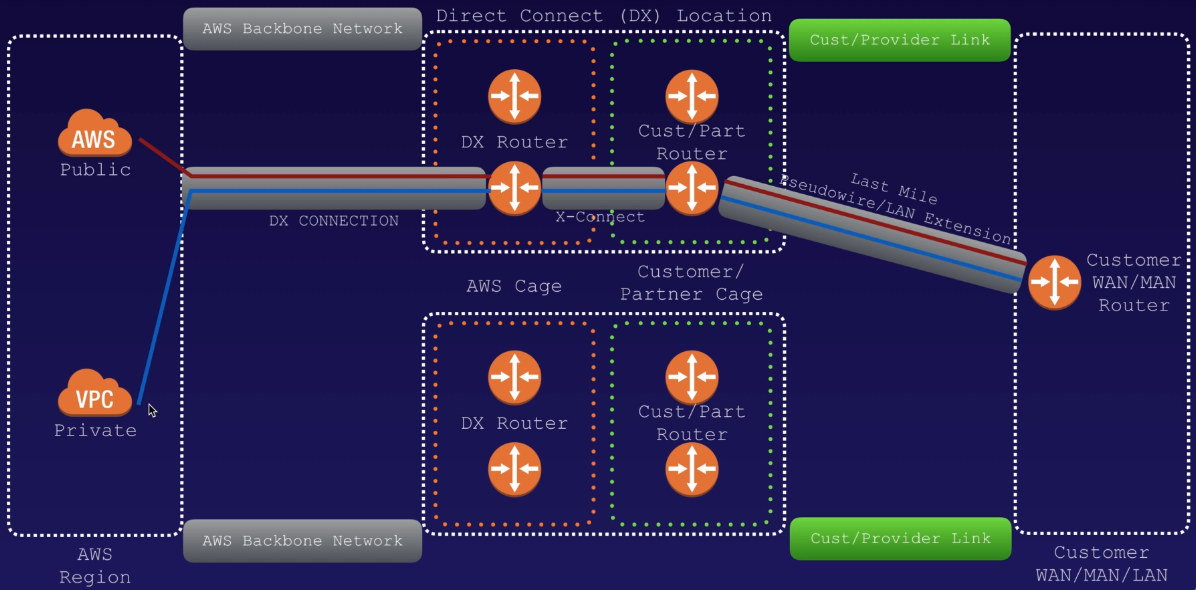
Direct Connect vs VPN
A VPC VPN Connection establish encrypted network connectivity between your intranet and Amazon VPC over the Internet. VPN Connections can be configured in minutes and are a good solution if you have an immediate need, have low to modest bandwidth requirements, and can tolerate the inherent variability in Internet-based connectivity. AWS Direct Connect does not involve the Internet; instead, it uses dedicated, private network connections between your intranet and Amazon VPC.
- Expensive to Setup and Takes time vs Cheap & Immediate
- Dedicated private connections vs Internet
- Reduced data transfer rate vs Internet data transfer cost
- Consistent performance vs Internet inherent variability
- Do not provide Redundancy vs Provides Redundancy
Setting up Direct Connect [SAA-C02]
- Create a virtual interface in the Direct Connect console. This is a PUBLIC Virtual Interface
- Go to the VPC console and then to VPN connections. Create a Customer Gateway
- Create a Virtual Private Gateway
- Attach the Virtual Private Gateway to the desired VPC
- Select VPN Connections and create new VPN Connection
- Select the Virtual Private Gateway and the Customer Gateway
- Once the VPN is available, setup the VPN on the customer gateway or firewall
Global Accelerator [SAA-C02]
- AWS Gloabla Accelerator is a service in which you create accelerators to improve availability and performance of your applications for local and global users.
- You are assigned two static IP addresses (or alternatively you can bring your own).
- You can control traffic using traffic dials. This is done within the endpoint group.
VPC Endpoints
A VPC endpoint enables you to privately connect your VPC to supported AWS services and VPC endpoint services powered by AWS PrivateLink without requiring an internet gateway, NAT device, VPN connection, or AWS Direct Connect connection. Instances in your VPC do not require public IP addresses to communicate with resources in the service. Traffic between your VPC and the other service does not leave the Amazon network.
Endpoints are virtual devices. They are horizontally scaled, redundant, and highly available VPC components. They allow communication between instances in your VPC and services without imposing availability risks or bandwidth constraints on your network traffic.
VPC Endpoints Types
There are two types of VPC endpoints:
- Interface Endpoints: enables you to connect to services powered by AWS PrivateLink by adding an Elastic Network Interface within a VPC. AWS creates a local/regional DNS entry which resolves to the local IP address assigned to ENI.
- Gateway Endpoints: provide secure private access to Amazon S3 and DynamoDB without routing via the Internet. When Gateway Endpoints are created, VPC Endpoint is created along with the addition of S3 prefixes in the routing table, pointing to VPCE.
Currently Gateway Endpoints support:
- Amazon S3
- DynamoDB
Amazon Redshift also now supports Enhanced VPC Routing
AWS PrivateLink and Network Load Balancers
- AWS PrivateLink is the best way to expose a service VPC to tens, hundreds, or thousands of customer VPCs
- Doesnt require VPC peering, no route tables, NAT, IGWs, etc.
- Requires a Network Load Balancer on the service VPC and an ENI on the customer VPC
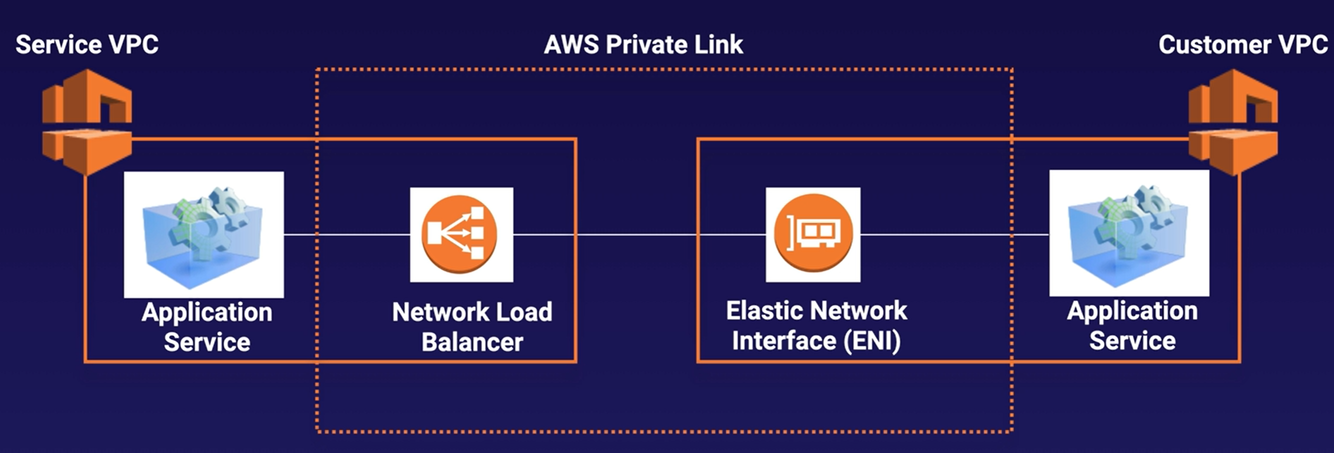


-
1_Identity Access Management (IAM)7
-
2_S3 and Glacier24
-
3_AWS Object Storage, CDN and CloudFront14
-
4_EC232
-
5_RDS12
-
6_DynamoDB, Redshift, Elasticache, Aurora21
-
7_Route5313
-
8_VPC27
-
9_HA Architecture13
-
9 bis_Auto Scaling9
-
10_Application Services18
-
11_Serverless3
-
12_Security1
-
AWS Security Whitepaper17
-
AWS Storage Services Whitepaper8
-
Additional Services6



