What are temporal tables?
Are generally a database feature that brings built-in support for providing information about data stored in the table at any point in time rather than only the data that is correct at the current moment in time.
What is a system-versioned temporal table?
A system-versioned temporal table is a type of user table designed to keep a full history of data changes to allow easy point in time analysis.
Every temporal table has two explicitly defined columns, each with a datetime2 data type. These columns are referred to as period columns. These period columns are used exclusively by the system to record period of validity for each row whenever a row is modified.
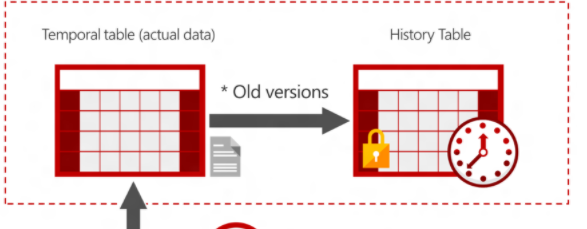
In addition to these period columns, a temporal table also contains a reference to another table with a mirrored schema. The system uses this table to automatically store the previous version of the row each time a row in the temporal table gets updated or deleted. This additional table is referred to as the history table, while the main table that stores current (actual) row versions is referred to as the current table or simply as the temporal table. During temporal table creation users can specify existing history table (must be schema compliant) or let system create default history table.
How does temporal work?
System-versioning for a table is implemented as a pair of tables, a current table and a history table. Within each of these tables, the following two additional datetime2 columns are used to define the period of validity for each row:
Period start column: The system records the start time for the row in this column, typically denoted as the SysStartTime column.
Period end column: The system records the end time for the row in this column, typically denoted as the SysEndTime column.
The current table contains the current value for each row. The history table contains each previous value for each row, if any, and the start time and end time for the period for which it was valid.
How do I query temporal data?
The SELECT statement FROM
clause has a new clause FOR SYSTEM_TIME with five temporal-specific sub-clauses to query data across the current and history tables.
- AS OF<date_time>;</date_time>
- FROM<start_date_time>TO<end_date_time>;</end_date_time></start_date_time>
- BETWEEN<start_date_time>AND<end_date_time>;</end_date_time></start_date_time>
- CONTAINED IN (<start_date_time> , <end_date_time>);</end_date_time></start_date_time>
- ALL.
How would you create a system -versioned temporal table?
There are three ways to create a system-versioned temporal table with regards to how the history table is specified:
- Temporal table with an anonymous history table: you specify the schema of the current table and let the system create a corresponding history table with auto-generated name.
- Temporal table with a default history table: you specify the history table schema name and table name and let the system create a history table in that schema.
- Temporal table with a user-defined history table created beforehand: you create a history table that fits best your needs and then reference that table during temporal table creation.
How would you create a temporal table with anonymous history table?
It is the simplest way to create a temporal table since it doesn’t require any parameter in SYSTEM_VERSIONING clause.
Important Remarks:
- A system-versioned temporal table must have a primary key defined and have exactly one PERIOD FOR SYSTEM_TIME defined with two datetime2 columns, declared as GENERATED ALWAYS AS ROW START / END
- The PERIOD columns are always assumed to be non-nullable, even if nullability is not specified. If thePERIOD columns are explicitly defined as nullable, the CREATE TABLE statement will fail.
- The history table must always be schema-aligned with the current or temporal table, in terms of number of columns, column names, ordering and data types.
- An anonymous history table is automatically created in the same schema as current or temporal table.
- A default clustered index is created for the history table with an auto-generated name in format IX_<history_table_name>. The clustered index contains the PERIOD columns (end, start).</history_table_name>
How would you create a temporal table with default history table?
Creating a temporal table with a default history table is a convenient option when you want to control naming and still rely on the system to create the history table with the default configuration.
Important Remarks:
- The history table is created using the same rules as apply to creating an “anonymous” history table, with the following rules that apply specifically to the named history table.
- The schema name is mandatory for the HISTORY_TABLE parameter.
- If the specified schema does not exist, the CREATE TABLE statement will fail.
- If the table specified by the HISTORY_TABLE parameter already exists, it will be validated against the newly created temporal table in terms of schema consistency and temporal data consistency. If you specify an invalid history table, the CREATE TABLE statement will fail.
How would you create a temporal table with a user-defined history table?
Creating a temporal table with user-defined history table is a convenient option when the user wants to specify a history table with specific storage options and additional indexes.
Important remarks
- If you plan to run analytic queries on the historical data that employs aggregates or windowing functions, creating a clustered columnstore as a primary index is highly recommended for compression and query performance.
- If the primary use case is data audit (i.e. searching for historical changes for a single row from the current table), then a good choice is to create rowstore history table with a clustered index
- The history table cannot have a primary key, foreign keys, unique indexes, table constraints or triggers. It cannot be configured for change data capture, change tracking, transactional or merge replication.
Why and how would you alter a non-temporal table to be a system-versioned temporal table?
Using temporal system-versioning is less complex and provides additional benefits including:
- Immutable history;
- New syntax for time-travelling queries;
- Better DML performance;
- Minimal maintenance costs.
Also when you convert a table it is highly recommended to consider using the HIDDEN clause to hide the new PERIOD columns (the datetime2 columns SysStartTime and SysEndTime) to avoid impacting existing applications that do not explicitly specify column names like SELECT or INSERT.
How would you add versioning to non-temporal tables?
You need to add the PERIOD definition and optionally provide a name for the empty history table that SQL Server will create for you
Important remarks:
- With a large existing history table with data on SQL Server Standard Edition, adding a non-null column can be an expensive operation.
- Constraints for period start and period end columns must be carefully chosen:
- Default for start column specifies from which point in time you consider existing rows to be valid. It cannot be specified as a datetime point in the future.
- End time must be specified as the maximum value for a given datetime2 precision
- Adding period will perform a data consistency check on the current table to make sure that the defaults for period columns are valid.
How would you query temporal tables?
To perform any type of time-based analysis, use the new FOR SYSTEM_TIME clause with four temporal-specific sub-clauses to query data across the current and history tables. These are : AS OF; FROM… TO.. ;BETWEEN AND CONTAINED IN ( , ); ALL
FOR SYSTEM_TIME can be specified independently for each table in a query. It can be used inside common table expressions, table-valued functions and stored procedures. When using a table alias with a temporal tables, the FOR SYSTEM_TIME clause must included between the temporal table name and the alias
How would you query with the AS OF subclause for a specific time?
Use the AS OF sub-clause when you need to reconstruct state of data as it was at any specific time in the past. You can reconstruct the data with the precision of datetime2 type that was specified in PERIOD column definitions.
The AS OF sub-clause clause can be used with constant literals or with variables, which allows you to dynamically specify time condition. The values provided are interpreted as UTC time.
How would you query with AS OF using Views?
Using views is very useful in scenarios when complex point-in time analysis is required. A common example is generating a business report today with the values for previous month.
Usually, customers have a normalized database model which involves many tables with foreign key relationships. Answering the question how data from that normalized model looked like at a point in the past can very challenging, since all tables change independently, on their own cadence.
In this case, the best option is to create a view and apply the AS OF sub-clause to the entire view. Using this approach allows you to decouple modeling of the data access layer from point-in time analysis as SQL Server will apply AS OF clause transparently to all temporal tables that participate in view definition. Furthermore, you can combine temporal with non-temporal tables in the same view and AS OF will be applied only to temporal ones. If view does not reference at least one temporal table, applying temporal querying clauses to it will fail with an error.
How would you query for changes to specific rows over time?
The temporal sub-clauses FROM…TO, BETWEEN…AND and CONTAINED IN are useful when you want to perform a data audit, i.e. when you need to get all historical changes for a specific row in the current table.
The first two sub-clauses return row versions that overlap with a specified period (i.e. those that started before given period and ended after it), while CONTAINED IN returns only those that existed within specified period boundaries.
Important
If you search for non-current row versions only, we recommend you query the history table directly as this will yield the best query performance. Use ALL when you need to query current and historical data without any restrictions.
What is Format query results as JSON with FOR JSON part 1?
Format query results as JSON, or export data from SQL Server as JSON, by adding the FOR JSON clause to a SELECT statement. Use the FOR JSON clause to simplify client applications by delegating the formatting of JSON output from the app to SQL Server. Azure Data Studio is the recommended query editor for JSON queries because it auto-formats the JSON results (as seen in this article) instead of displaying a flat string.
When you use the FOR JSON clause, you can specify the structure of the JSON output explicitly, or let the structure of the SELECT statement determine the output.
- To maintain full control over the format of the JSON output, use FOR JSON PATH. You can create wrapper objects and nest complex properties. (option 1)
- To format the JSON output automatically based on the structure of the SELECT statement, use FOR JSON AUTO. (option 2)
What options do you use to control the output of the FOR JSON clause?
Control the output of the FOR JSON clause by using the following additional options.
- ROOT. To add a single, top-level element to the JSON output, specify the ROOT option. If you don’t specify this option, the JSON output doesn’t have a root element. For more info, see Add a Root Node to JSON Output with the ROOT Option (SQL Server).
- INCLUDE_NULL_VALUES. To include null values in the JSON output, specify the INCLUDE_NULL_VALUES option. If you don’t specify this option, the output doesn’t include JSON properties for NULL values in the query results. For more info, see Include Null Values in JSON Output with the INCLUDE_NULL_VALUES Option (SQL Server).
- WITHOUT_ARRAY_WRAPPER. To remove the square brackets that surround the JSON output of the FOR JSON clause by default, specify the WITHOUT_ARRAY_WRAPPER option. Use this option to generate a single JSON object as output from a single-row result. If you don’t specify this option, the JSON output is formatted as an array - that is, it’s enclosed within square brackets. For more info, see Remove Square Brackets from JSON Output with the WITHOUT_ARRAY_WRAPPER Option (SQL Server).
If the result set contains a single column what characteristics does the FOR JSON output clause has?
- A small result set may contain a single row.
- A large result set splits the long JSON string across multiple rows.
- By default, SQL Server Management Studio (SSMS) concatenates the results into a single row when the output setting is Results to Grid. The SSMS status bar displays the actual row count.
- Other client applications may require code to recombine lengthy results into a single, valid JSON string by concatenating the contents of multiple rows. For an example of this code in a C# application, see Use FOR JSON output in a C# client ap.
If the result set contains multiple columns what characteristics does the FOR JSON output clause has?
If the results are formatted as an array of JSON objects.The number of elements in the JSON array is equal to the number of rows in the results of the SELECT statement (before the FOR JSON clause is applied);
JSON Elements can be: String, Number, Boolen, Object, Array.
Each row in the results of the SELECT statement (before the FOR JSON clause is applied) becomes a separate JSON object in the array;
Each column in the results of the SELECT statement (before the FOR JSON clause is applied) becomes a property of the JSON object;
What functions do you call when you have to provide a JSON PATH expression?
Use JSON path expressions to reference the properties of JSON objects.
You have to provide a path expression when you call the following functions.
- When you call OPENJSON to create a relational view of JSON data. For more info, see OPENJSON (Transact-SQL).
- When you call JSON_VALUE to extract a value from JSON text. For more info, see JSON_VALUE (Transact-SQL).
- When you call JSON_QUERY to extract a JSON object or an array. For more info, see JSON_QUERY (Transact-SQL).
- When you call JSON_MODIFY to update the value of a property in a JSON string.
What are JSON PATH components, modes and remarks?
Parts of a path expression a path expression has two components:
- The optional path mode, with a value of lax or strict.
- The path itself.
Path mode:
- In lax mode, the function returns empty values if the path expression contains an error. For example, if you request the value $.name, and the JSON text doesn’t contain a name key, the function returns null, but does not raise an error.
- In strict mode, the function raises an error if the path expression contains an error.
After the optional path mode declaration, specify the path itself.
- The dollar sign ($) represents the context item.
- The property path is a set of path steps. Path steps can contain the following elements and operators.
- Key names. For example, $.name and $.”first name”. If the key name starts with a dollar sign or contains special characters such as spaces, surround it with quotes.
- Array elements. For example, $.product[3]. Arrays are zero-based.
- The dot operator (.) indicates a member of an object. For example, in $.people[1].surname, surname is a child of people.
FOR XML def, remarks
def: A SELECT query returns results as a rowset. You can optionally retrieve formal results of a SQL query as XML by specifying the FOR XML clause in the query. The FOR XML clause can be used in top-level queries and in subqueries. The top-level FOR XML clause can be used only in the SELECT statement. In subqueries, FOR XML can be used in the INSERT, UPDATE, and DELETE statements. FOR XML can also be used in assignment statements.
Remarks:
- XML RAW-creates a generic row identifier an element;
- Adding the ELEMENTS Keyword will return the rows as elements rather than attributes;
- ROOT will format XML document with the single root node which is required for a well-formated XML document.
- WITH AS in combination with XML PATH will create one element for each table combination, and not one element for each row identifier.
FOR XML (modes)
In a FOR XML clause, you specify one of these modes:
- RAW:
- The RAW mode generates a single element per row in the rowset that is returned by the SELECT statement. You can generate XML hierarchy by writing nested FOR XML queries.
- AUTO;
- The AUTO mode generates nesting in the resulting XML by using heuristics based on the way the SELECT statement is specified. You have minimal control over the shape of the XML generated. The nested FOR XML queries can be written to generate XML hierarchy beyond the XML shape that is generated by AUTO mode heuristics.
- EXPLICIT;
- The EXPLICIT mode allows more control over the shape of the XML. You can mix attributes and elements at will in deciding the shape of the XML. It requires a specific format for the resulting rowset that is generated because of query execution. This rowset format is then mapped into XML shape. The power of EXPLICIT mode is to mix attributes and elements at will, create wrappers and nested complex properties, create space-separated values and mixed contents.
- PATH.
- The PATH mode together with the nested FOR XML query capability provides the flexibility of the EXPLICIT mode in a simpler manner.
These modes are in effect only for the execution of the query for which they are set. They do not affect the results of any subsequent queries.
Remove Square Brackets from JSON
To remove the square brackets that surround the JSON output of the FOR JSON clause by default, specify the WITHOUT_ARRAY_WRAPPER option. Use this option with a single-row result to generate a single JSON object as output instead of an array with a single element.
If you use this option with a multiple-row result, the resulting output is not valid JSON because of the multiple elements and the missing square brackets.
What are the validate, query, and change JSON functions
ISJSON-tests whether a string contains valid JSON.
JSON_VALUE-extracts a scalar value from a JSON string.
JSON_QUERY-extracts an object or an array from a JSON string.
JSON_MODIFY-updates the value of a property in a JSON string and returns the updated JSON string.

-
A1-Create Transact-SQL Select queries17
-
A2-Query multiple tables by using joins7
-
A3-Implement functions and aggregate data35
-
A4-Modify data22
-
B1-Query data by using the subqueries and APPLY9
-
B2-Query data by using table expressions16
-
B3-Group and pivot data by using queries13
-
B4-Query temporal data non-temporal-relational data34
-
C1-Create database programmability objects by using Transact-SQL54
-
C2-Implement error handling and transactions21
-
C3-Implement data types and NULLs13
-
General12



