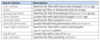
What do the following keystrokes do when used in the terminal emulator?
Ctrl+Alt+(F2, F3, F4, etc)
Opens TTY2, TTY3, TTY4, etc.
Prints the user name associated with the current effective user ID. It is equivalent to the command ‘id -un’.
whoami
Prints the name of the current working directory.
pwd
Prints information about the machine and operating system it is run on.
uname
Print all of the information available about the system, except omit the processor type and the hardware platform name if they are unknown.
uname -a
Prints the kernel release
uname -r
Prints the kernel version
uname -v
Print the saved bash history file to screen (usually saved at logout unless done manually)
cat .bash_history (when executed from user’s home folder)
Lists all files (including hidden ones) in the directory specified.
ls -a
Lists files in the specified directory and adds the following classification indicators:
/=directory
*=executable file
@=symbolic link
ls -F
Produces a long listing of file information
ls -l
Displays all the lines of a text file. Also used to concatenate files together.
cat
What does the following command do?
cat -n 10 [filename]
Displays the first 10 lines of text from [filename]
Similar to cat command, but shows the last (10 lines by default) of a specified file
tail
What does the following command do?
tail -f [filename]
Displays text lines as they are added to a file
By default, displays the following counts of a text file:
1- lines
2- words
3- bytes
wc
By default, shows only unique lines of a text file; not duplicates:
Lines are considered duplicate, if:
- They have the exact same content
- Are on two lines, one after the other, in the file
The following options can be used with this command:
- Display a count number of times duplicate line occurs (-c)
- Print only duplicate lines, and show only one occurrence (-d)
- Print only duplicate lines, but show all occurrences (-D)
uniq
- By default, provides a line number for each file text line
- Lines numbers are not added to file; only displayed
- By default, blank lines are not numbered
nl
- By default, sorts a designated text file alphanumerically
- Use the -n option to sort a text file numerically
- Does not modify the original file
sort
- Displays designated files’ data in a side-by-side column format
- Output may be sloppy in appearance
- Does not modify the original files
paste
- Splits up a text file
- Does not modify original file; creates new files with data
- By default, new file names are xaa, xab, xac, and so on
split
- Displays a designated field from all the text file’s records
- Use delimiter (-d) option to designate file record character that separate the fields
- Use field number (-f) option to designate field to display
- Use cut (-c )option to designate character(s) location to display
cut
- Translates one character in a file to another
- Needs the < symbol prior to the text file name
- Does not modify the original file
tr
- By default, displays a files’ data in octal
- Can display a files’ data in hexadecimal
- Useful for analyzing binary files in hexadecimal
od