CVPI commands
cvpi status all
cvpi start/stop all
cvpi deps
cvpi deps hbase start
cvpi env
cvpi backup/restore
cvpi -v=3 start all
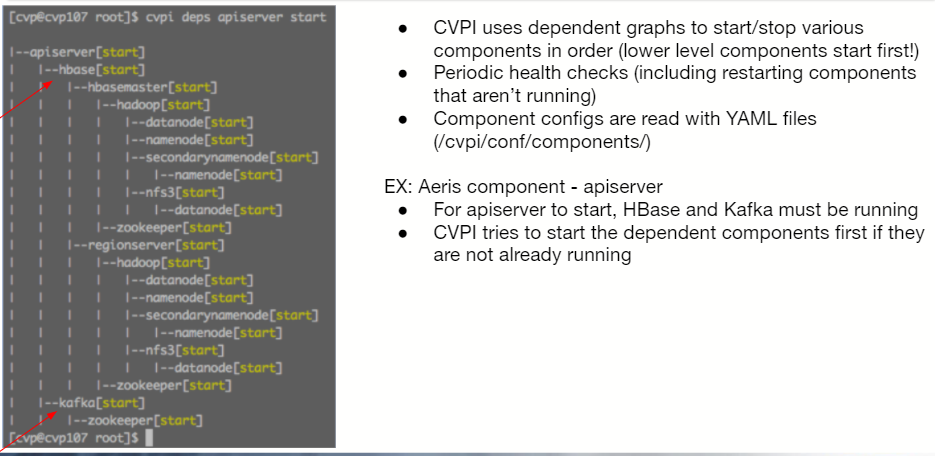
The log directory in CVP
/var/log/agents
(note there are multiple files in this directory)
Zookeeper
- is a centralized service for maintaining configuration information, naming, providing distributed synchronization, and providing group services. All of these kinds of services are used in some form or another by distributed applications.
- provides failover services of hbase and hdfs hadoop.
- if one of the sub components of hadoop or hbase fails, zookeeper launches a backup on the next available node.
- located in /cvpi/zookeeper
Hadoop
- Hadoop is an open-source framework for storing data and running applications on clusters of commodity hardware.
- Components include:
+ Datanode - (which holds the actual data)
+ Namenode - (which holds the metadata)
+ nfs3
+ secondarynamenode
+ Journalnode
Datanode
- is responsible for storing the actual data in HDFS.
- Datanode and Namenode are in constant communication.
- When a Datanode starts up it announces itself to the Namenode along with a list of blocks it is responsible for.
- When a Datanode is down, it does not affect the availability of data or the cluster. Namenode will arrange for replication for the blocks managed by the Datanode that is not available.
- is also known as the Slave.
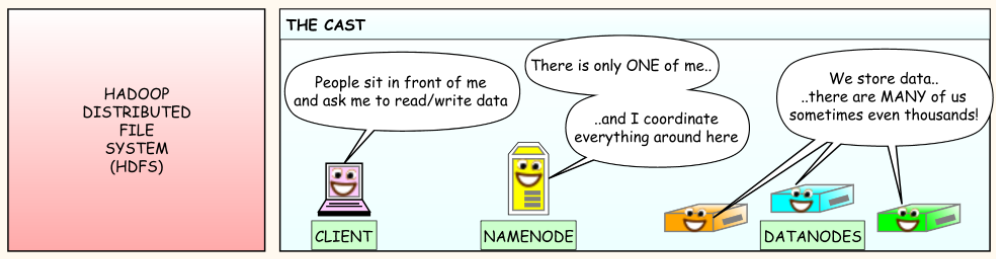
Namenode
- Is the centerpiece of HDFS (Hadoop Distributed Filesystem); coordinates the storage for the whole Hadoop cluster.
- is also known as the Master.
- Only stores the metadata of HDFS - the directory tree of all files in the file system, and tracks the files across the cluster.
Journalnode
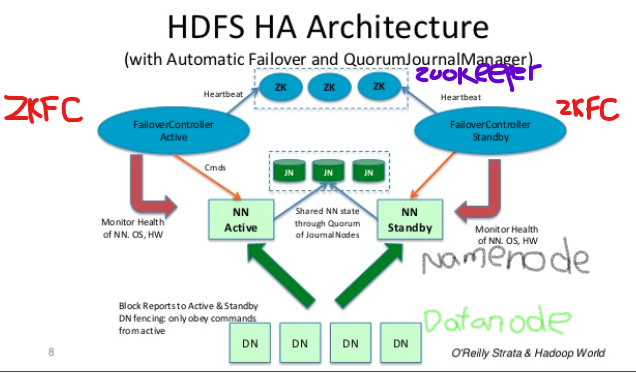
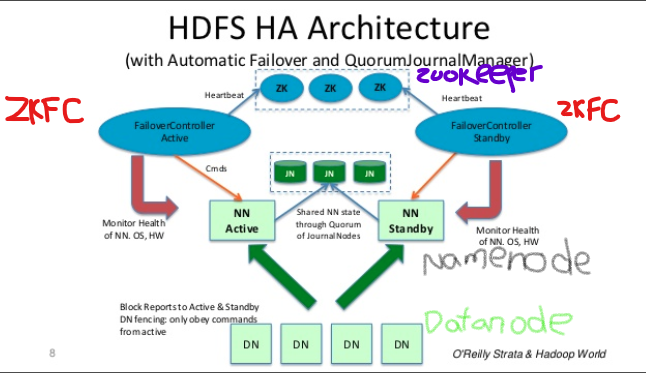
- in order for the Standby Namenode to keep its state synchronized with the Active Namenode, both nodes communicate with a group of seperate daemons called Journalnode (JNs).
- in the event of a failover, the Standby will ensure that it has read all of the edit from the Journalnodes before promoting itself to the Active state. This ensures that the namespace state is fully synchronized before a failover occurs.
HBase
- HBase = Hadoop database
- it is a NoSQL database that runs on top of Hadoop.
- it combines the scalability of Hadoop by running on the Hadoop Distributed File System (HDFS), with real-time data access as a key/value store and deep analytic capabilities of Map Reduce.
RegionServers
- are the software processs (often called daemons) you activate to store and retrieve data in HBase (Hadoop database). In production environments, each RegionServer is deployed on its own dedicated compute node. When you start using HBase, you create a table and then begin storing and retreiving your data.
- However, at some point the table grows beyond a configurable limit. At this point, the HBase system automatically splits the table and distributes the load to another RegionServer. This process is called auto-sharding.
- Auto-sharding is what is so special about Hadoop. Where most database management systems require manual intervention to scale the overall system.
Zookeeper Failover Controller (ZKFC)
- ZKFC will monitor the health of the namenode by peridically pinging the active namenode and expecting a response in a timely manner.
- Each of the machines which runs a NameNode also runs a ZKFC.
Automatic NameNode Failover process
- Two nodes are running Namenodes in a CVP multinode setup: the Primary and the Secondary nodes.
- At any point in time, exactly one of the Namenodes is in an Active state (primary node by default), the other is in a Standby state (secondary node by default).
- The Active Namenode is responsible for all client operations in the cluster, while the Standby is simply acting as a slave, maintaining enough state to provide a fast failover if necessary.
- The ZKFC (ZooKeeper Failover Controller) is used to monitor the health/availability of the Namenodes.
Kafka
- Distributed Message (queueing) system /central messaging bus
- centralizes communication from producers of data and consumers of that data.
- Two major message queues with 12 partitions each:
- toDB (removed in 2020.1.0)
- postDB
Aerisdiskmonitor (Gardener)
- Monitor and prunes Aeris data.
- Runs as a component on cvpi.
- We have a data retention policy in CloudVision where we store data for up to 3 months. We have a second policy where we store - for each telemetry state we store 43,200 records.
- Config file is located in /cvpi/conf/deleteconfig.yaml. Always on the teriary node in the case of a multinode cluster.
- You can set the frequency of major compaction in this file. Default is every Sunday at 2 AM UTC. After changing the file you will need to restart the “aerisdiskmonitor” service. cvpi stop aerisdiskmonitor && cvpi start aerisdiskmonitor.
Firewalld
We are using firewalld to do permit/deny connections to and from the nodes.
In 2019.1.X and later the rules are in /etc/firewalld/zones/ethX-Zone.xml
iptables -nvL will give you all the rules in iptable format.
Turbines
Turbines take in raw data, do some processing and then write it back as usable data.
Like wind turbines, our Turbines have two main components:
- Rotor: which manages the Aeris connections
- Blade: which performs the logic
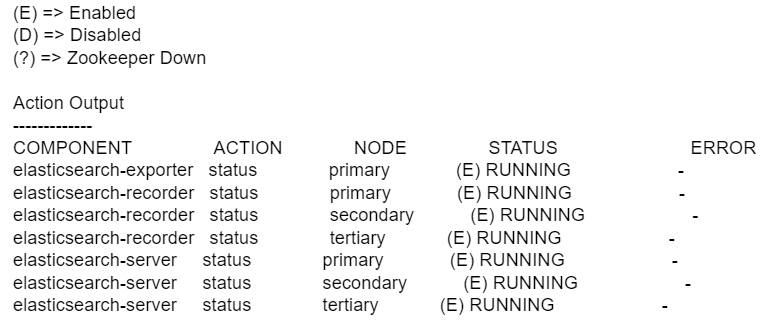
Elasticsearch
Elasticsearch is used for storing IP addresses, mac addresses, and now the new events app.
So if you take a case and the customer is saying that the events app is not working even after they enabled it in the UI, it could be because elasticsearch is down.
cvpi status search -v=3
TerminAttr
The daemon TerminAttr is how we stream data from EOS switches into CVP.
CVP ingest port is 9910. This is the port CVP is listening on and expecting to be receiving telemetry data sent from switches.
You need to use the exec function to execute the TerminAttr binary from /usr/bin/TerminAttr - connect it to the ingest port of the CVP ip and port 9910.
daemon TerminAttr
exec /usr/bin/TerminAttr -ingestgrpcurl=10.83.13.33:9910 -taillogs -ingestauth=key,mysecretkey
-ingestvrf=management -smashexcludes=ale,flexCounter,hardware,kni,pulse,strata
-ingestexclude=/Sysdb/cell/1/agent,/Sysdb/cell/2/agent
-cvcompression=gzip
no shutdown




