Three categories of peripheral devices
- Input devices
- Output devices
- Input & Output (I/O) devices
Keyboard
Keyboards connect through a USB port. Many keyboards include special function keys that simplify playing music or browsing the internet. Some keyboards include a built-in USB port that can be used to connect other peripheral devices.
Almost every desktop computer requires at least a keyboard to function. Most computers require a keyboard, mouse, and display device in order to function properly
Mouse
A mouse can be either wired or wireless.
- A wired mouse uses a USB port to connect to the computer.
- A wireless mouse uses an internal battery for power and uses RF signals (e.g., Bluetooth) to connect to a receiver, which is either connected to a USB port or integrated with the computer.
When selecting a mouse, consider the following:
- Because optical mice use light rays to detect motion, they don’t work on some surfaces.
- Some mice have internal motion sensors, allowing them to detect movements while in the air. This particular device can attach to a user’s head and move the cursor when the head moves.
- You can select mice with additional buttons or a scroll wheel to add functionality.
- High-end gaming mice use a rating of dots per inch (DPI). The rating denotes how many steps (cursor movements) are counted in a single inch
Digitizer
A digitizer captures some type of analog signal and converts it into digital data. Some common types of digitizer devices include:
- Graphics Tables—Graphics tablets capture analog stylus strokes written on a pad and convert them to digital data. These are mostly used by graphic artists to capture hand-drawn images.
- Document Scanners—Document scanners are specifically designed to convert paper documents into digital documents, such as PDFs or Rich Text Format files. Document scanners use optical character recognition (OCR) to create editable word processor documents. There are two types of document scanners. Automatic Document Feeder (ADF) scanners automatically scan a stack of papers. Flatbed scanners require that you place each page on a scanning surface one by one.
- 3D Scanners—3D scanners use either physical contact or lasers to map the size and shape of a physical object and convert it into a 3D digital model
Game controllers
Game controllers are input devices designed specifically for computer gaming. There are two main types of game controllers:
- Gamepads are handheld controllers with directional controls on the left and buttons on the right.
- Joysticks consist of a stick that pivots on a base. Both the stick and the base have several input buttons. Joysticks are typically used with flight simulator games
Scanner
Scanners are used to scan hard-copy images and documents and convert them into digital input for the PC. For example, film photos can be scanned and saved as image files.
Some scanners combine the functionality of a document scanner and are able to create editable documents.
Motion sensor
Motion sensors are devices that are able to detect the slightest amount of movement in an area. They are typically used with security systems and require special software and configuration. Two types of motion sensors exist:
- Active motion sensors use ultrasonic sound waves to detect movement in an area. If movement is detected, something happens (e.g., a door opens or an alarm triggers).
- Passive motion sensors detect infrared energy, which is emitted by humans and animals. Passive motion sensors ignore small changes in infrared energy in order to avoid false alarms. Passive motion sensors are sometimes called passive infrared sensors (PIR).
Touch pad
Touch pads are typically found on notebook computers and are used in place of a mouse. Users slide their finger on the touch pad to manipulate the cursor. Touch pads can also be used with desktop computers. These touch pads connect to the computer through a USB port and are used instead of a mouse
Card reader
A card that contains an embedded microchip or a magnetic strip is inserted into the reader. The reader then scans the chip or strip, verifies its contents, and authenticates the user. Card readers can be stand-alone devices or integrated with other peripherals (e.g., a keyboard or workstation).
Biometric scanner
Biometric scanners are used as a form of authentication. They are able to scan users’ unique physical features and use them to verify their identity. Common physical features used by biometric scanners include:
- Retina (eyes)
- Fingerprint
- Face
- Heart beat
Barcode reader
A barcode reader is a device that can scan barcodes.
- Barcodes are most commonly used in retail environments at checkout stands. Shipping companies, hospitals, and other organizations use barcodes to track or inventory items.
- Most bar code readers use a laser to scan the barcode. Some use cameras or optical scanners.
- Barcode readers include software that interprets the meaning of the barcode.
By installing a special app, smart phones are able to function as a barcode reader by using the phone’s built-in camera.
Near Field Communication (NFC)/ Tap Pay Device
NFC is a set of communication protocols that allows devices to communicate when they are within 1.6 inches of one another. NFC technology is most often employed between a base and a smart phone to allow Tap Pay transactions at stores and restaurants; the user places their phone within proximity of the base and uses an app to make an electronic transactions from their mobile phone. NFC is also used to share contacts, photos, videos, and documents, such as identity documents and key cards.
Virtual Reality (VR) Headset
A device worn on the head that covers the eyes and provides separate images for each eye, stereo sound, and motion tracking sensors to create a virtual reality experience for the user. Some headsets also have eye tracking sensors and work with handheld gaming controllers. Virtual reality is widely used to train medical and military professionals. As it becomes more affordable, it is being widely adopted in many fields.
Microphone
A microphone converts sound into an electrical signal. Some computers have a built-in microphone, and many headsets and camera systems that connect to computers include microphones.
Signature Pad
Signature pads are used to obtain signatures for transactions and agreements. The user uses a stylus on a touch screen to sign his or her name. The signature is captured and stored digitally. Signature pads are commonly used in retail stores and restaurants.
Projector
Projectors are display devices that use light to project display output onto a wall or screen. Projectors are often used in classrooms and meetings to display information for a large audience. The brightness of light from projectors and other output devices is measured in lumens. Projectors may use light-emitting diodes (LEDs), organic light-emitting diodes (OLEDs), or other hardware.
KVM Switch
A KVM (keyboard, video, mouse) switch allows multiple computers to use a single keyboard, mouse, and monitor. KVM switches have multiple input groups, with each group accepting keyboard, video, and mouse connections from one computer. A single output group connects to the shared peripheral devices. Buttons on the KVM switch are used to toggle between each connected computer.
- Rackmount KVM switches can support up to 16 computers and are typically used in data centers to manage servers from a central console.
- Desktop KVM switches typically support two or three computers, which must be within about 5 meters.
- Networked or remote KVM switches use special hardware devices that send keyboard, mouse, and video content through a network connection.
When connecting peripheral devices, consider the following recommendations
- Make sure the computer supports the connection type used by the device.
- Most peripheral devices use USB connectors.
- Older peripheral devices can use PS/2, serial, or parallel connectors. For these devices, you can use an adapter (e.g., a PS/2 to USB adapter).
- An expansion card can be added to provide the necessary connections.
- Identify the system requirements of the peripheral device. Some peripheral devices specify a minimum CPU speed, memory size, or OS version.
- Install any necessary drivers or software.
- Configure the device in the OS and verify it is working correctly.
USB
The Universal Serial Bus (USB) is the most commonly used connection interface. Almost every device (e.g., laptops, smart phones, tablets, desktop computers) uses USB in some capacity. USB:
- Uses serial communication (bits are sent sequentially)
- Supports plug-and-play and hot plugging (adding and removing devices without rebooting)
- Allows up to 127 devices to be connected to a single bus, directly to the host or via hubs (hubs are limited to five tiers)
- Shares the bandwidth among all devices connected to a single bus
- Provides 5 V of power through the cable
USB versions
USB has several versions, all of which are backwards compatible. The following table describes the specifications of each version:
Version
Speed
Data Rate
Max Cable Length
1.1
Low Speed
1.5 Mbps
3 m
Full Speed
12 Mbps
5 m
2.0
Hi-Speed
480 Mbps
5 m
3.0/3.1
SuperSpeed
Up to 5 Gbps
3 m
SuperSpeed+
Up to 10 Gbps
5 m
Name and describe this USB type
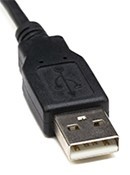
Type A
A rectangular connector that generally plugs directly into the computer or a hub. Almost all USB cables have one Type-A connector on one of the ends.
Name and describe this USB type
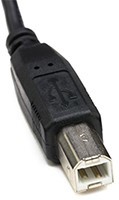
Type B
A square connector with two beveled corners. Type-B connectors are mostly used with printers. Some networking devices, such as hubs and modems, also use this connector.
Most USB cables that use this connector have a Type-A connector on one end that plugs into the computer.
Name and describe this USB type
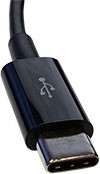
Type C
A long, thin oval connector designed to be a universal USB port that works with many devices and connectors.
Name and describe this USB type
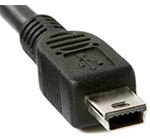
miniUSB
This connector is used by portable electronic devices, such as digital cameras and some portable storage devices.






