Physical access to data respect to DBMS architecture and general description of physical access structures and access method manager
Data may be stored on disk in different formats to provide efficient query execution, depending on the needs.
Physical access structures describe how data is stored on disk.
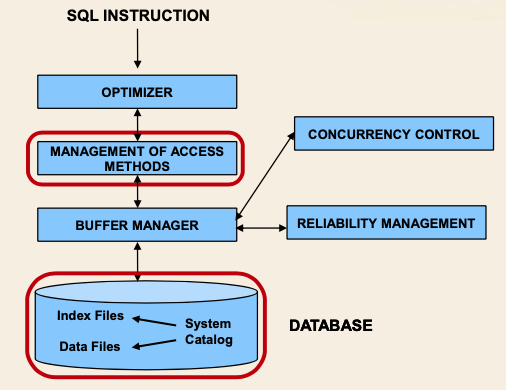
Access method manager: transforms an access plan generated by the optimizer into a sequence of physical access requests to database disk pages using access methods.
Access method
Sofware module specialized for a single physical data structure.
It provides primitives for reading and writing data.
Selects the appriopirate blocks of a file to be loaded in memory
Requests them to the buffer manger
Knows the organization of data into a page, so, can find specific tuples and values inside a page.
Organization of disk page
Different for different access methods
Divided in:
- space available for data
- Space reserved for access method control information
- Space reserved for file systems control information
Note that:
- Tuples may have varying sizes (varchar, null values)
- A single tuple may span accross several pages (BLOB, CLOB)
Physical structures in relational systems
Physical structures define how data is stored on disk to provide efficient query execution.
Physical data storage:
- Sequential structures
- Hash structures
Indexing to increase efficiency
- Tree structures (B-tree, B+-tree)
- Unclustered Hash index
- Bitmap index
Sequential structures
Tuples are storend in a given sequential order.
Different types of structures implement different ordering criteria.
Structure types:
- Heap file (entry sequenced)
- Insert is typically an append.
- All space inside a block is completely exploited before starting a new block.
- Delete or update may cause wasted space.
- updated tuple may not fit if new values have larger size.
- efficient sequential reading.
- Popular choice jointly used with secondary indices to support search and sort operations
- Ordered sequential structure
- Order depends on the value of a key (sort key), that may contain more than one attribute
- Appropriate for sort and group by operations on the sort key
- Search and join on the sort key
- Problem: preserving sort order when inserting new tuples
- Solution: leaving percentage of free space in each block and dynamically re(sorting) in main memory tuples.
- Alternative solution: Overflow file containing tuples which do not fit into the correct block
- Typically used with B+-tree clustered (primary) indices and by DBMS to store intermediate query results.
Tree structures
Provide direct access to data based on the value of a key field (can include more attributes).
Does not contrain the physical position of tuples.
Most widespread in relational DBMS.
General characteristics:
- One root node
- Many intermediate nodes
- Nodes have large fan-out
- Leaf node provide access to data
- clustered
- unclustered
B-Tree and B+-Tree
B stands for balanced
- Leaves are all at the same distance from root
- Access time is constant, regardless of the search value
B-Tree
- Data pages are reached only through key values by visiting the tree
B+-Tree
- Provides a link structure allowing sequentail access in the sort order of key values
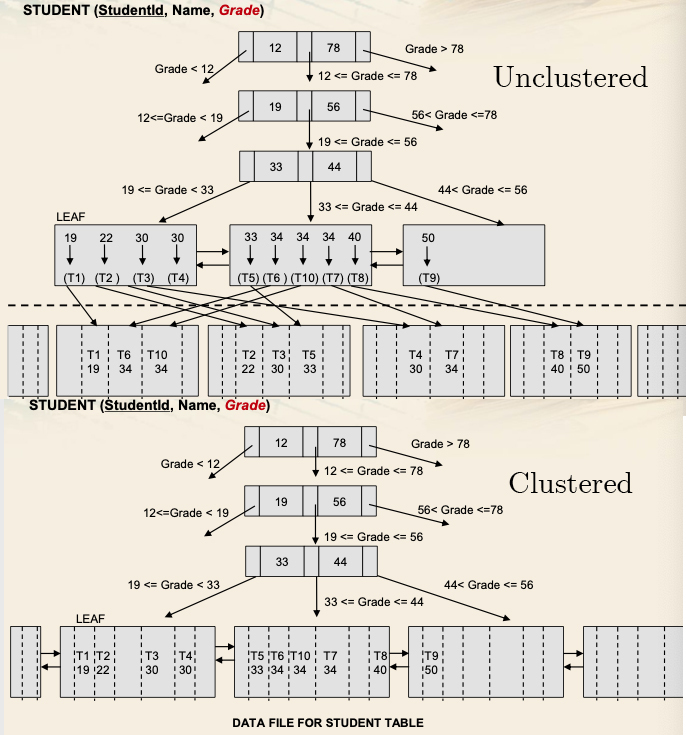
Clustered
- Constraints the physical position of tuples in a given leaf node
- position may be modified by splitting the node when it is full
- Also called key sequenced
- Typically used for primary key indexing
Unclustered
- Leaf contains physical pointers to actual data, but not the data itself.
- position of tuples in a file is unconstrained
- Used for secondary indices.
Pros:
- Very efficient for range queries
- Appropriate for sequantial scan in the order of the key field (clustered, otherwise not guaranteed)
Cons:
- Insertions may require a split of a leaf
- possibly also of intermediate nodes
- computationally intensive
- Deletions may requier merging uncrowded nodes and rebalancing
Bitmap index
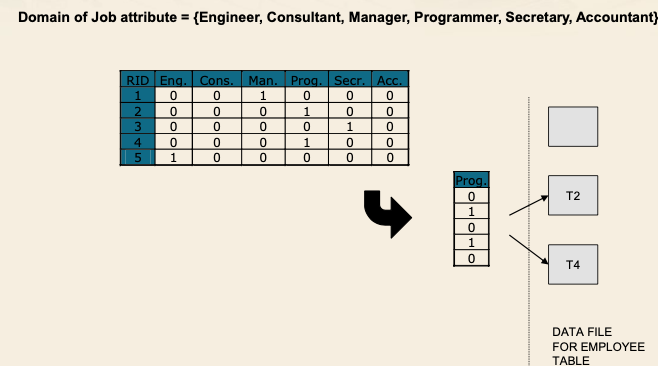
Guarantees direct and efficient access to daa based on the value of a key field. (based on the bit matrix)
The bit matrix references data rows by means of RIDs (Row IDentifiers).
- Actual data is stored on separate structure
The matrix has a column for each different value of the indexed attribute, and one row for each tuple. The position (i, j) of the matrix is 1 if tuple i takes value j, 0 otherwise.
Pros:
- Efficient for boolean expressions
- Appropriate for attributes with limited domain cardinality
Cons:
- Note feasible to use for continuos attributes
- Required space grows sigificantly with domain cardinality.
Hash Structure (clustered and unclustered)
- It guarantees direct and efficient access to data based on the value of a key field (one or more attributes)
- Suppose the hash structure has B blocks
- the hash functions returns a value between 0 and B - 1
- Blocks should never be completely filled
- To allow new data insertion
Pros:
- Very effiecient for equality queries.
- No sorting of disk blocks is required.
Cons:
- Inefficient for range queries
- Collision may occur
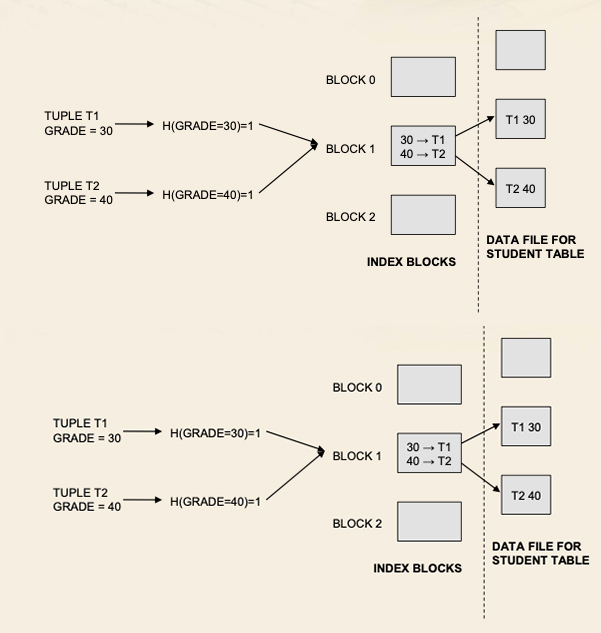
Unclustered hash index:
- Actual data is stored in a separate structure
- Position of tuples is not constrained by a block