CORS
Cross Origin Resource Sharing (CORS) defines a way for client web applications that are loaded in one domain to interact with resources in a different domain.
- Need to enable it on the resources bucket and state the URL for the origin that will be calling the bucket.
- S3 website URL <> Bucket URL:
- S3 Website URL: http://patin.s3-website-us-east-1.amazonaws.com
- Bucket URL: https://s3-us-east-1.amazonaws.com/patin
CORS
Cross Origin Resource Sharing (CORS) defines a way for client web applications that are loaded in one domain to interact with resources in a different domain.
- Need to enable it on the resources bucket and state the URL for the origin that will be calling the bucket.
- S3 website URL <> Bucket URL:
- S3 Website URL: http://patin.s3-website-us-east-1.amazonaws.com
- Bucket URL: https://s3-us-east-1.amazonaws.com/patin
S3 - Exam Tips
- Read the S3 FAQ before taking the exam!
- S3 is object based i.e. allows you to upload files (not suitable to install programs or OS)
- Successful uploads will generate a HTTP 200 status code with an MD5 checksum
- Files can be from 0 byte to 5 GB with PUT operation, 5 TB with Multipart upload (faster)
- There is unlimited storage
- You can use Multi-Object Delete to delete large numbers of objects
- By default, you can provision up to 100 buckets per AWS account.
- S3 is a universal namespace, that is, (bucket) names must be unique globally
- https://s3-us-west-1.amazonaws.com/julienheck
S3 - Exam Tips
- Read the S3 FAQ before taking the exam!
- S3 is object based i.e. allows you to upload files (not suitable to install programs or OS)
- Successful uploads will generate a HTTP 200 status code with an MD5 checksum
- Files can be from 0 byte to 5 GB with PUT operation, 5 TB with Multipart upload (faster)
- There is unlimited storage
- You can use Multi-Object Delete to delete large numbers of objects
- S3 is a universal namespace, that is, (bucket) names must be unique globally
- https://s3-us-west-1.amazonaws.com/julienheck
S3 - Consistency
- Read after write consistency for PUTS of new objects
- Eventual consistency for overwrite PUTS and DELETES (can take some time to propagate)
S3 - Consistency
- Read after write consistency for PUTS of new objects
- Eventual consistency for overwrite PUTS and DELETES (can take some time to propagate)
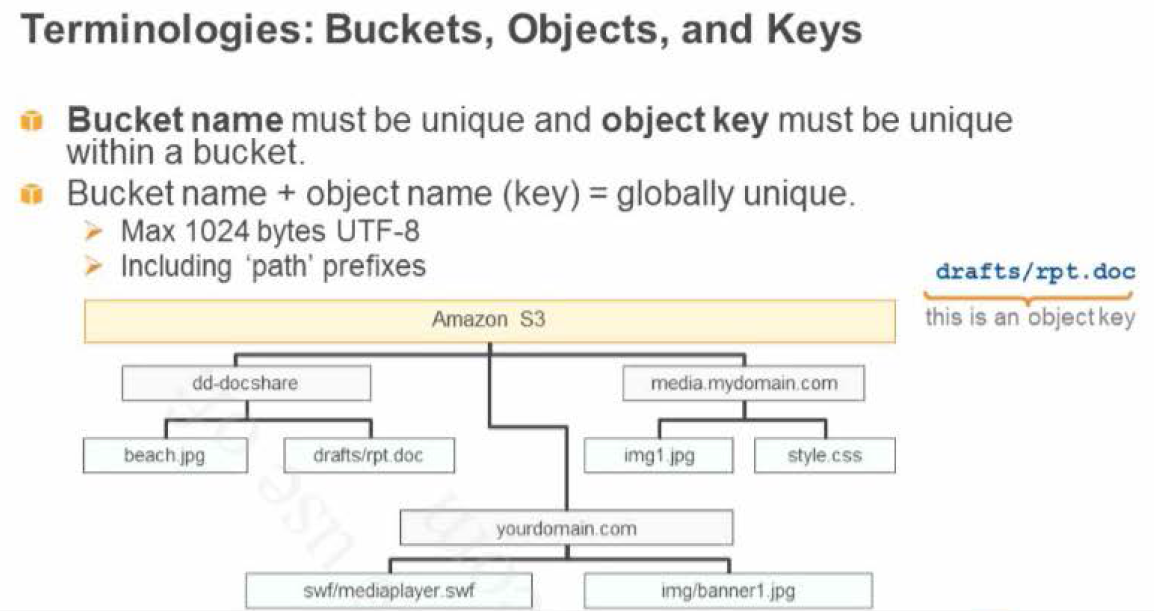
S3 - Core fundamentals of an S3 object
- Key (name)
- Value (data)
- Version ID
- Metadata
- Subresources
- Access Control Lists
- Torrent
S3 - Core fundamentals of an S3 object
- Key (name)
- Value (data)
- Version ID
- Metadata
- Subresources
- Access Control Lists
- Torrent
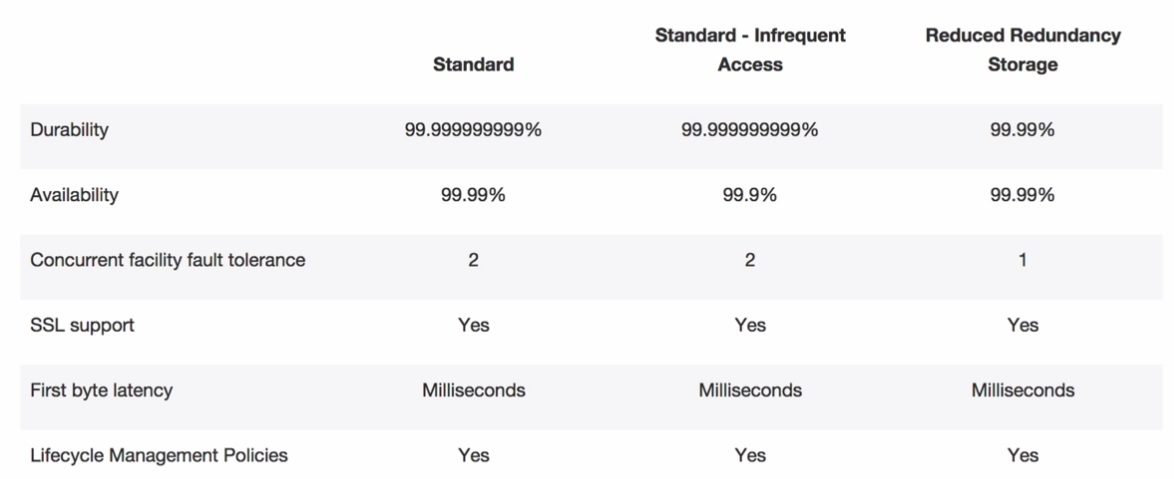
S3 - Storage Classes/Tiers
- S3 : 99.99% availability, 99.999999999% durability, immediately available, frequently accessed
- S3 - IA (Infrequently Accessed) : For data that is accessed less frequently, but requires rapid access when needed. 99.99% availability. Lower fee than S3, but you are charged a retrieval fee
- S3 - RRS (Reduced Redundancy Storage) : Designed to provide 99.99% availability and 99.99% durability
- Glacier - Archived data, where you can wait 3-5 hours before accessing
S3 - Storage Classes/Tiers
- S3 : 99.99% availability, 99.999999999% durability, immediately available, frequently accessed
- S3 - IA (Infrequently Accessed) : For data that is accessed less frequently, but requires rapid access when needed. 99.99% availability. Lower fee than S3, but you are charged a retrieval fee
- S3 - RRS (Reduced Redundancy Storage) : Designed to provide 99.99% availability and 99.99% durability
- Glacier - Archived data, where you can wait 3-5 hours before accessing
S3 - Transfer Acceleration vs CloudFront vs Import/Export vs Snowball vs Direct Connect
Transfer Acceleration optimizes the TCP protocol and adds additional intelligence between the client and the S3 bucket, making Transfer Acceleration a better choice if a higher throughput is desired. If you have objects that are smaller than 1GB or if the data set is less than 1GB in size, you should consider using Amazon CloudFront’s PUT/POST commands for optimal performance.
The AWS Import/Export Snowball is ideal for customers moving large batches of data at once. The AWS Snowball
has a typical 57 days turnaround time. As a rule of thumb, Transfer Acceleration over a fullyutilized 1 Gbps line can transfer up to 75 TBs in the same time. In general, if it will take more than a week to transfer over the Internet, or there are recurring transfer jobs and there is more than 25Mbps of available bandwidth, Transfer Acceleration is a good option. Another option is to use both: perform initial heavy lift moves with an AWS Snowball (or series of AWS Snowballs) and then transfer incremental ongoing changes with Transfer Acceleration.
AWS Direct Connect is a good choice for customers with a private networking requirement or have access to AWS Direct Connect exchanges. Transfer Acceleration is best for submitting data from distributed client locations over the public Internet, or where variable network conditions make throughput poor. Some AWS Direct Connect customers use Transfer Acceleration to help with remote office transfers, where they may suffer from poor Internet performance.
S3 - Transfer Acceleration vs CloudFront vs Import/Export vs Snowball vs Direct Connect
Transfer Acceleration optimizes the TCP protocol and adds additional intelligence between the client and the S3 bucket, making Transfer Acceleration a better choice if a higher throughput is desired. If you have objects that are smaller than 1GB or if the data set is less than 1GB in size, you should consider using Amazon CloudFront’s PUT/POST commands for optimal performance.
The AWS Import/Export Snowball is ideal for customers moving large batches of data at once. The AWS Snowball
has a typical 57 days turnaround time. As a rule of thumb, Transfer Acceleration over a fullyutilized 1 Gbps line can transfer up to 75 TBs in the same time. In general, if it will take more than a week to transfer over the Internet, or there are recurring transfer jobs and there is more than 25Mbps of available bandwidth, Transfer Acceleration is a good option. Another option is to use both: perform initial heavy lift moves with an AWS Snowball (or series of AWS Snowballs) and then transfer incremental ongoing changes with Transfer Acceleration.
AWS Direct Connect is a good choice for customers with a private networking requirement or have access to AWS Direct Connect exchanges. Transfer Acceleration is best for submitting data from distributed client locations over the public Internet, or where variable network conditions make throughput poor. Some AWS Direct Connect customers use Transfer Acceleration to help with remote office transfers, where they may suffer from poor Internet performance.
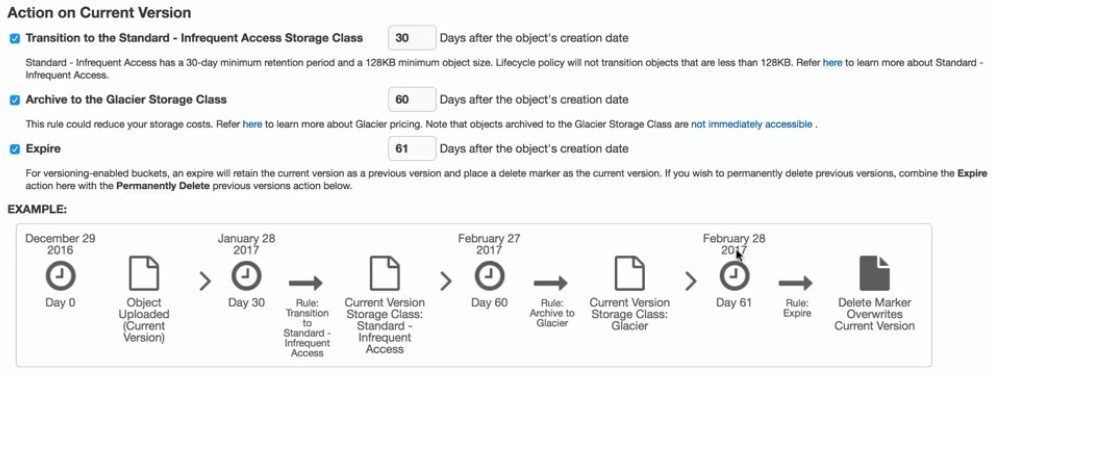
S3 - Life Cycle Management
- Can be used in conjunction with versioning
- Can be applied to current versions and previous versions
- Following actions can now be done:
- Transition to the standard-Infrequent Access Storage Class (128kb and 30 days after the creation date)
- Archive to the Glacier Storage Class (30 days after IA, if relevant)
- Permanently Delete
- Use Lifecycle policies to expire incomplete Multipart uploads by automatically removing incomplete multipart uploads and the associated storage after a predefined number of days.
S3 - Life Cycle Management
- Can be used in conjunction with versioning
- Can be applied to current versions and previous versions
- Following actions can now be done:
- Transition to the standard-Infrequent Access Storage Class (128kb and 30 days after the creation date)
- Archive to the Glacier Storage Class (30 days after IA, if relevant)
- Permanently Delete
- Use Lifecycle policies to expire incomplete Multipart uploads by automatically removing incomplete multipart uploads and the associated storage after a predefined number of days.
S3 - Securing your buckets
- By default, all newly created bucket are private
- You can setup access control to your buckets using:
- IAM policies: You can only grant users within your own AWS account permission to access your Amazon S3 resources
- Access Control Lists (ACLs): You can only grant other AWS accounts (not specific users) access to your Amazon S3 resources
- Bucket Policies: can be used to add or deny permissions across some or all of the objects within a single bucket. Policies can be attached to users, groups, or Amazon S3 buckets, enabling centralized management of permissions. You can grant users within your AWS account or another AWS account access to your Amazon S3 resources
- S3 buckets can be configured to create access logs which log all requests made to the S3 bucket. This can be done to another bucket.
S3 - Securing your buckets
- By default, all newly created bucket are private
- You can setup access control to your buckets using:
- IAM policies: You can only grant users within your own AWS account permission to access your Amazon S3 resources
- Access Control Lists (ACLs): You can only grant other AWS accounts (not specific users) access to your Amazon S3 resources
- Bucket Policies: can be used to add or deny permissions across some or all of the objects within a single bucket. Policies can be attached to users, groups, or Amazon S3 buckets, enabling centralized management of permissions. You can grant users within your AWS account or another AWS account access to your Amazon S3 resources
- S3 buckets can be configured to create access logs which log all requests made to the S3 bucket. This can be done to another bucket.
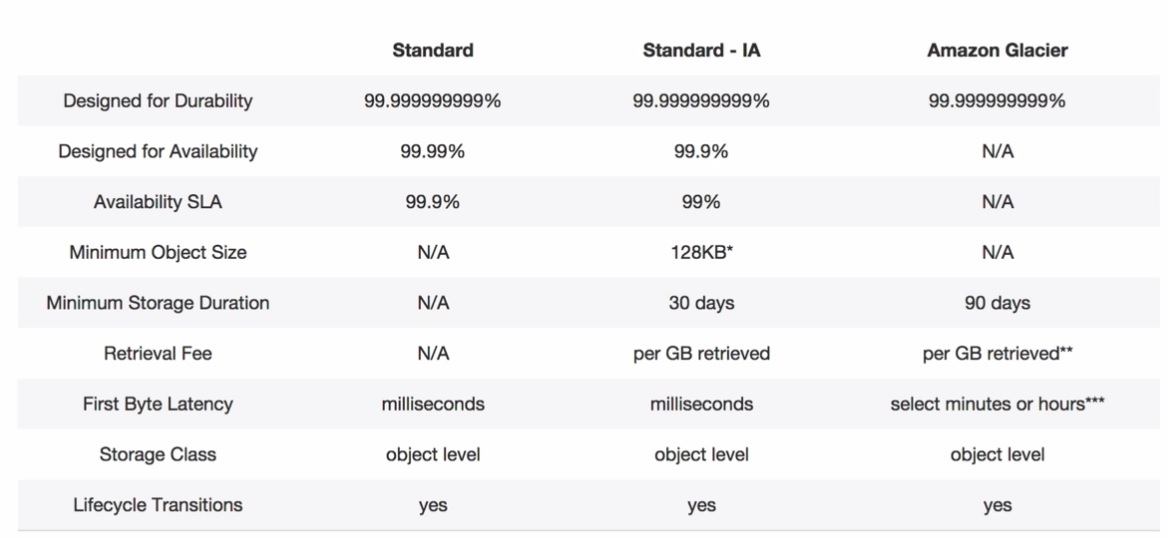
S3 vs Glacier
To retrieve Amazon S3 data stored in Amazon Glacier, initiate a retrieval job via the Amazon S3 APIs or Management Console. The retrieval request creates a temporary copy of your data in RRS while leaving the archived data intact in Amazon Glacier.
S3 vs Glacier
To retrieve Amazon S3 data stored in Amazon Glacier, initiate a retrieval job via the Amazon S3 APIs or Management Console. The retrieval request creates a temporary copy of your data in RRS while leaving the archived data intact in Amazon Glacier.
S3 - Version Control
- Stored all versions of an object (including all writes and even if you delete an object; be careful when versioning large files)
- Great backup tool
- Once enabled, versioning cannot be disabled, only suspended
- Integrates with Lifecycle rules
- Versioning’s MFA Delete capability, which uses multi-factor authentication, can be used to provide an additional layer of security
S3 - Version Control
- Stored all versions of an object (including all writes and even if you delete an object; be careful when versioning large files)
- Great backup tool
- Once enabled, versioning cannot be disabled, only suspended
- Integrates with Lifecycle rules
- Versioning’s MFA Delete capability, which uses multi-factor authentication, can be used to provide an additional layer of security
S3 - Encryption
- In Transit
- SSL/TLS
- At Rest
- Server Side Encryption:
- SSE - S3: S3 Managed Keys
- SSE - KMS: AWS Key Management Service, managed Keys
- SSE - C: Server-side encryption with customer provided key
- Client Site Encryption
- Server Side Encryption:
S3 - Encryption
- In Transit
- SSL/TLS
- At Rest
- Server Side Encryption:
- SSE - S3: S3 Managed Keys
- SSE - KMS: AWS Key Management Service, managed Keys
- SSE - C: Server-side encryption with customer provided key
- Client Site Encryption
- Server Side Encryption:
S3 - Key Name Prefixes Considerations
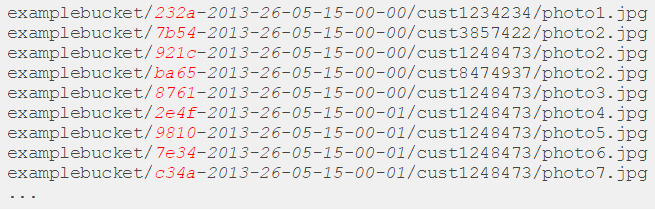
S3 maintains an index of object key names in each AWS region. Object keys are stored across multiple partitions in the index. The key name dictates which partition the key is stored in.
Using a sequential prefix, such as timestamp or an alphabetical sequence, increases the likelihood that Amazon S3 will target a specific partition for a large number of your keys, overwhelming the I/O capacity of the partition. If you introduce some randomness in your key name prefixes, the key names, and therefore the I/O load, will be distributed across more than one partition.
S3 - Key Name Prefixes Considerations
S3 maintains an index of object key names in each AWS region. Object keys are stored across multiple partitions in the index. The key name dictates which partition the key is stored in.
Using a sequential prefix, such as timestamp or an alphabetical sequence, increases the likelihood that Amazon S3 will target a specific partition for a large number of your keys, overwhelming the I/O capacity of the partition. If you introduce some randomness in your key name prefixes, the key names, and therefore the I/O load, will be distributed across more than one partition.
S3 - Cross-Region replication
- Cross-Region replication needs versioning to be enabled on the both the source and destination bucket
- Files in an existing bucket are not replicated automatically. All subsequent updated files will be replicated automatically
- You cannot replicate to multiple buckets or use daisy chaining
- Delete markers are replicated
- Deleting individual versions or delete markers will not be replicated
- The metadata and ACLs associated with the object are also part of the replication
S3 - Cross-Region replication
- Cross-Region replication needs versioning to be enabled on the both the source and destination bucket
- Files in an existing bucket are not replicated automatically. All subsequent updated files will be replicated automatically
- You cannot replicate to multiple buckets or use daisy chaining
- Delete markers are replicated
- Deleting individual versions or delete markers will not be replicated
- Understand what Cross Region Replication is at a high level
S3 - Transfer Acceleration
You can speed up transfers to S3 using transfer acceleration. This costs extra, and has the greatest impact on people who are in far away location (upload to Edge location).
S3 - Transfer Acceleration
You can speed up transfers to S3 using transfer acceleration. This costs extra, and has the greatest impact on people who are in far away location (upload to Edge location).
S3 - Static Websites
- You can use S3 to host static website
- Serverless
- Very cheap, scales automatically
- STATIC only, cannot host dynamic sites
S3 - Static Websites
- You can use S3 to host static website
- Serverless
- Very cheap, scales automatically
- STATIC only, cannot host dynamic sites
S3 - Encryption
SSE-S3 provides an integrated solution where Amazon handles key management and key protection using multiple layers of security. You should choose SSE-S3 if you prefer to have Amazon manage your keys.
SSE-C enables you to leverage Amazon S3 to perform the encryption and decryption of your objects while retaining control of the keys used to encrypt objects. With SSE-C, you don’t need to implement or use a clientside library to perform the encryption and decryption of objects you store in Amazon S3, but you do need to manage
the keys that you send to Amazon S3 to encrypt and decrypt objects. Use SSE-C if you want to maintain your own encryption keys, but don’t want to implement or leverage a clientside encryption library.
SSE-KMS enables you to use AWS Key Management Service (AWS KMS) to manage your encryption keys. Using AWS KMS to manage your keys provides several additional benefits. With AWS KMS, there are separate
permissions for the use of the master key, providing an additional layer of control as well as protection against unauthorized access to your objects stored in Amazon S3. AWS KMS provides an audit trail so you can see who used your key to access which object and when, as well as view failed attempts to access data from users without permission to decrypt the data. Also, AWS KMS provides additional security controls to support customer efforts to comply with PCIDSS, HIPAA/HITECH, and FedRAMP industry requirements.
Using an encryption client library, such as the Amazon S3 Encryption Client, you retain control of the keys and complete the encryption and decryption of objects clientside using an encryption library of your choice. Some customers prefer full end to end control of the encryption and decryption of objects; that way, only encrypted objects are transmitted over the Internet to Amazon S3. Use a clientside library if you want to maintain control of your encryption keys, are able to implement or use a clientside encryption library, and need to have your objects encrypted before they are sent to Amazon S3 for storage.
S3 - Encryption
SSE-S3 provides an integrated solution where Amazon handles key management and key protection using multiple layers of security. You should choose SSE-S3 if you prefer to have Amazon manage your keys.
SSE-C enables you to leverage Amazon S3 to perform the encryption and decryption of your objects while retaining control of the keys used to encrypt objects. With SSE-C, you don’t need to implement or use a clientside library to perform the encryption and decryption of objects you store in Amazon S3, but you do need to manage
the keys that you send to Amazon S3 to encrypt and decrypt objects. Use SSE-C if you want to maintain your own encryption keys, but don’t want to implement or leverage a clientside encryption library.
SSE-KMS enables you to use AWS Key Management Service (AWS KMS) to manage your encryption keys. Using AWS KMS to manage your keys provides several additional benefits. With AWS KMS, there are separate
permissions for the use of the master key, providing an additional layer of control as well as protection against unauthorized access to your objects stored in Amazon S3. AWS KMS provides an audit trail so you can see who used your key to access which object and when, as well as view failed attempts to access data from users without permission to decrypt the data. Also, AWS KMS provides additional security controls to support customer efforts to comply with PCIDSS, HIPAA/HITECH, and FedRAMP industry requirements.
Using an encryption client library, such as the Amazon S3 Encryption Client, you retain control of the keys and complete the encryption and decryption of objects clientside using an encryption library of your choice. Some customers prefer full endtoend control of the encryption and decryption of objects; that way, only encrypted objects are transmitted over the Internet to Amazon S3. Use a clientside library if you want to maintain control of your encryption keys, are able to implement or use a clientside encryption library, and need to have your objects encrypted before they are sent to Amazon S3 for storage.
S3 - Security
Customers may use four mechanisms for controlling access to Amazon S3 resources: Identity and Access Management (IAM) policies, bucket policies, Access Control Lists (ACLs) and query string authentication. IAM enables organizations with multiple employees to create and manage multiple users under a single AWS account.
With IAM policies, companies can grant IAM users finegrained control to their Amazon S3 bucket or objects while also retaining full control over everything the users do. With bucket policies, companies can define rules which apply broadly across all requests to their Amazon S3 resources, such as granting write privileges to a subset of Amazon S3 resources. Customers can also restrict access based on an aspect of the request, such as HTTP referrer and IP address.
With ACLs, customers can grant specific permissions (i.e. READ, WRITE, FULL_CONTROL) to specific users for an individual bucket or object. With query string authentication, customers can create a URL to an Amazon S3 object which is only valid for a limited time.
S3 - Security
Customers may use four mechanisms for controlling access to Amazon S3 resources: Identity and Access Management (IAM) policies, bucket policies, Access Control Lists (ACLs) and query string authentication. IAM enables organizations with multiple employees to create and manage multiple users under a single AWS account.
With IAM policies, companies can grant IAM users finegrained
control to their Amazon S3 bucket or objects while also retaining full control over everything the users do. With bucket policies, companies can define rules which apply broadly across all requests to their Amazon S3 resources, such as granting write privileges to a subset of
Amazon S3 resources. Customers can also restrict access based on an aspect of the request, such as HTTP referrer and IP address. With ACLs, customers can grant specific permissions (i.e. READ, WRITE, FULL_CONTROL) to specific users for an individual bucket or object. With query string authentication, customers can create a URL to an Amazon S3 object which is only valid for a limited time.
S3 - Data Protection
- Versioning offers an additional level of protection by providing a means of recovery when customers accidentally overwrite or delete objects.
- Only the owner of an Amazon S3 bucket can permanently delete a version
- Versioning’s MFA Delete capability, which uses multifactor authentication, can be used to provide an additional layer of security. If you enable Versioning with MFA Delete on your Amazon S3 bucket, two forms of authentication are required to permanently delete a version of an object: your AWS account credentials and a valid six digit code and serial number from an authentication device in your physical possession
S3 - Data Protection
- Versioning offers an additional level of protection by providing a means of recovery when customers accidentally overwrite or delete objects.
- Only the owner of an Amazon S3 bucket can permanently delete a version
- Versioning’s MFA Delete capability, which uses multifactor authentication, can be used to provide an additional layer of security. If you enable Versioning with MFA Delete on your Amazon S3 bucket, two forms of authentication are required to permanently delete a version of an object: your AWS account credentials and a valid six digit code and serial number from an authentication device in your physical possession



