Which Object Support Teams?
Account, Opportunity and Case.
Creating a team member in the app creates two records: a team record and an associated share record. If you create team members programmatically, you have to manage both the team record and associated share record.
There is only one team per record (Account, Opportunity, or Case). If multiple teams are needed, depending on your specific needs, consider territory management or programmatic sharing
https://developer.salesforce.com/docs/atlas.en-us.dat.meta/dat/dat_components.htm
How can a user setup a default team?
User setting -> Advanced setting - > While defining team, access level for account , opportunity and case object can be defined.
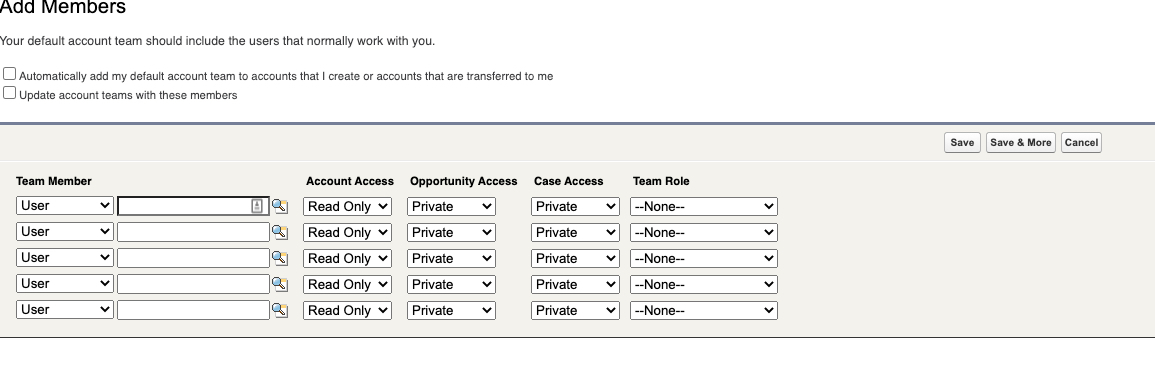
Can teams be managed out of Salesforce?
If teams are managed externally, say through an external commission or territory management system, then integration can be used to manage the account team. There are cases when territory management in an external system can align with a team solution within Salesforce.
Who can modify team members?
Record Owners, Roles higher in the role hierarchy or Admin. They can update existing team member record or add new members. A Team member with Read Write access can add other users to team who already has access to the record. https://developer.salesforce.com/docs/atlas.en-us.dat.meta/dat/dat_components.htm
Teams Use Cases?
- To provide the user with the ability to give access (read-only or read/write) to a single group of users (the team).
- If teams are managed externally, say through an external commission or territory management system, then integration can be used to manage the account team. There are cases when territory management in an external system can align to a team solution within Salesforce.
- Multiple owners of an account can be managed by the account team.
- A single group of users (team) require either read-only or read/write access to an opportunity record. (Opportunity Team)
Major considerations
- The group working on an account, opportunity, or case.
- Gives read-only access or read/write access.
- Owners, users higher in the hierarchy, and administrators can add team members.
- Read/write access members can add other members.
- Creating a team member creates two records: a team record and an associated share record.
- Only one team per record (if more needed, use programmatic sharing).
- A team object is not a first-class object, meaning you cannot create custom fields, validations rules, or triggers.



