- Which type of hypervisor runs operating systems on bare metal?
A. Type 1
B. Type 2
C. Virtual PC
D. Windows XP Mode
A. Type 1
- Which of the following relies on PPTP to create a secure tunnel?
A. WWan
B. 4G LTE
C. VPN
D. WLAN
C. VPN
- Which of the following will occur if %temp% is executed from Run?
A. Applications located in the %temp% folder will be executed.
B. The operating system’s temporary folder will be open.
C. The current user temporary folder will be open.
D. Applications will be deleted in the %temp% folder.
C. The current user temporary folder will be open.
- Which type of device uses an MOV to protect equipment?
A. Power strip
B. Power supply
C. Surge suppressor
D. Multimeter
C. Surge suppressor
- Tay used file properties to hide files in his folder and now needs to get the files back. Using a command-line tool, which of the following combinations of parameters will make the files viewable once again?
A. Attrib - RV *.*
B. Attrib - A+H *.*
C. Attrib + A+ *.*
D. Attrib -H *.*
D. Attrib -H *.*
- Which group is best to assign to a home user to prevent software installation?
A. Administrators
B. Power users
C. Remote Desktop users
D. Users
D. Users
- A Windows PC is not booting correctly. You need to locate bad sectors and recover information. Which command is best?
A. Chkdsk C: /R
B. Chkdsk C: /F
C. Chkdsk C: /C
D. Chkdsk C: /I
A. Chkdsk C: /R
- Where can a user’s Desktop folder be found in Windows by default?
A. C:\Users\%username%\desktop
B. C:\Documents and Settings\%username%\desktop
C. C:\System Volume Information\%username%\desktop
D. C:\Users\System32\%username%\desktop
A. C:\Users\%username%\desktop
- A user who is part of a workgroup reports that she cannot print to a new printer. Everyone else in the workgroup can print to the new printer, and the user can still automatically send print jobs to the old printer. Which of the following statements describes how to remedy the problem? (2 best answers)
A. Add the new printer to the user’s computer.
B. Clear the print queue on the new printer.
C. Change the user’s password and permissions.
D. Set the new printer as the default printer.
A. Add the new printer to the user’s computer. D. Set the new printer as the default printer.
- Your organization has an Active Directory domain. One of the users, Bill, should not have read access to a folder named Accounting. The Accounting folder is shared on a network server, on a partition formatted as NTFS. Which of the following statements best describes how to stop Bill from having read access to the folder without impacting any other users on the network?
A. Remove Bill from all domain groups that have access to the Accounting folder.
B. Deny read access to the Accounting folder for Bill through local access security.
C. Deny read access to the accounting folder for any group that bill is a member of.
D. Deny read access to the Accounting folder for Bill through shared access security.
D. Deny read access to the Accounting folder for Bill through shared access security.
- One of the computers in your warehouse often requires the replacement of power supplies, CPU’s, and optical drives. Which tool can help to prevent these types of hardware faults?
A. Compressed air
B. Antistatic wrist straps
C. Rescue Disk
D. Multimeter
A. Compressed air
- Which of the following is the most appropriate question to ask a customer first when attempting to troubleshoot an input device issue over the phone?
A. Can you describe the steps you have taken?
B. Have you verified that all USB plugs are secure?
C. Have you tried turning it off and on again?
D. Are you sure that the device is plugged in?
A. Can you describe the steps you have taken?
- Examine the following figure. Then answer the question that follows.
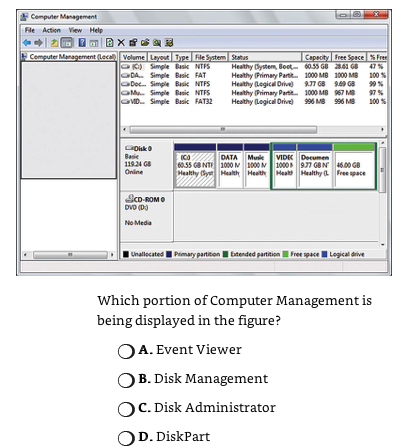
B. Disk Management
- Which of the following is the correct path if you wanted to disable a service in Windows?
A. Msconfig > Settings > Services
B. System Settings > Tools > Services
C. Control Panel > Services
D. Control Panel > Administrative Tools > Services
D. Control Panel > Administrative Tools > Services
- Which of the following programs in Windows 7 saves problem descriptions and solutions?
A. File History
B. Problem Reports and Solutions
C. Action Center
D. Performance Monitor
C. Action Center
- A co-worker tells you that a work PC has become infected with a virus. Which of the following statements best describes the rirst stemp you should take to remedy the problem?
A. Check for system security patches.
B. Perform an antivirus program scan.
C. Boot the PC into Safe Mode.
D. Remove the PC from the Network.
D. Remove the PC from the Network.
- A customer reports to you that a newely issued smart card does not work in a laptop. You try your smart card in the laptop, and it works without any problems. Which of the following statements best describes the most lekely solution to the problem?
A. Perform a BIOS flash.
B. Reinstall the OS.
C. Upgrade the smart card reader firmware.
D. Replace the smart card reader.
C. Upgrade the smart card reader firmware.
- A Windows 7 computer has an Experience Index Base score of 3.8. The technician discovers that the computer has the following:
Performance index
Ram 1GB 4.6 Video3D 3.8CPU2, 4GHz 4.2
The tech upgrades the mem to 2GB and gets the following results:
Performance Index
Ram 2GB 5.0 Video3D 3.8CPU2, 4GHz 4.2
But the Windows Experience Index Base Score is still at 3.8. Which of the following can the technician do to improve the performance index Base score?
A. Double the RAM again
B. Upgrade the CPU to 3 GHz
C. Increase the resolution on the screen
D. Upgrade the video card
D. Upgrade the video card
- Which of the following commands enables you to copy a file without prompts?
A. Comy /z
B. Xcopy
C. Copy /Y
D. Copy /A
C. Copy /Y
- Which of the following is the best Windows utility to back up important system settings without requiring external storage?
A. Msconfig
B. Task Manager
C. System Protection
D. Xcopy
C. System Protection
- Examine the following Win 7 Figure. Then Answer the question that follows.
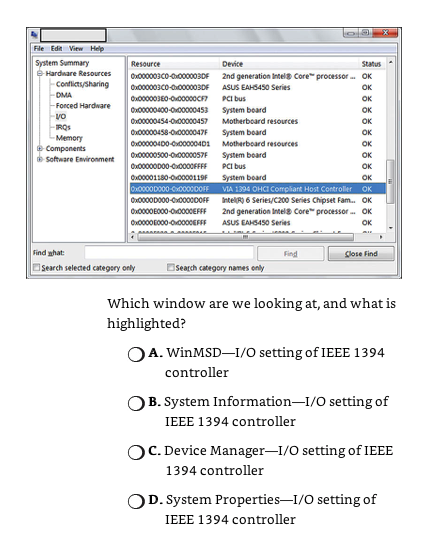
B. System Information–I/O setting of IEEE 1394 controller
- You are working just outside a server room that is being built and you hear a loud popping sound from inside. As you enter the server room, you notice an electrician lying on the floor with an electrical cord in his hand. Which of the following statments describes the first step you should take.
A. Call 911
B. Call the building super.
C. Pull the electrician away from the cord.
D. Turn off the electrical power at the source.
D. Turn off the electrical power at the source.
- Your boss wants to encrypt a hard drive that will be storing critical data. Your boss needs to be able to drag and drop folders onto the volume and have them be encrypted in real-time. Which encryption technique should you suggest?
A. BitLocker
B. PKI
C. TPM
D. Kerberos
A. BitLocker
- Which of the following file extnesions will start the program installion process in Windows?
A. *.INI
B. *.CFG
C. *.SYS
D. *.EXE
D. *.EXE






