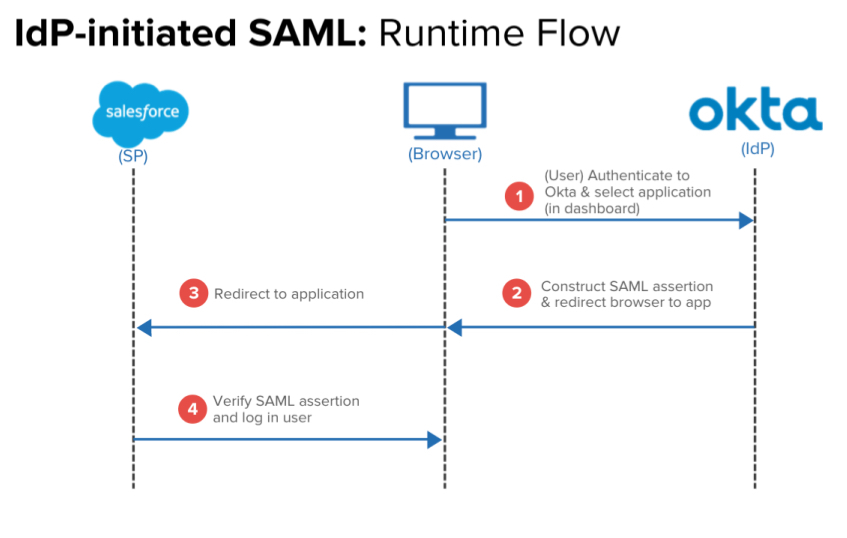
Describe IdP-initiated SAML workflow
- Browser (User) Authenticate to Okta & select application (in dashboard)
- Oka - Construct SAML Application & Redirect browser to app
- Back to Browser - Redirect to Application
- App - Verify SAML assertion and log in user.
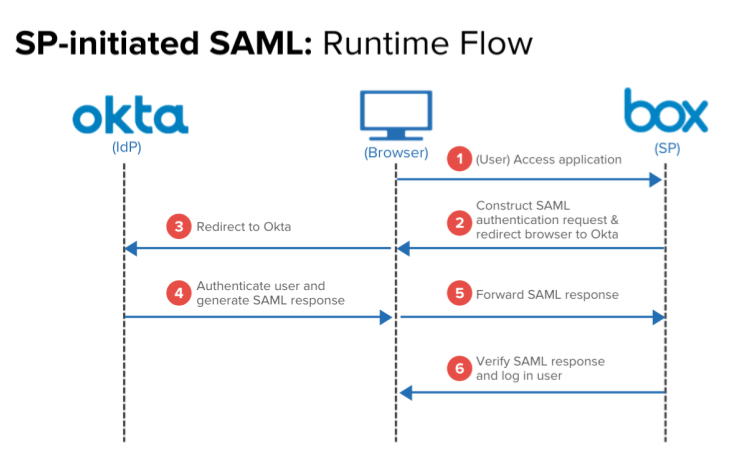
Describe the SP-initated SAML Workflow
- User - Access Application (BOX)
- Box - Construct SAML authN request & redirect browser to Okta
- Redirect to Okta
- Okta Authenticates user and generates SAML response
- Forward SAML response
- (Box) Verify SAML response and log in user.
What is SAML
SAML (Security Assertion Markup Language) is an XML-based standard for exchanging authentication and authorization data between an identity provider (IdP) such as Okta, and a service provider (SP) such as Box, Salesforce, G Suite, Workday, etc, allowing for a Single Sign-On (SSO) experience.
What does SAML do?
SAML completely changes how a user signs into a SAML-supported site or service.
Once an SP (e.g. Box or Salesforce) is configured to authenticate via SAML, users attempting to access its service will no longer be prompted to enter a username or password specific to the SP they are logging onto (e.g. a Box username and password). Instead, an exchange between the SP and the configured IdP will occur that will verify the user’s identity and permissions, and then grant or deny that user’s access to the SP.
What won’t the user have to do once SAML is enabled?
Instead of using user credentials (like a password) to verify a user, a SAML-configured service verifies that user’s identity with the IdP. Of course, this assumes the user has already logged into the IdP with a username and password (and ideally multi-factor authentication as well!).
What is SAML JIT Provisioning?
It occurs in the IdP-initiated flow.
- Users log into Okta Okta (or launches Okta Mobile)
- Launches the SP application by clicking its chiclet from their Okta home page.
- If the user has an account on the SP side, they will be authenticated as a user of the application and will generally be delivered to its default landing page.
- If they do NOT currently have an account on the SP side, in some cases SAML can actually create the user’s account immediately in a process known as Just In Time Provisioning (JIT - please consult our Provisioning Guide for more details)
How do SAML Assertions work?
Both IdP and SP initiated authentication flows rely upon assertions that are passed between the user’s browser and URLs that are specifically created to handle SAML traffic (known as endpoints). These assertions are in XML format and contain information that verifies who the identity provider is, who the user is, and whether the user should have access to the SP. At a basic level, a successful SP-initiated SAML flow occurs as follows:
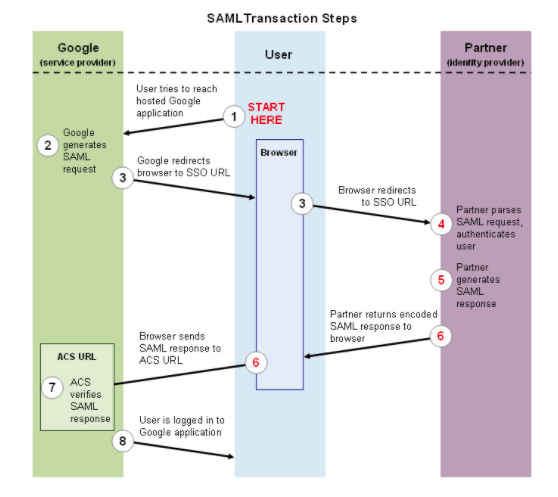
What is ACS
Assertion Consumer Service or Entity ID
What are some of the inherent issues/troubleshooting with Assertion
- The application’s specific URL that SAML assertions from Okta should be sent to (typically referred to as the ACS). In Okta, this is entered in the application’s Single Sign On URL field. Remember that this will very likely not be the same URL as the application’s basic login page, which generally cannot receive or process SAML assertions.
- The Audience Restriction, which dictates the entity or audience the SAML Assertion is intended for. This field is frequently referred to as the “Entity ID” or “Audience URI” by vendors. It can technically be any string of data up to 1024 characters long but is usually in the form of a URL that contains the Service Provider’s name within, and is often simply the same URL as the ACS.
- The username format expected by the application (i.e. email address, first initial last name, etc)
What are deployment best practices
Begin by verifying the following information from the Service Provider you intend to integrate with Okta:
Whether standard login methods are disabled once SAML is activated, and if so, if there is another way for users to log in traditionally (using a username and password) if Okta authentication is disrupted.
If possible, it’s best to create at least one “service account” on the SP side that can bypass SAML and access its admin console via their login page. This will allow a “back door” entry in the event that the SAML flow is interrupted for any reason. Some service providers (G Suite, for example) bypass SAML automatically if the user is a member of a particular administrator group.
More deployment best practices
The endpoint information discussed above
Whether they support IDP and/or SP initiated authentication flows
Whether they support potentially useful features such as JIT Provisioning and Single Log Out (SLO)
What SAML attributes they expect to receive in the assertion
We also recommend familiarizing yourself with tools such as Fiddler and the aforementioned SAML Trace utility to examine the SAML assertion. Okta Support will occasionally require output from one of these tools to help determine what is causing a SAML assertion to fail.
What are the steps information that you will need from the vendor/developer?
You will also need to provide the vendor/developer with the following information from the Okta application (accessed via the View Setup Instructions button in the application’s Sign On tab):
- The Identity Provider Single Sign-On URL. The SP may refer to this as the “SSO URL” or “SAML Endpoint.” It’s the only actual URL Okta provides when configuring a SAML application, so it’s safe to say that any field on the Service Provider side that is expecting a URL will need this entered into it.
The Identity Provider Issuer. This is often referred to as the Entity ID or simply “Issuer.” The assertion will contain this information, and the SP will use it as verification.
The x.509 Certificate. Some service providers allow you to upload this as file, whereas others require you paste it as text into a field.

-
04 Define Users in Okta (Provisioning-LCM)45
-
05 Explain External Directories (Single Directory Integration)26
-
06 - Configure Groups31
-
07 - Configure SSO & Provisioning52
-
08 - Integrate Custom Applications8
-
09 - Okta Policy Network56
-
10-Configure Universal Directory (Okta as a directory (LCM)23
-
11 - Customize Okta (Personalization)20
-
12- Monitor your Okta Org (Logging and Reporting (Admin & troubleshooting))32
-
13- SAML12
-
14- How Okta Integrates Applications9
-
15- Create a SAML Integration using AIW19
-
Token Management (API Functions)0
-
API Extended Functions (API Functions)0
-
Industry Knowledge (IAM)3
-
Self-Service End User (IAM)13
-
16 - Basic Multifactor Authentication (Security)9
-
Administrator Access Control (Security)6
-
API and API Token Management (Admin & Troubleshooting)4
-
Customer Support Practices (Admin and Troubleshooting)8
-
Okta Terminology12
-
Identity Providers9
-
Configure WS-Federation6
-
Okta Identity Cloud4



