BitLocker is supported on what operating systems?
Windows Vista & above
Windows Server 2008 & Above
What does the PowerShell CmdLet Do?
Add-BitLockerKeyProtector
Adds a key protector for a BitLocker volume.
What does the PowerShell CmdLet Do?
Backup-BitLockerKeyProtector
Saves a key protector for a BitLocker volume in AD DS.
What does the PowerShell CmdLet Do?
Clear-BitLockerAutoUnlock
Removes BitLocker automatic unlocking keys.
What does the PowerShell CmdLet Do?
Disable-BitLocker
Disables BitLocker encryption for a volume.
What does the PowerShell CmdLet Do?
Disable-BitLockerAutoUnlock
Disables automatic unlocking for a BitLocker volume.
What does the PowerShell CmdLet Do?
Enable-BitLocker
Enables encryption for a BitLocker volume.
What does the PowerShell CmdLet Do?
Enable-BitLockerAutoUnlock
Enables automatic unlocking for a BitLocker volume.
What does the PowerShell CmdLet Do?
Get-BitLockerVolume
Gets information about volumes that BitLocker can protect.
What does the PowerShell CmdLet Do?
Lock-BitLocker
Prevents access to encrypted data on a BitLocker volume.
What does the PowerShell CmdLet Do?
Remove-BitLockerKeyProtector
Removes a key protector for a BitLocker volume.
What does the PowerShell CmdLet Do?
Resume-BitLocker
Restores Bitlocker encryption for the specified volume.
What does the PowerShell CmdLet Do?
Suspend-BitLocker
Suspends Bitlocker encryption for the specified volume.
What does the PowerShell CmdLet Do?
Unlock-BitLocker
Restores access to data on a BitLocker volume.
How would you enable bitlocker for a device using a PIN and TPM?
- Run the following:
- $SecureString = ConvertTo-SecureString “1234” -AsPlainText -Force
- Enable-BitLocker -MountPoint “C:” -EncryptionMethod Aes256 -UsedSpaceOnly -Pin $SecureString -TPMandPinProtector
What is bitlocker for?
Bitlocker is drive Encryption. It can only be used for NTFS formated drives. It do full drive encryption or used space encryption.
Bitlocker has what characteristics?
- Can be used to encrypt entire hard drive or only the used parts of a hard drive
- Can be combined with EFS (Encrypted File System)
- Protects the integrity of the Windows boot process
- If the windows version is 2008 or Vista what do you need to do to provision bitlocker?
- If the windows version is 2008r or Windows 7 what do you need to do to provision bitlocker?
- Create a partition before deploying bitlocker
- It creates the partition for you. There is nothing to do
If you are enabling group policy to configure BitLocker what GPO should you set so that you will not encrypt the computer without the Recovery key in AD:
- If you are using Windows Server 2008R2/Windows 7 or above?
- If you are using Windows Server 2008/Windows Vista?
- Enable the GPO: Choose how Bitlocker-protect operating system drives can be recovered
- Select the option: Do not enable BitLocker until recovery information is stored in AD DS for operating system drives
- Enable the GPO: Store BitLocker recovery information in Active Directory Domain Services (Windows Server 2008 and Windows Vista)
- The option need: “Require Bitlocker backup to AD DS” is enabled by default once the policy is enabled
What would you configure to set up a TPM and another source to unlock the computer?
The GPO: Require additional authentication at startup
This allows you to let computers use a usb instead of TPM if there is not a TPM chip. This will also be
- If you dont want to use EFS how would you disable all users ability to use it?
- If a CA is not avalible for EFS what happens?
- If you dont want to use EFS how would you disable all users ability to use it?
- Remove any recovery agent and disallow self signed certs.
- You can do this by navigating to Computer Configuration\Windows Settings\Security Settings\Public Key Policies\Encrypting File System and right-clicking selecting properties, on the general tab don not allow EFS
- Remove any recovery agent and disallow self signed certs.
- If a CA is not avalible for EFS what happens?
It generates a self-signed cert. If it is not deselected.
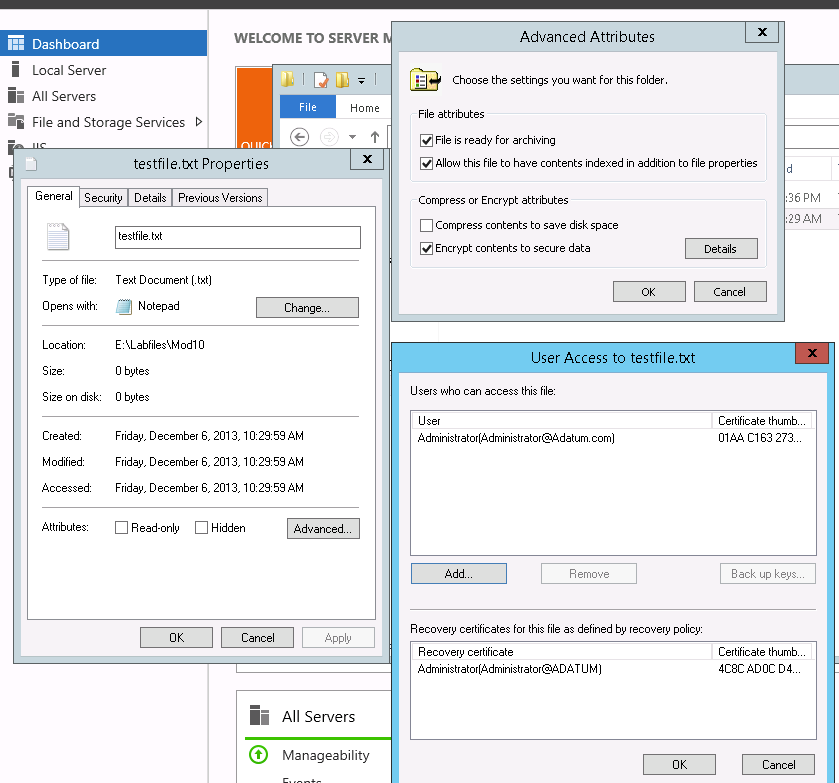
Where can you back up the key for EFS Certificates?
You can go into the file or folder properties:
- On the General Tab
- Select Advance
- Select Details
- Select the Cert to back up
- Click Back up keys..
- This will take you to the Certificate Export Wizard
OR
You can go into the certificates console
If you add additional recovery agents what happens to files that were encrypted before it was added?
The certificate is added when:
- The file is open and closed
- You can run: cipher /u
How do you add additional Data Recovery Agents to your Domain?
- Edit the default domain policy
- Navigate to Computer Configuration -> Windows Settings -> Security Settings -> Public Key Policies
- Select what you want a Data Recovery Agent for (either EFS, Data Protection, or Bitlocker Drive Encryption)
- Right-Click and Select Add or Create Data Recovery Agent

-
DNS - PowerShell CmdLets100
-
Maintaining AD DS - PowerShell157
-
Managing User and Service Accounts26
-
Implementing a Group Policy Infrastructure - PowerShell41
-
Installing, Configuring, and Troubleshooting the NPS Role / Implementing NAP30
-
Implementing Remote Access - PowerShell106
-
Optimizing File Services178
-
Configuring Encryption and Advanced Auditing47
-
Deploying and Maintaining Server Images81
-
Implementing Update Management27
-
Monitoring Windows Server 201225
-
Configuring and Troubleshooting DNS46
-
Maintaining AD DS24
-
Implementing a Group Policy Infrastructure90
-
Implementing Remote Access77



