In task manager what are the tabs?
- Process
- Performance
- Users
- Details
- Services
In Task Manager:
What information can you see on the Processes Tab?
- All of the Process that are currently running on the local computer
- By default it is sorted by Name in Apps and Background Processes
- It shows the current process CPU utilization
- It shows the current process Memory utilization
In Task Manager:
What information can you see on the Performance tab?
- You can view details about how CPU, Memory, and Ethernet are utilized at the current time
“Its similar to a Quick snapshot of Performance Manager”
In Task Manager:
What information can you see on the Users tab?
What can you do?
- Lists currently active user accounts
- You can quickly log off or disconnect users
- Connect as the user if you know the password
- Send a console message
In Task Manager:
What information can you see on the Details tab?
What can you do from this view?
- Shows applications currently running on the system
- You can stop applications
- Set Affinity Level (Processors its allowed to run on)
- Open the properties of the application
- Open the file location of the application
In Task Manager:
What information can you see/do on the Services tab?
- You can stop and start services from here
- You can open the services console
- What kind of data does Resource Monitor display?
- What does it show?
- How do you start Resource Monitor from run and cmd?
- A through view of real time data
- CPU
- Disk
- Network
- Memory
- RUN: Resmon.exe CMD: perfmon /res
- How do you launch performance monitor from run and cmd?
- What does performance monitor allow you to do?
- RUN: perfmon CMD: perfmon /sysStart
- Collect, store, and analyze information about the CPU, Memory, disk, and network
What are the different kinds of Performance Monitors?
- Performance Counter
- Event Trace Data
- System Configuration information
- Performance Coutner Alert
How do you create a Performance Data Collector Set from a tempalte?
- Open Performance Monitor
- Expand Data Collector Sets
- Right-Click User Defined - Select Data Collector Set
- Select from a Template or Manual
- Select the tempalte you want to use
- Select where you would like the data to be saved
- Select if you would like to run it under a certain account
- Select if you want to start, save, or open the properties of the data collector set
How do you create a Data Collector Set (Manual)?
- Open Performance Monitor
- Expand Data Collector Sets
- Right-Click User Defined - Select Data Collector Set
- Select from a Template or Manual and assign a Name
- Select the type of data you want to include
- Create Data Logs
- Performance Coutner - (Add the counters and intervals to collect data)
- Event trace data - (Select the Event Trace Provider)
- System configuration information - (Add the registry keys you want to record)
- Performance Counter Alert - (Add the counters and intervals to collect data)
- Create Data Logs
- Select where you would like to save it
- Select if you would like to run it under a certain account
- Select if you want to start, save, or open the properties of the data collector set
Where would you change your directory for a Data Collector Set?
What else can you change?
- The Data Collector Properties
- Other items:
- Subdirectory
- subdirectory name format
- Perfexi subdirectory with computer name
- Serial number
What does the Data Collector Set Schedule do?
Ability to add a schedule. This adds a start time and when the schedule expires
This does not stop the data collector set. It just expires the schedule
How do you schedule when performance mornitoring is done for that day?
Go to the stop condition tab
- Select if it is a overal duration
- Maximum size of the log
- You can restart eh data collector set at limits
What does the different performance monitors do?
- Performance counter
- Event Trace Data
- System configuration information
- Performance Counter Alert
- Performance counter - Computer Resources
- Event Trace Data - (Application information to troubleshoot specific problems )
- System configuration information - (Monitoring the Registery )
- Performance Counter Alert - (trigger to add an event to the event log and you can also configure a task)
Can you stop individual data collector in a Data Collector Set?
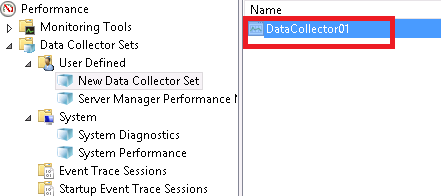
No
Where would you find the Event for a Performance Monitor Alert?
In the Applications under Microsoft under windows
What can you configure in a Performance Counter Alert?
- Log an entry in the application event log
- Start a data collector set
- Run a task
How do you forward events in event viewer?
- Open event viewer
- Expand Windows Logs
- Right-Click Forwarded Events
- Click Poperties
- Select the subscription tab
- Create a subscription
- Either collector initiated or Source computer initiated
What is the difference between a Collector initiated and a Source computer initated Subscription?
- Collector: This computer contacts the selected source computers and provides the subscription
- Source: Source computers must be configured (through policy or local config) to contact this computer and
Once a Data Collector set is set up in Performance Monitor. What do you need to do to Windows Event Collector Service?
Bullets are notes as to why these need to happen - helpful for remembering what to run
- winrm qc
- This enables the Windows Remote Management service, sets its initial network configuration, and prepares it for use by the Event Log.
- Add permissions to Account getting logs: “Event Log Reader”
- This allows the account to be able to access the event logs
- wecutil qc
- The following is used to configure the Windows Event Collector service to ensure event subscriptions can be created and sustained through computer restarts
What does the following CMD do?
wecutil
Enables you to create and manage subscriptions to events that are forwarded from remote computers, which support WS-Management protocol. For examples of how to use this command
What does the following CMD do?
- wecutil qc
- wecutil gs
- wecutil ss
- wecutil cs
- wecutil qc
- does quick config on subscriptions
- wecutil gs
- gives an output configuration information for a subscription
- wecutil ss
- Update the subscription configuration
- wecutil cs
- Create a subscription based on a config file
Where would you monitor Network performance, activity, and connections?
Resource Monitor

-
DNS - PowerShell CmdLets100
-
Maintaining AD DS - PowerShell157
-
Managing User and Service Accounts26
-
Implementing a Group Policy Infrastructure - PowerShell41
-
Installing, Configuring, and Troubleshooting the NPS Role / Implementing NAP30
-
Implementing Remote Access - PowerShell106
-
Optimizing File Services178
-
Configuring Encryption and Advanced Auditing47
-
Deploying and Maintaining Server Images81
-
Implementing Update Management27
-
Monitoring Windows Server 201225
-
Configuring and Troubleshooting DNS46
-
Maintaining AD DS24
-
Implementing a Group Policy Infrastructure90
-
Implementing Remote Access77



