What is DNS?
DNS (Domain Name System) provides a name to number (IP address) mapping or translation, allowing internet users to use, easy to remember names and not numbers to access resources on a network and the Internet.
All devices (computers etc) that are connected to the Internet, your own network, or company network are identified by a unique number. What is that known as?
An IP Address.
Though IP Addresses are great at helping uniquely identify everything connected to the internet and/or networks, what inherent problem do they present?
IP addresses are easy for computers to process but they are not so easy for people to remember.
To make it easy for humans to remember individual computers on a network, what is used?
Host Name.
What are host files?
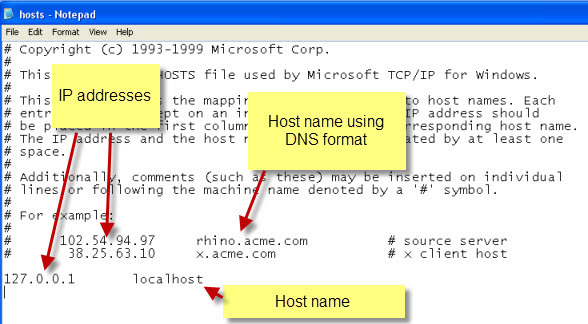
On early computer networks, they were simple text files that were created that mapped hostnames to IP addresses.
Why did host files become impractical?
The location for the hosts’ file is normally C\windows\system32\drivers\etc
As network sizes increased the hosts’ file approach became impractical due to the fact that:
- It needed to be stored on each computer
- The text file could take a long time to process due to the fact that it was unstructured.
- Updates were difficult to manage as all of the computers would need to be given an updated file.
How was the host file system issue overcome?
To overcome these (and other) limitations the DNS system was developed.
What does the DNS system provide for?
- A way to organize the names- Domain name structure
- Protocols ,services and methods for storing,updating, and retrieving IP addresses for hosts computers.- DNS System
From the perspective of the end-user, what can a DNS system be considered as?
A structured hosts file.
How can a hosts file be defined?
The hosts file is simply a list of names and IP addresses with no structure making it difficult to scale to a large number of machines.
How was the non-existent structure of hosts file resolved?
Domain Name Structure was the solution which was to place the machines into administrative areas known as domains and arrange the domains in a hierarchy.
This takes the form of a tree-like structure that resembles the file system structure found on computers.
What is the DNS System?
The DNS system consists of many Domain Name servers that together provide the name to IP address mapping for registered devices (usually servers) on the Internet.
The main DNS severs (root servers) are owned and managed by a variety of different organizations, and are located mainly in the USA.
Here is a list http://www.iana.org/domains/root/servers.
Other companies including ISPs have their own DNS servers which are linked to the root servers in a hierarchical fashion providing a distributed system.
Fortunately you don’t need to manage a DNS server or create DNS records to use the Internet.
However you need to have access to a DNS server.
How would you access a DNS server?
To access a DNS server you will need the IP address of the DNS server.
This is usually supplied to you by your ISP (Internet Service Provider).
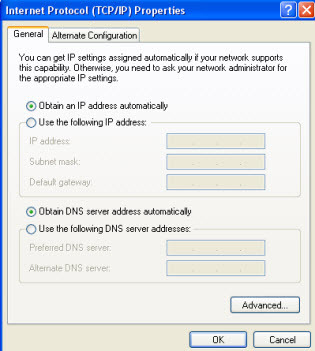
Most client computers/devices will be configured to obtain an IP and a DNS server address automatically. (see below)
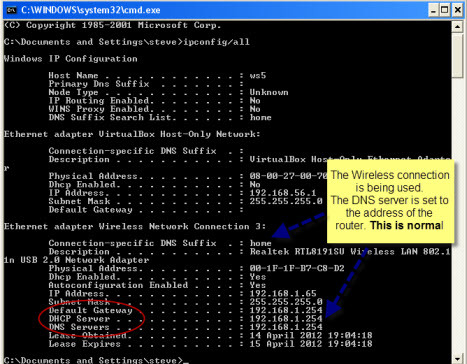
How can you use the Command Line Interface (CLI) to access your devices assigned IP and DNS Address?
ipconfig/all
If your DNS isn’t working properly you can’t access other machines on the internet using their name.
Is there any other way your machine can access other machines on the internet?
Yes. You would use their IP Address.
Most Home users will use the DNS severs provided by their ISP via their home router.
What are the alternative DNS servers you can use and what is a critical step to using these alternate servers?
You can use DNS servers like OpenDNS and Google Public DNS, but you must manually add these server addresses to your DNS settings
What are the benefits of using alternative DNS servers?
- The standard DNS server doesn’t provide any form of protection from malicious sites.
- Because DNS is the gateway to the Internet there are many companies that provide security-related services based on the public DNS service.
- They do this by filtering DNS requests. Most will detect phishing and spam sites, and many will provide protection from adult-related sites.
- Most security internet product suites will use some form of filtered DNS.
How is DNS Name Resolution achieved?
To resolve a hostname to an IP address using DNS you will need to have s DNS client on your machine, and the client must know the IP address of a DNS server.
The DNS client queries its DNS server which then follows through a process to get an answer- See DNS lookups explained.
Are internal IP Addresses normally static?
No. They are non-static.
How do large corporations manage their internal non-static IP addresses?
Internal IP addresses are normally non-static as they are usually assigned by a DHCP server.
In large corporate networks that use their own internal DNS and DHCP servers a need to keep the DNS servers up to date was required.
DDNS (Dynamic DNS updates) was introduced to solve this problem- Wiki
The basic procedure is:
- The Machine gets IP address from DHCP
- The Machine or the DHCP server contacts the DNS server and updates the DNS record with the IP address and DNS name
Home and small business networks don’t use their own DNS servers because they don’t have so many servers/machines, so do they use DDNS, and why or why not?
They do not need DDNS because they are in the same broadcast domain.
Because they are in the same broadcast domain windows networking will resolve the names and IP addresses, even if the IP addresses change.
However small business/home networks may need DDNS if they want to provide access to internal resources from across the internet. See Dynamic DNS and Services Guide
What’s the first thing you check if you can’t connect to the internet?
If you have problems connecting to resources on the Internet then DNS is one of the first things to check.
The main troubleshooting tool is nslookup and it is available on all of the main operating systems. See using nslookup.
What’s the best way to sum up the DNS system?
- The DNS system provides a domain name to IP address mapping for devices connected to the Internet, and it is crucial to the working of the Internet.
- Usually you don’t need to worry about it as your are automatically assigned the address of the DNS server by your ISP and Home router.
- If you are concerned about security then consider using a filtered DNS service like Open DNS.

-
React.js and the virtual DOM vs real DOM11
-
HTTP Basics22
-
DNS Basics23
-
JavaScript Event Loop7
-
Binary Tree4
-
Linked Lists8
-
Object Oriented Programming (OOP)13
-
Node.js17
-
Skillstorm Intro to Coding - SQL and MySQL56
-
Skillstorm Intro to Coding - Data Structures in Java105
-
SkillStorm Interview Prep52
-
Skillstorm Intro to Coding - OOP & Java Fundamentals97
-
Skillstorm Intro to Coding - Programming in Java65



