bend an object from
the object menu:
Object / Envelope Distort /
Make with Warp or Mesh or
Top Object
LP stroke mode
hover over stroke
(‘Paint Strokes’ must be
ticked off in options dialog)
- or hold down Shift key
LP keyboard shortcut
K
Outline Stroke -
Deke’s alternative name is…
a filled path outline
scissors -
typical ways to use:
click anywhere on a segment,
2, 3, 4 or more times,
to create as many cuts.
how to bend an arc
out of shape
DST -
click one end handle
and drag handle
RCP -
summon Transform Panel
double-click RCP
individual points can be
switched on / off
Variable Width Tool -
change thickness of stroke
only on one side:
hold down Alt
pouring text in
linked text box:
by holding down Alt while
clicking to pour overflow text,
you skip having to click the overflow link.
freeform gradients - how to add and edit colours…
work from the Properties panel to edit colours:
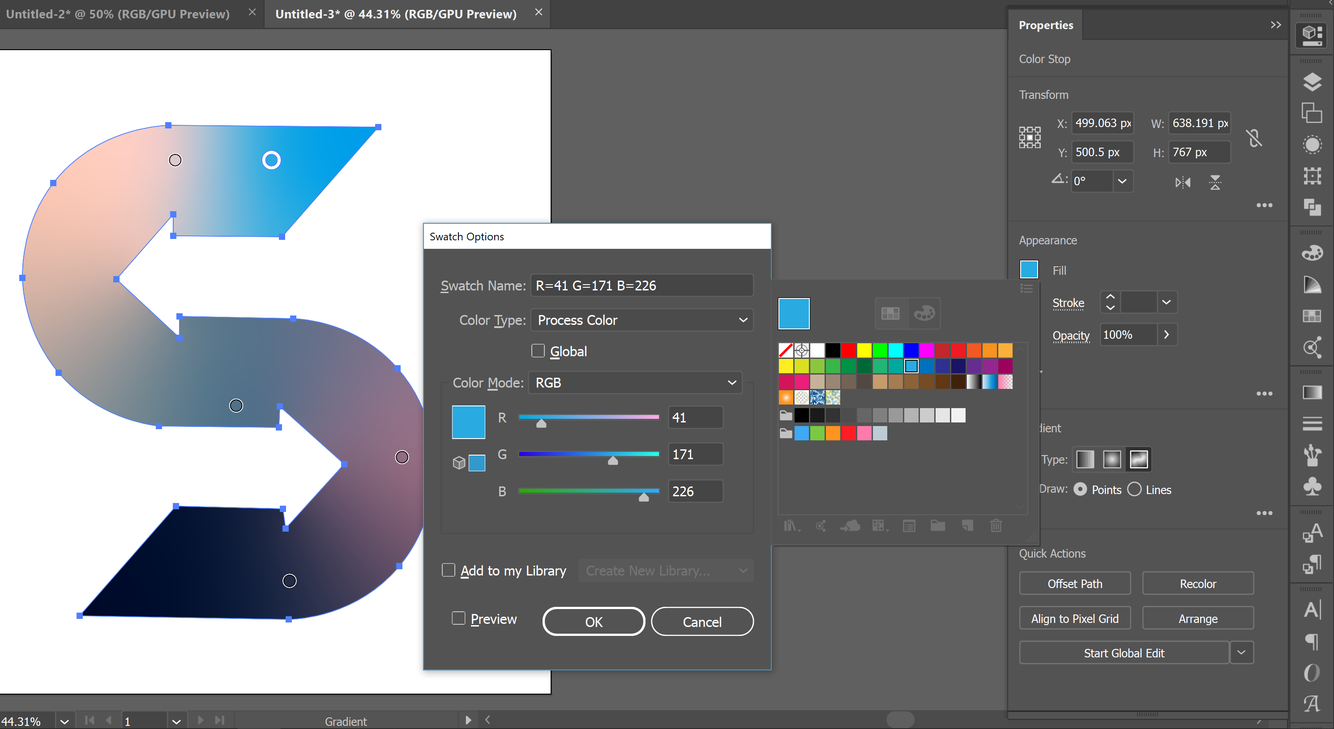
- click the single swatch: swatch panel appears
- x2-click chosen swatch - swatch options panel appears, where you can make the swatch global, which, once you’re done, can be toyed with in the three sliders of the swatch options panel, to achieve refined tweaking of your gradient (global swatches have a white triangle bottom right of their icon).



