Cloud Storage
- Bucket is a logical container for objects
- Buckets exist within projects
- Bucket names exist within a global namespace
- Buckets can be:
- Regional: Use a region to help optimize latency and network bandwidth for data consumers, such as analytics pipelines, that are run in the same region
- Dual-regional: Use a dual-region when you want similar performance advantages as regions, but also want the higher availability that comes with being geo-redundant.
- Multi-regional: Use a multi-region when you want to serve content to data consumers that are outside of the Google network and distributed across large geographic areas
- Storage class:
- Standard: Frequently accessed data (more than once every 30 days)
- Nearline: Data accessed less frequently (more than 30 days apart)
- Coldline: Archive storage or compliance (accessed less than once a year)
- Archive
Cloud SQL
- Direct lift and shift of traditional MySQL/PostgreSQL workloads with the maintenance stack managed for you.
- Standard SLA is 99.95%
- What is managed:
- OS installation/management
- Database installation/management
- Backups
- Scaling - disk space
- Availability:
- Failover
- Read Replicas
- Monitoring
- Authorize network connections/proxy/use SSL
- Limitations
- Read Replicas limited to the same region as the master
- Up to 416Gb RAM and 30 TB storage
- Unsupported features:
- User defined functions
- InnoDB memcached plugin
- Federated engine
- SUPER privilege
Cloud SQL High Availability
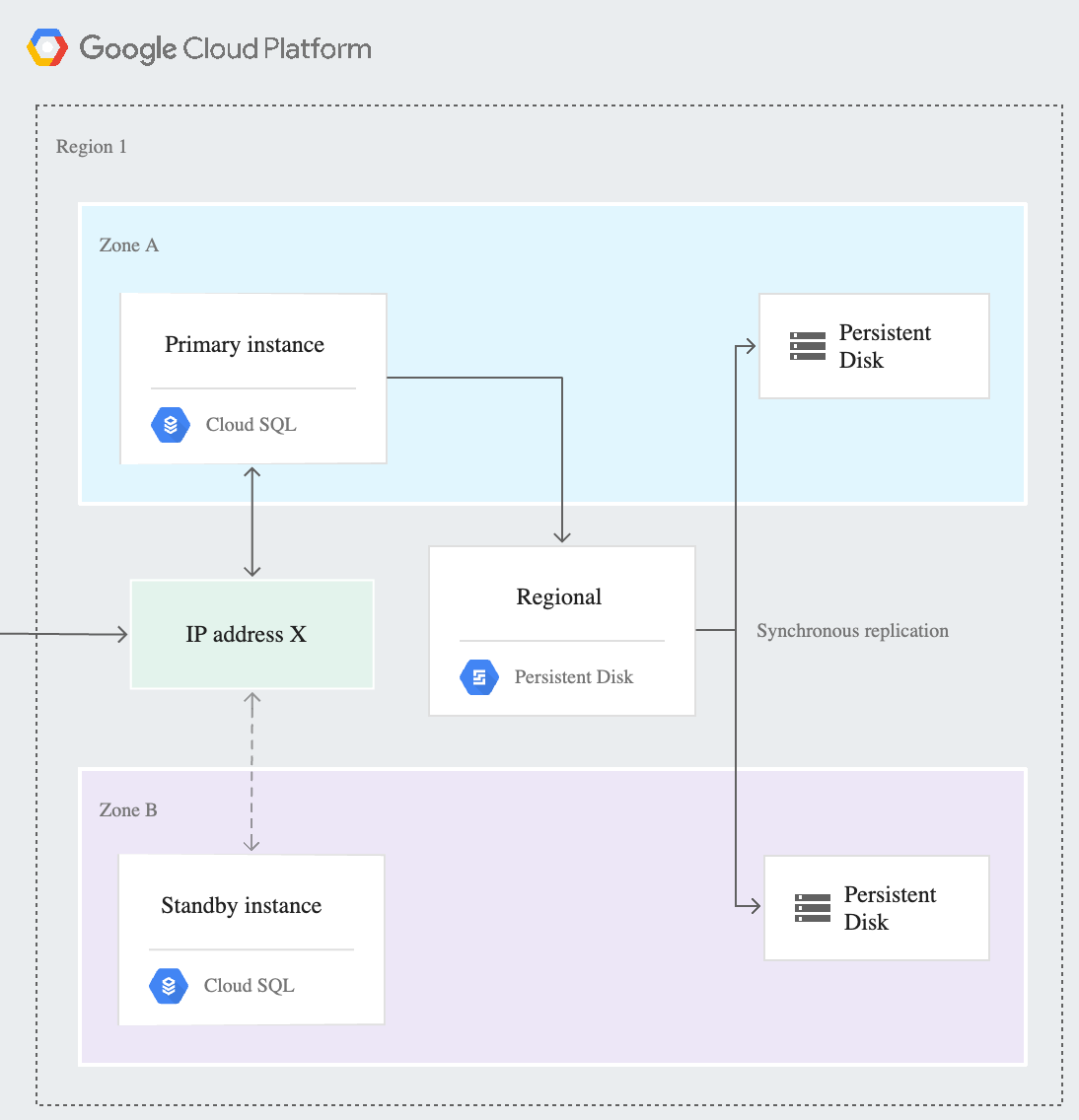
The HA configuration, sometimes called a cluster, provides data redundancy. A Cloud SQL instance configured for HA is also called a regional instance and is located in a primary and secondary zone within the configured region. Within a regional instance, the configuration is made up of a primary instance and a standby instance. Through synchronous replication to each zone’s persistent disk, all writes made to the primary instance are also made to the standby instance. In the event of an instance or zone failure, this configuration reduces downtime, and your data continues to be available to client applications.
Note: The standby instance cannot be used for read queries. This differs from the Cloud SQL for MySQL legacy HA configuration.
Cloud Spanner
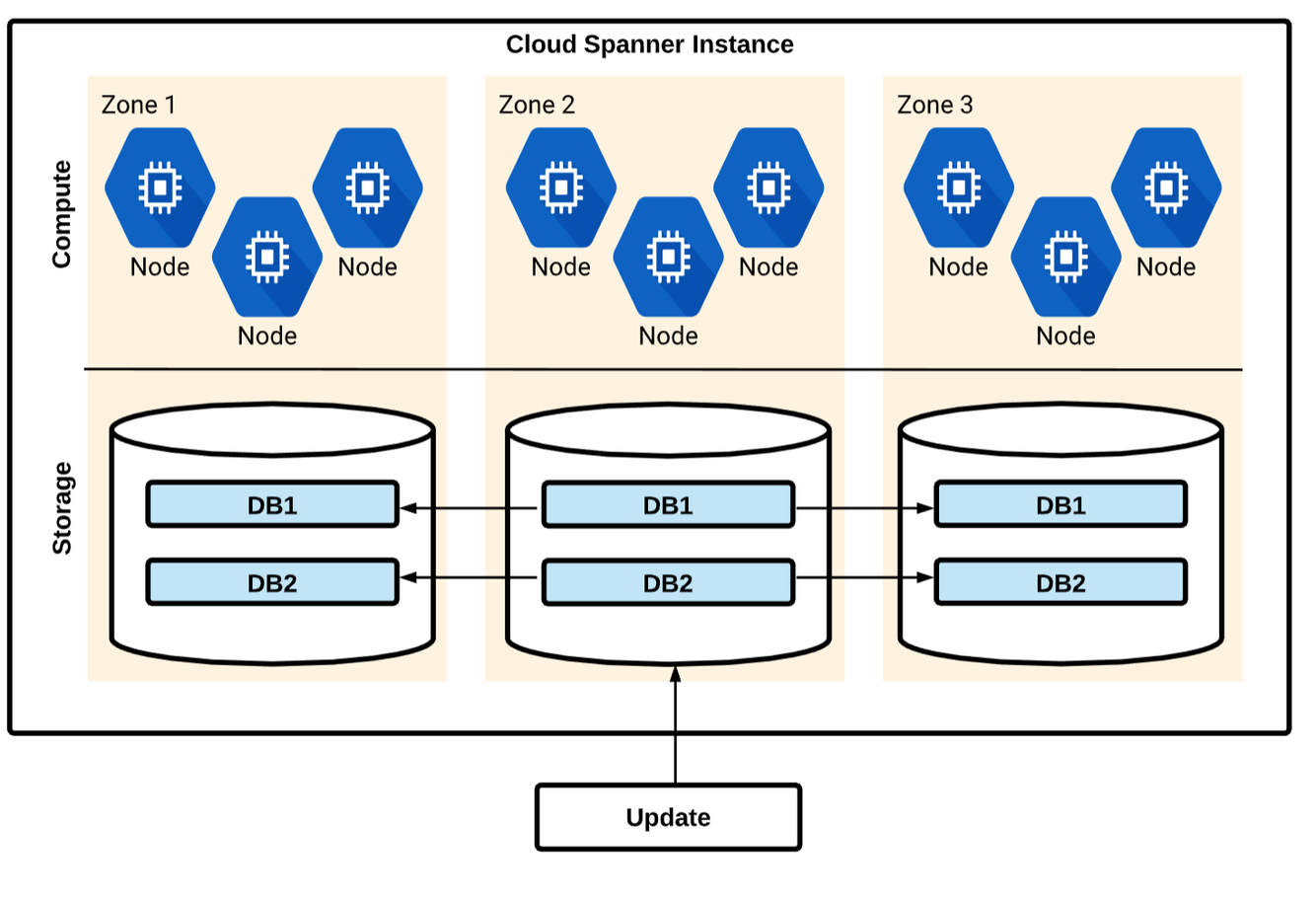
- Managed SQL-Compliant DB: SQL (ANSI 2011) schemas and queries with ACID transactions
- Horizontally scalable: strong consistency across rows, regions from 1 to 1000 of nodes.
- Highly available: automatic global replication, no planned downtime and 99.99% SLA.
- Similar architecture to Bigtable
- Used for mission critical, relational databases that need strong transactional consistency (ACID compliant)
- Higher workloads than Cloud SQL can support
- Standard SQL format (ANSI 2011)
- Regional or Multi-regional instances
- CPU utilization is the recommended metric for scaling
- Supports secondary indexes
- You can use a Universally Unique Identifier (UUID) as the primary key. Version 4 UUID is recommended, because it uses random values in the bit sequence.
Cloud Spanner - Schema Design
You should be careful when choosing a primary key to not accidentally create hotspots in your database. One cause of hotspots is having a column whose value monotonically increases as the first key part, because this results in all inserts occurring at the end of your key space. This pattern is undesirable because Cloud Spanner divides data among servers by key ranges, which means all your inserts will be directed at a single server that will end up doing all the work.
A common technique for spreading the load across multiple servers is to create a column that contains the hash of the actual unique key, then use the hash column (or the hash column and the unique key columns together) as the primary key. This pattern helps avoid hotspots, because new rows are spread more evenly across the key space.
You can also use a Universally Unique Identifier (UUID) as the primary key. Version 4 UUID is recommended, because it uses random values in the bit sequence.
Cloud Spanner - Secondary Indexes
In a Cloud Spanner database, Spanner automatically creates an index for each table’s primary key.
You can also create secondary indexes for other columns. Adding a secondary index on a column makes it more efficient to look up data in that column.
For example, if a lookup is done within a read-write transaction, the more efficient lookup also avoids holding locks on the entire table, which allows concurrent inserts and updates to the table for rows outside of the lookup range.
In addition to the benefits they bring to lookups, secondary indexes can also help Spanner execute scans more efficiently, enabling index scans rather than full table scans.
Cloud Spanner - Transactions
A transaction in Cloud Spanner is a set of reads and writes that execute atomically at a single logical point in time across columns, rows, and tables in a database.
Cloud Spanner supports these transaction modes:
- Locking read-write. This type of transaction is the only transaction type that supports writing data into Cloud Spanner. These transactions rely on pessimistic locking and, if necessary, two-phase commit. Locking read-write transactions may abort, requiring the application to retry. Read-write transactions provide the ACID properties of relational databases.
- Read-only. This transaction type provides guaranteed consistency across several reads, but does not allow writes. Read-only transactions can be configured to read at timestamps in the past. Read-only transactions do not need to be committed and do not take locks.
- Partitioned DML. This transaction type executes a Data Manipulation Language (DML) statement as Partitioned DML. Partitioned DML is designed for bulk updates and deletes, particularly periodic cleanup and backfilling.
Read outside of Transactions
Cloud Spanner allows you to determine how current the data should be when you read data by offering two types of reads:
- A strong read is a read at a current timestamp and is guaranteed to see all data that has been committed up until the start of this read. Cloud Spanner defaults to using strong reads to serve read requests.
- A stale read is read at a timestamp in the past. If your application is latency sensitive but tolerant of stale data, then stale reads can provide performance benefits.
Cloud Firestore
- Fully managed NoSQL database
- Serverless autoscaling NoSQL document store. Integrated with GCP and Firebase.
- Realtime DB with mobile SDKs
- Android and iOS client libraries, frameworks for all popular programming languages
- Scalability and Consistency
- Horizontal autoscaling and strong consistency, with support for ACID transactions.
- Single Firestore database per project
- Multi-regional for wide access, single region for lower latency and for single location
Cloud Firestore - Usage
- Use Firestore for:
- Applications that need highly available structured data, at scale
- Product catalogs - real-time inventory
- User profiles - mobile apps
- Game save states
- ACID transactions - e.g. transferring funds between accounts
- Supports JSON and SQL-like queries but cannot easily ingest CSV files.
- Operates on multiple keys
- Do not use Firestore for:
- Analytics
- Use BigQuery/Cloud Spanner
- Extreme scale (10M+ read/writes per second)
- Use Bigtable
- Don’t need ACID transactions/data not highly structured
- Use Bigtable
- Lift and Shift (existing MySQL)
- Use Cloud SQL
- Near zero latency (sub 10ms)
- Use in-memory database (Redis)/Memorystore
- Analytics
Cloud Firestore - Data Model
- Document Store (think MongoDB)
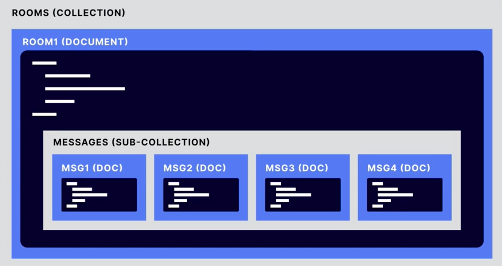
- Documents (JSON data) are grouped by Collections
- Documents can be hierarchical
- Documents can contain sub-collections
- Each document/entity has one or more properties
- Each entity is of a particular kind, which categorizes the entity for the purpose of queries: for instance, a task list application might represent each task to complete with an entity of kind Task.
- Properties have a value assigned
Cloud Firestore - Indexes
An index is defined on a list of properties of a given entity kind, with a corresponding order (ascending or descending) for each property.
REF: https://cloud.google.com/datastore/docs/concepts/indexes
When the same property is repeated multiple times, Firestore in Datastore mode can detect exploding indexes and suggest an alternative index. However, in all other circumstances, a Datastore mode database will generate an exploding index. In this case, you can circumvent the exploding index by manually configuring an index in your index configuration file:
- indexes:
- kind: Task
- properties:
- name: tags
- name: created
- kind: Task
- properties:
- name: collaborators
- name: created
https://cloud.google.com/datastore/docs/concepts/indexes#index_limits
Cloud Firestore - Managed Exports
With the managed export and import service, you can recover from accidental deletion of data and export data for offline processing. You can export all entities or just specific kinds of entities. Likewise, you can import all data from an export or only specific kinds.
BigQuery supports loading data from Datastore exports created using the Datastore managed import and export service. You can use the managed import and export service to export Datastore entities into a Cloud Storage bucket. You can then load the export into BigQuery as a table.
To run exports on a schedule, we recommend using Cloud Functions and Cloud Scheduler. Create a Cloud Function that initiates exports and use Cloud Scheduler to run your function.
REF: https://cloud.google.com/datastore/docs/export-import-entities
Cloud Memorystore
- Fully managed Redis instance
- Provisioning, replication and failover are fully automated
- No need to provision VMs
- Scale instances with minimal impact
- Automatic replication and failover
- Basic tier
- Efficient cache that can withstand a cold restart and full data flush
- Standard tier
- Adds cross-zone replication and automatic failover
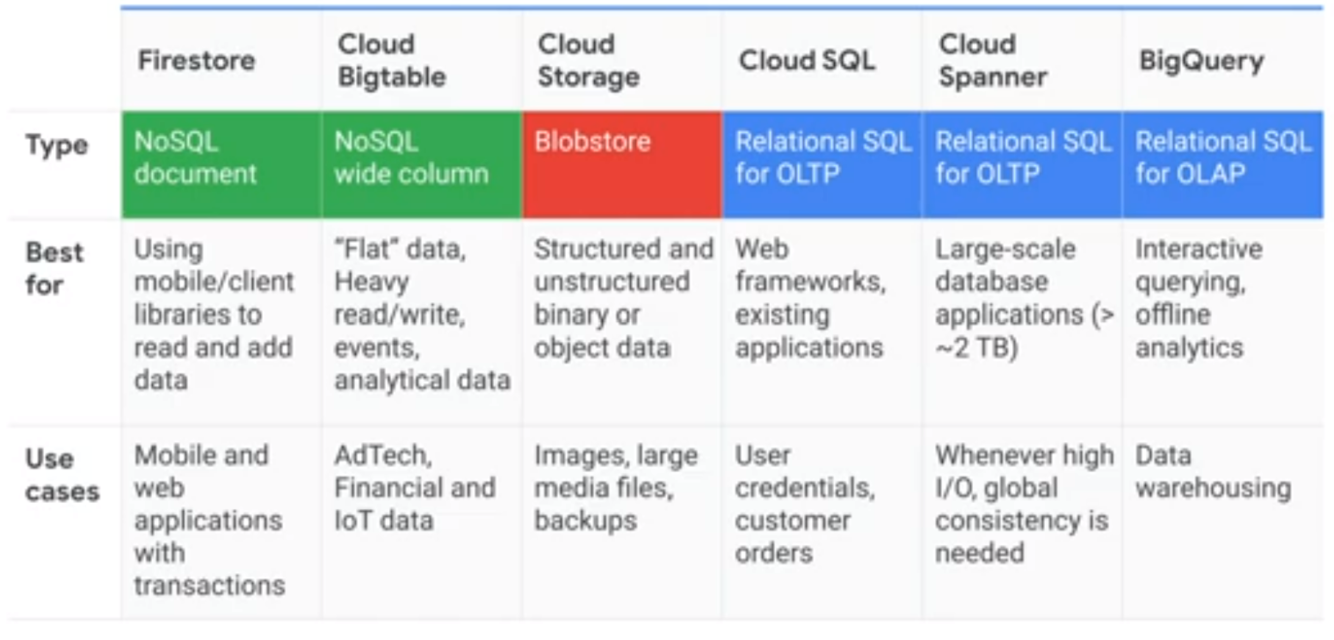
Comparing Storage Options
Storage Transfer Service
- Move or backup data to a Cloud Storage bucket either from other cloud storage providers or from your on-premises storage (POSIX file system).
- Move data from one Cloud Storage bucket to another, so that it is available to different groups of users or applications.
- Periodically move data as part of a data processing pipeline or analytical workflow.
Other Google Cloud transfer options include:
- Transfer Appliance for moving offline data, large data sets, or data from a source with limited bandwidth
- Used for on-premises transfers, not cloud-to-cloud, and is not used for repeated/scheduled transfers
- BigQuery Data Transfer Service to move data from SaaS applications to BigQuery.
- Transfer service for on-premises data to move data from your on-premises machines to Cloud Storage
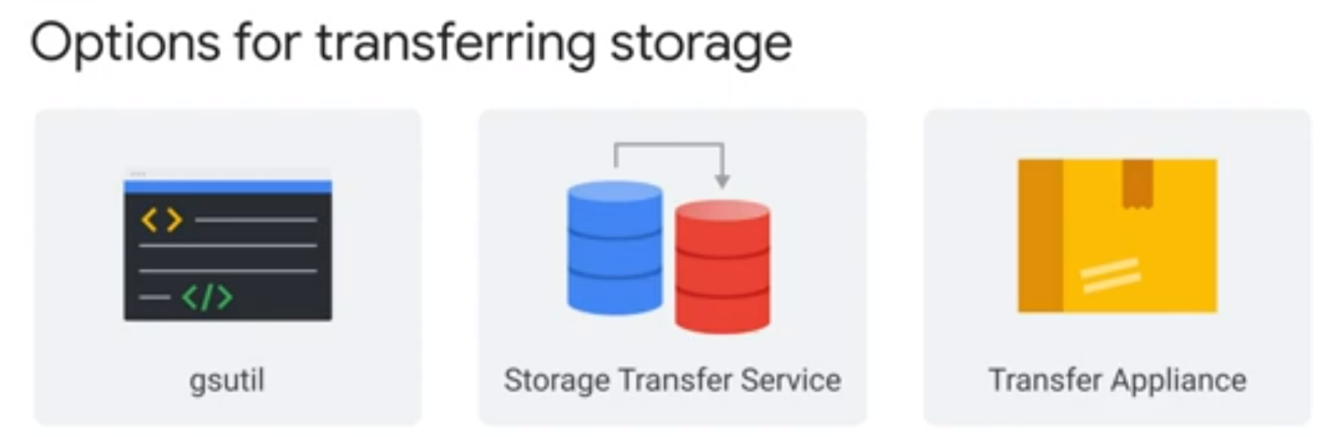
Options for transferring storage
Storage Transfer Service: Moving large amounts of data is seldom as straightforward as issuing a single command. You have to deal with issues such as scheduling periodic data transfers, synchronizing files between source and sink, or moving files selectively based on filters. Storage Transfer Service provides a robust mechanism to accomplish these tasks.
- Use when transferring data from another cloud storage provider OR your private data center to Google Cloud for more than 1 TB of data
gsutil: For one-time or manually initiated transfers, you might consider using gsutil, which is an open source command-line tool that is available for Windows, Linux, and Mac. It supports multi-threaded transfers, processed transfers, parallel composite uploads, retries, and resumability.
- Use when transferring data from your private data center to Google Cloud for less 1 TB of data
Transfer Appliance: Depending on your network bandwidth, if you want to migrate large volumes of data to the cloud for analysis, you might find it less time consuming to perform the migration offline by using the Transfer Appliance.
- Use when transferring data from your private data center to Google Cloud with not enough bandwidth to meet your project deadline (or typically > 50 TB)