BigQuery Key Features
- High Availability: Automatic data replication to multiple locations with availability.
- Supports Standard SQL: BigQuery supports a standard SQL dialect which is ANSI:2011 compliant.
- Federated Data: BigQuery able to connect to, and process, data stored outside of BigQuery (external sources).
- Automatic Backups: BigQuery automatically replicates data and keeps a seven-day history of changes.
- Governance and Security: Fine-grained identity and access management. Data encrypted at rest and in transit.
- Separation of Storage and Compute: Leads to a number of benefits including ACID-compliant storage operations, cost-effective scalable storage and stateless resilient compute.
Streaming data into BigQuery
Instead of using a job to load data into BigQuery, you can choose to stream your data into BigQuery one record at a time. This approach enables querying data without the delay of running a load job. But enabling streaming on BigQuery is not free.
If you have an app that collects a large amount of data in real-time, streaming inserts can be a good choice. Generally, these types of apps have the following criteria:
- Not transactional. High volume, continuously appended rows. The app can tolerate a rare possibility that duplication might occur or that data might be temporarily unavailable.
- Aggregate analysis. Queries generally are performed for trend analysis, as opposed to single or narrow record selection.
Views
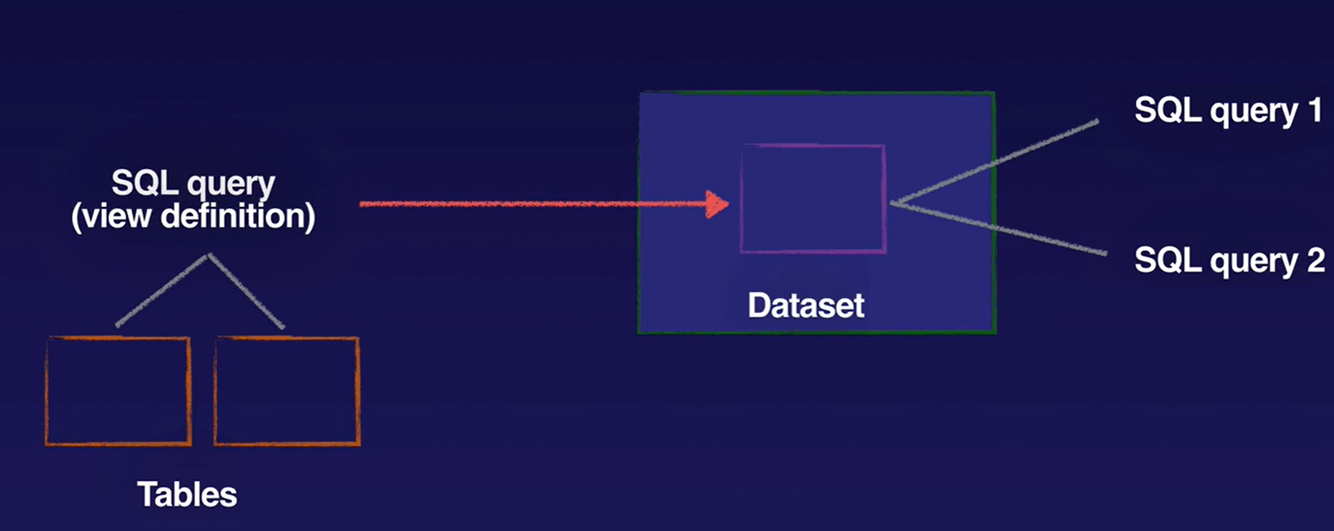
- Virtual table defined by a query
- Contains data only from query that contains view
- Control access to data
- Giving a view access to a dataset is also known as creating an authorized view in BigQuery. An authorized view allows you to share query results with particular users and groups without giving them access to the underlying source data
- When making an authorized view in another dataset, both the source data dataset and authorized view dataset must be in the same regional location.
- You can also control access to tables and views with access control set at the table level, within the same dataset.
- Reduce query complexity
- Constructing logical tables
- Ability to create authorized views
Views limitations:
- Cannot export data from a view
- Cannot use JSON API to retrieve data from a view
- Cannot combine standard and legacy SQL
- No user defined functions
- No wildcard table references
External Tables
An external table is a table that acts like a standard BigQuery table. The table metadata, including the table schema, is stored in BigQuery storage, but the data itself resides in the external source.
You can use external tables with the following data sources:
- Bigtable
- Cloud Storage
- Drive
External tables can be temporary or permanent.
A permanent table is a table that is created in a dataset and is linked to your external data source.
When you use a temporary table, you do not create a table in one of your BigQuery datasets. Because the table is not permanently stored in a dataset, it cannot be shared with others. Querying an external data source using a temporary table is useful for one-time, ad-hoc queries over external data, or for extract, transform, and load (ETL) processes.
BigQuery Data Transfer Service
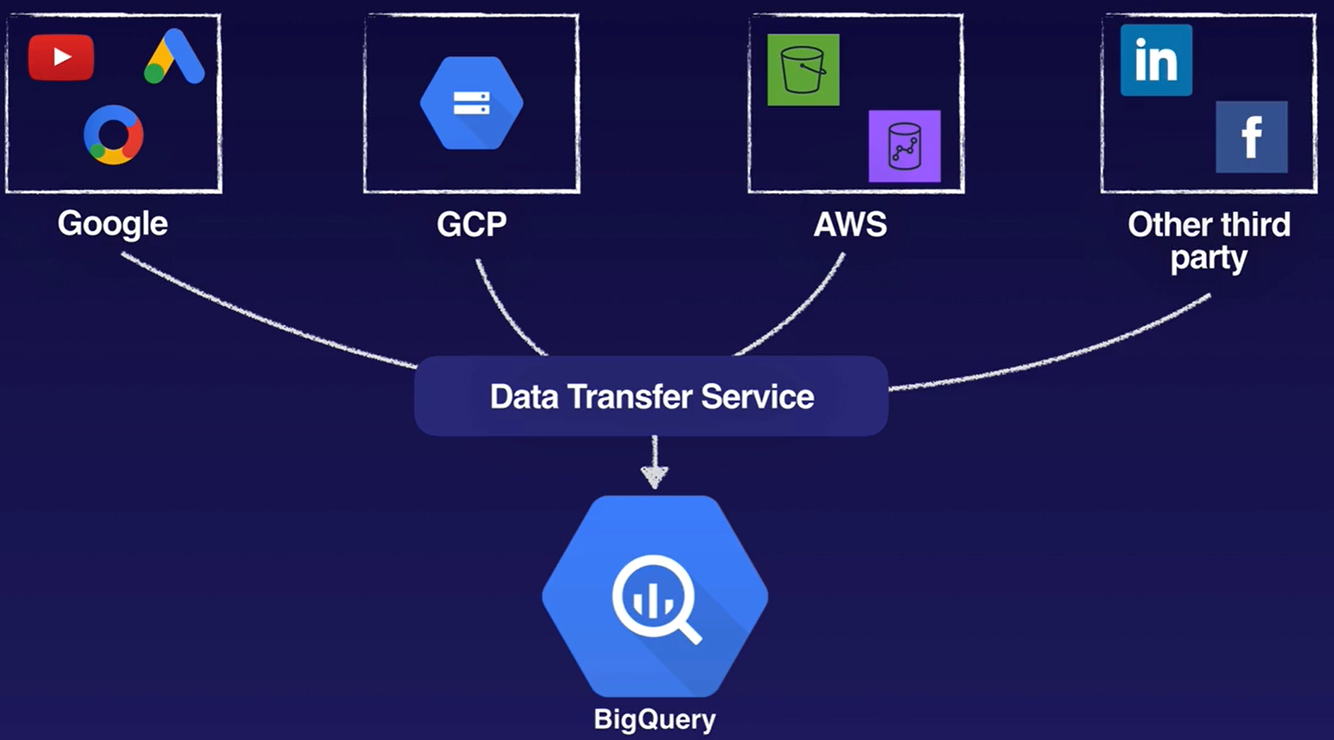
- Import data to BigQuery from other Google advertising SaaS applications.
- Google Cloud Storage
- Google Ads
- YouTube reports
- External Cloud Storage providers
- Amazon S3
- Data Warehouses
- Teradata
- Amazon Redshift
https://cloud.google.com/bigquery-transfer/docs/introduction
Denormalisation
- JOINs are typically not as performant as denormalized structures. Query performance shows a much steeper decay in the presence of JOINs.
- BigQuery performance optimised when data is denormalised appropriately
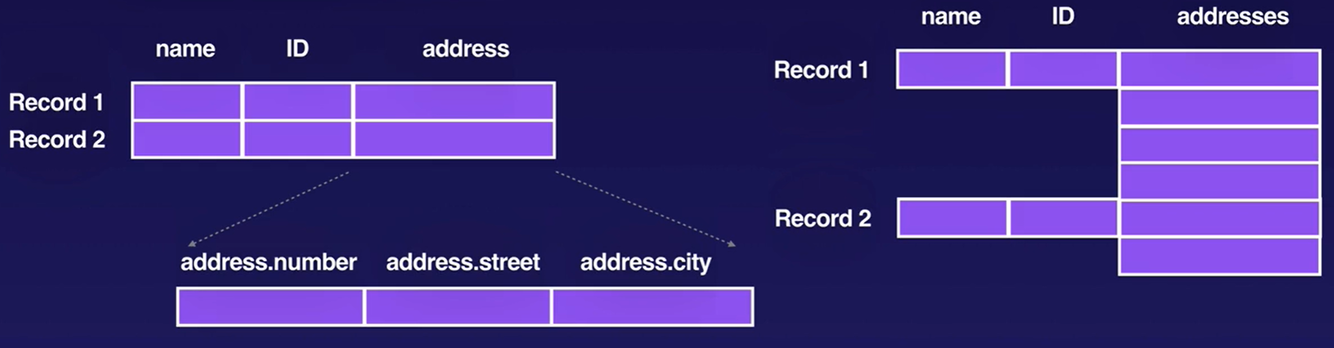
- The preferred method for denormalizing data takes advantage of BigQuery’s native support for nested and repeated structures in JSON or Avro input data
- Maintain data relationships in an efficient manner
- ARRAY and STRUCT or RECORD are complex data types to represent nested and repeated fields.
Inserts & Updates
- Avoid point-specific DML statements (updating or inserting 1 row at a time). Batch your updates and inserts.
- UPDATE and DELETE DML statements in BigQuery are oriented towards periodic rewrites of your data, not single row mutations. The INSERT DML statement is intended to be used sparingly.
- Appending query results to an existing table is faster than DML statements.
- Your project can make up to 1,500 table operations per table per day, whether the operation appends data to the table or truncates the table. This limit includes the combined total of all load jobs, copy jobs, and query jobs that append to or overwrite a destination table or that use a DML DELETE, INSERT, MERGE, TRUNCATE TABLE, or UPDATE statement to write data to a table.
Wildcards
- Use backticks ` , not single quote ‘
- Query across multiple, similarly named tables
- FROM
project.dataset.table_prefix*
- FROM
- Filter using _TABLE_SUFFIX in WHERE clause:
- FROM
project.dataset.table_prefix*WHERE _TABLE_SUFFIX BETWEEN ‘29’ and ‘35’
- FROM
- Filter using TABLE_DATE_RANGE:
- FROM (TABLE_DATE_RANGE([mydata.], TIMESTAMP(‘2014-03-19’), TIMESTAMP(‘2015-03-21’)))
- The legacy SQL TABLE_DATE_RANGE() functions work on tables that conform to a specific naming scheme: YYYYMMDD, where the [mydata.] represents the first part of a table name and YYYYMMDD represents the date associated with that table’s data, i.e. Date-sharded tables.
- In standard SQL, an equivalent query uses a table wildcard and the BETWEEN clause.
- Filter using TABLE_QUERY.
- The legacy SQL TABLE_QUERY() function enables you to find table names based on patterns. When migrating a TABLE_QUERY() function to standard SQL, which does not support the TABLE_QUERY() function, you can instead filter using the _TABLE_SUFFIX pseudo column.
- Limitations:
- The wildcard table functionality does not support views.
- Partitioning is recommended over sharding, because partitioned tables perform better. Sharding reduces performance while creating more tables to manage.
- Currently, cached results are not supported for queries against multiple tables using a wildcard even if the Use Cached Results option is checked. If you run the same wildcard query multiple times, you are billed for each query.
- Wildcard tables support native BigQuery storage only. You cannot use wildcards when querying an external table or a view.
https://cloud.google.com/bigquery/docs/querying-wildcard-tables
Partitioned & Sharded Tables
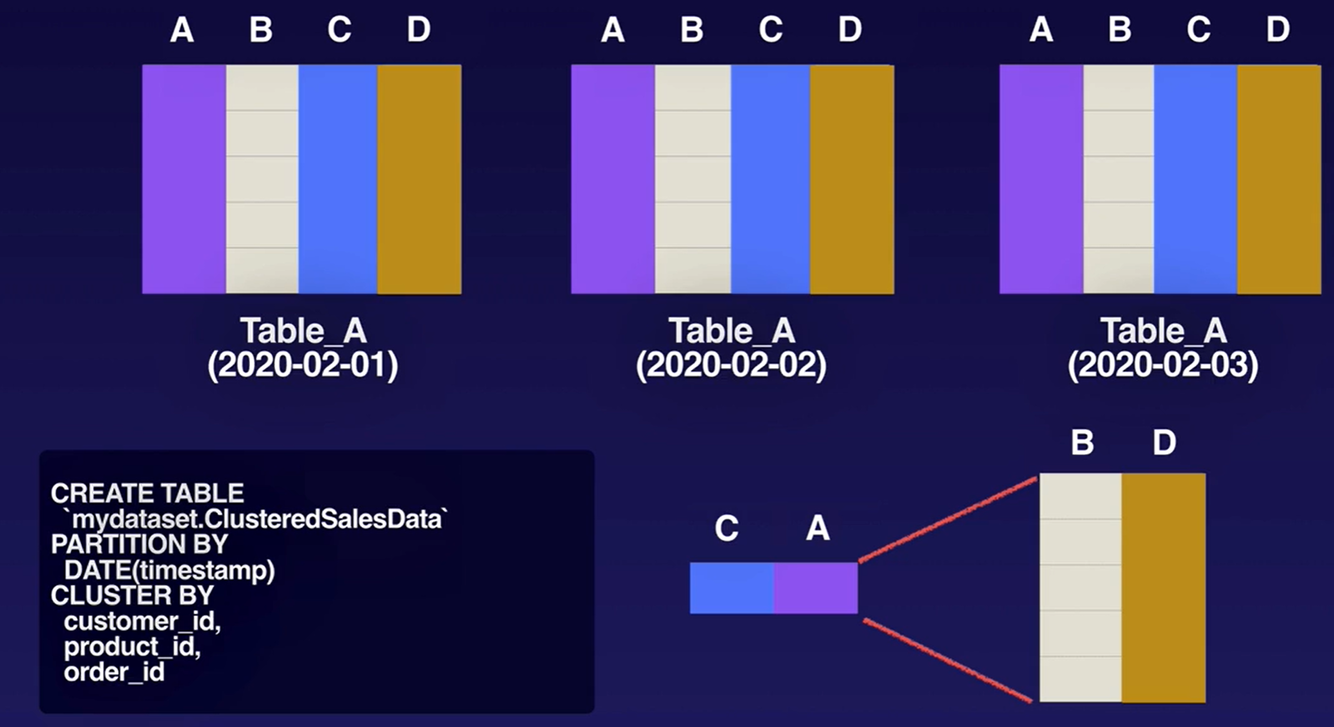
- Table divided into segments known as “partitions”
- Query only certain rows (partitions) instead of entire table
- Limits amount of read data
- Improves performance
- Reduces costs
- You can partition BigQuery tables by:
- Ingestion time: Tables are partitioned based on the data’s ingestion (load) time or arrival time.
- Date/timestamp/datetime: Tables are partitioned based on a TIMESTAMP, DATE, or DATETIME column.
- Integer range: Tables are partitioned based on an integer column.
- Why not use multiple tables plus wildcards instead?
- Limited to 1000 tables per dataset
- Bring tables number below 1000 to query all of them at once.
- Merge tables, then use table partitioning to divide single tables into segments (called partitions)
- Substantial performance drop vs. a single table
- Limited to 1000 tables per dataset
- As an alternative to date/timestamp/datetime partitioned tables, you can shard tables using a time-based naming approach such as [PREFIX]_YYYYMMDD. This is referred to as creating date-sharded tables. Compatible with legacy SQL. But Partitioning is recommended over sharding, because partitioned tables perform better. Sharding reduces performance while creating more tables to manage.
- You cannot use legacy SQL to query partitioned tables or to write query results to partitioned tables.
Partition Types
- Ingestion Time partitioned tables
- Partitioned by load or arrival date
- Data automatically loaded into date-based partitions (daily)
- Tables include the pseudo-column _PARTITIONTIME
- Use _PARTITIONTIME in queries to limit partitions scanned
- Partitioning based on specific TIMESTAMP or DATE column
- Data partitioned based on value supplied in partitioning column
- 2 additional partitions:
- __Null__
- __UNPARTITIONED__
- Use partitioning column in queries
REF: https://cloud.google.com/bigquery/docs/partitioned-tables
Clustered Tables
- Taking partitioned tables “to the next level”
- Similar to partitioning, divides table reads by a specified column field
- Instead of dividing dy date/time, divides by field
Limitations:
- Only (currently) available for partitioned tables
- Standard SQL only for querying clustered tables
- Standard SQL only for writing query results to clustered tables
- Specify clustering columns only when table is created
- Clustering columns cannot be modified after table creation
- Clustering columns must be top-level, non-repeated columns
- You can specify 1 to 4 clustering columns
Querying Clustered Tables:
- Filter clustered columns in the order they were specified
- Avoid using clustered columns in complex filter expressions
- Avoid comparing clustered columns to other columns
Cached Queries
BigQuery writes all query results to a table. The table is either explicitly identified by the user (a destination table), or it is a temporary, cached results table. Temporary, cached results tables are maintained per-user, per-project. There are no storage costs for temporary tables, but if you write query results to a permanent table, you are charged for storing the data.
The Use cached results option reuses results from a previous run of the same query unless the tables being queried have changed. Using cached results is only beneficial for repeated queries. For new queries, the Use cached results option has no effect, though it is enabled by default.
If you want to disable retrieving cached results and force live evaluation of a query job, you can set the configuration.query.useQueryCache property of your query job to false.
Query results are not cached:
- When a destination table is specified
- If any of the referenced tables or logical views have changed since the results were previously cached
- When any of the tables referenced by the query have recently received streaming inserts (a streaming buffer is attached to the table) even if no new rows have arrived
- If the query uses non-deterministic functions; for example, date and time functions such as CURRENT_TIMESTAMP() and NOW(), and other functions such as CURRENT_USER() return different values depending on when a query is executed
- If you are querying multiple tables using a wildcard
- If the cached results have expired; typical cache lifetime is 24 hours, but the cached results are best-effort and may be invalidated sooner
- If the query runs against an external data source
Slots
- A BigQuery slot is a virtual CPU used by BigQuery to execute SQL queries. BigQuery automatically calculates how many slots each query requires, depending on query size and complexity.
- Choice of using an on-demand pricing model or a flat-rate pricing model
- The flat-rate model gives you explicit control how many slots to reserve, whereas the on-demand model does not.
- Number of slots per query depends on its complexity:
- Query size = amount of data processed by the query.
- Query complexity = amount of data that is shuffled during steps of query.
- BigQuery automatically manages slots quota.
- View slots usage using Stackdriver monitoring.
- Default, on-demand pricing allocates 2000 slots
- Only an issue for extremely complex queries, or a high number of simaltaneous users.
- If more than 2000 slots required, switch to flat-rate pricing - purchase fixed number of slots.
- Viewing project and reservation slot usage in Cloud Monitoring: Information is available from the “Slots Allocated” metric in Cloud Monitoring. This metric information includes a per-reservation and per-job-type breakdown of slot usage. The information can also be visualized by using the custom charts metric explorer.
- If you have multiple BigQuery projects and users, you can manage costs by requesting a custom quota that specifies a limit on the amount of query data processed per day. Creating a custom quota on query data allows you to control costs at the project-level or at the user-level.
- Project-level custom quotas limit the aggregate usage of all users in that project.
- User-level custom quotas are separately applied to each user or service account within a project.
Data Loss Prevention
- Fully managed service for handling sensitive data (e.g. medical information, credit card numbers, etc.)
- Identify and protect sensitive data at scale.
- Over 100 predefined detectors to identify patterns, formats and checksums.
- De-identifies data using masking, tokenisation, pseudonymisation, date shifting and more.
Cloud DLP supports three pseudonymization techniques, all of which use cryptographic keys. Following are the available methods:
- Deterministic encryption using AES-SIV: An input value is replaced with a value that has been encrypted using the AES-SIV encryption algorithm with a cryptographic key, encoded using base64, and then prepended with a surrogate annotation, if specified. This method produces a hashed value, so it does not preserve the character set or the length of the input value. Encrypted, hashed values can be re-identified using the original cryptographic key and the entire output value, including surrogate annotation. Learn more about the format of values tokenized using AES-SIV encryption.
- Format preserving encryption: An input value is replaced with a value that has been encrypted using the FPE-FFX encryption algorithm with a cryptographic key, and then prepended with a surrogate annotation, if specified. By design, both the character set and the length of the input value are preserved in the output value. Encrypted values can be re-identified using the original cryptographic key and the entire output value, including surrogate annotation. (For some important considerations around using this encryption method, see Format preserving encryption later in this topic.)
- Cryptographic hashing: An input value is replaced with a value that has been encrypted and hashed using Hash-based Message Authentication Code (HMAC)-Secure Hash Algorithm (SHA)-256 on the input value with a cryptographic key. The hashed output of the transformation is always the same length and can’t be re-identified. Learn more about the format of values tokenized using cryptographic hashing.



