Apache Beam concepts
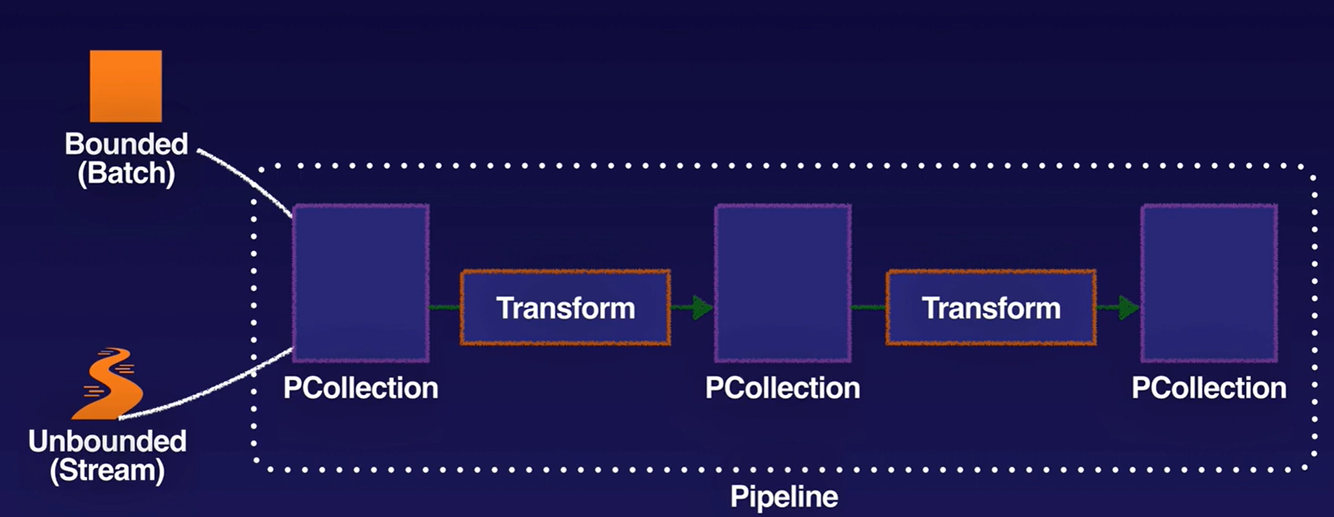
- Pipeline: encapsulates the entire series of computations involved in reading input data, transforming that data, and writing output data. The input source and output sink can be the same or of different types, allowing you to convert data from one format to another. Apache Beam programs start by constructing a Pipeline object, and then using that object as the basis for creating the pipeline’s datasets. Each pipeline represents a single, repeatable job.
- Element: single entry of data (e.g. table row).
- PCollection: represents a potentially distributed, multi-element dataset that acts as the pipeline’s data. Apache Beam transforms use PCollection objects as inputs and outputs for each step in your pipeline. A PCollection can hold a dataset of a fixed size (bounded, for batch) or an unbounded dataset from a continuously updating data source (for stream).
- Transform: represents a processing operation that transforms data. A transform takes one or more PCollections as input, performs an operation that you specify on each element in that collection, and produces one or more PCollections as output. A transform can perform nearly any kind of processing operation, including performing mathematical computations on data, converting data from one format to another, grouping data together, reading and writing data, filtering data to output only the elements you want, or combining data elements into single values.
- Runners: are the software that accepts a pipeline and executes it. Most runners are translators or adapters to massively parallel big-data processing systems. Other runners exist for local testing and debugging. Supported runners:
- Apache Flink
- Apache Samza
- Apache Spark
- Google Cloud Dataflow
- Hazelcast Jet
- Twister2
- Direct Runner
- Using a DirectRunner configuration with a staging storage bucket is the quickest and easiest way of testing a new pipeline, without risking changes to a pipeline that is currently in production.
IAM - Access Control
- Project-level only - all pipelines in the project (or none)
- Dataflow Admin: Minimal role for creating and managing dataflow jobs.
- Dataflow Developer: Provides the permissions necessary to execute and manipulate Dataflow jobs.
- Dataflow viewer: Provides read-only access to all Dataflow-related resources.
- Dataflow worker: Provides the permissions necessary for a Compute Engine service account to execute work units for a Dataflow pipeline.
Pipeline data access is separated from pipeline access.
For Dataflow users, use roles to limit access to only Dataflow Resources, not just the Project
ParDo Transforms
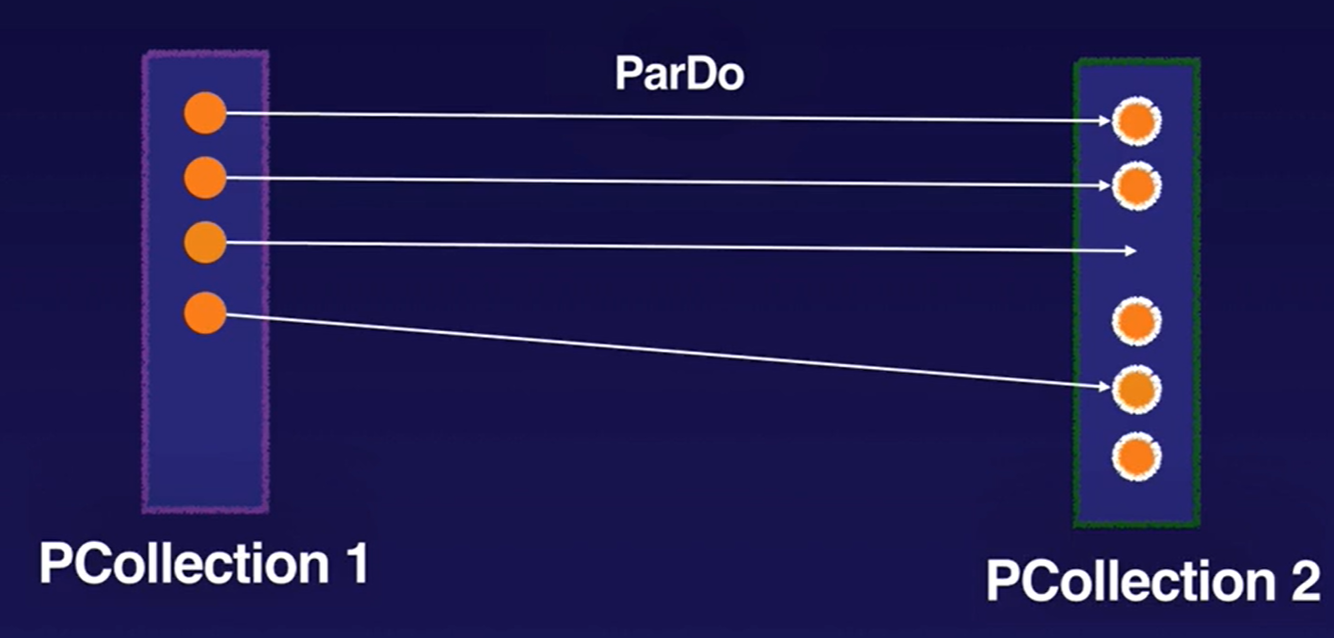
ParDo is the core parallel processing operation in the Apache Beam SDKs, invoking a user-specified function on each of the elements of the input PCollection. DoFn is a template you use to create user defined functions that are referenced by a ParDo.
ParDo collects zero or more output elements into an output PCollection. The ParDo transform processes elements independently and possibly in parallel.
The ParDo processing paradigm is similar to the “Map” phase of a Map/Shuffle/Reduce-style algorithm.
ParDo is useful for:
- Filtering amd emitting input
- Type conversion
- Extracting parts of input and calculating values from different parts of inputs
Aggregation Transforms
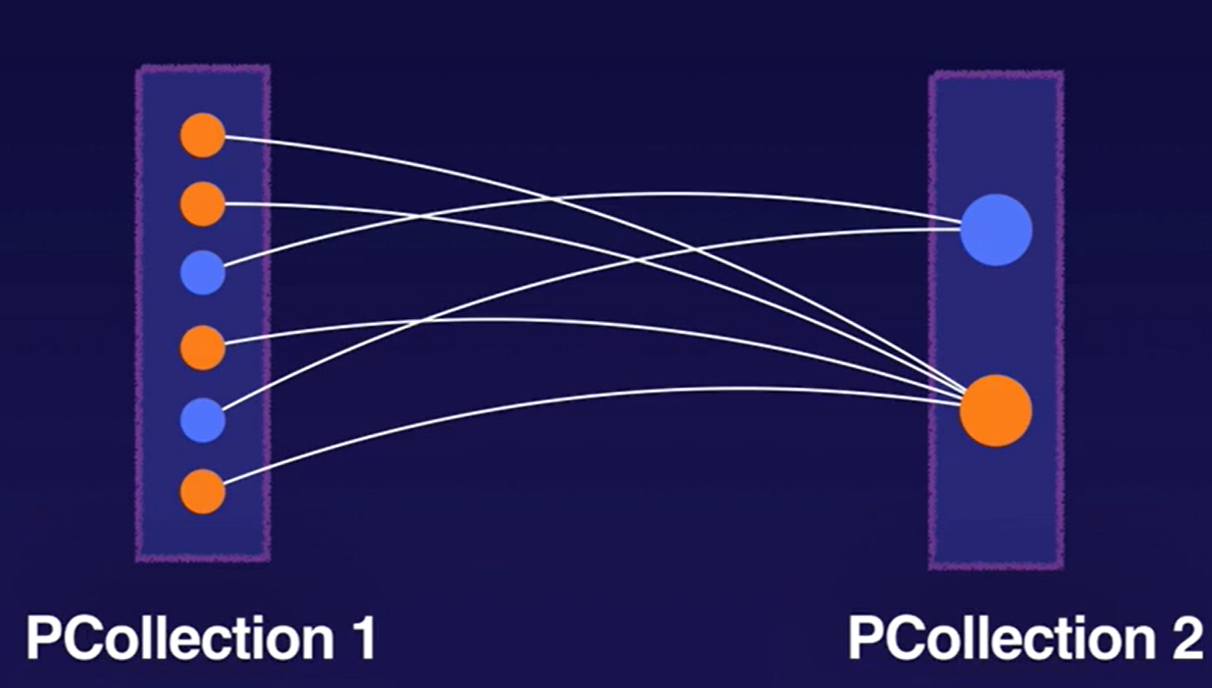
Aggregation is the process of computing some value from multiple input elements. The primary computational pattern for aggregation in Apache Beam is to group all elements with a common key and window. Then, it combines each group of elements using an associative and commutative operation.
Example: GroupByKey is a Beam transform for processing collections of key/value pairs. It’s a parallel reduction operation, analogous to the Shuffle phase of a Map/Shuffle/Reduce-style algorithm.
Note: The Flatten transformation merges multiple PCollection objects into a single logical PCollection, whereas Join transforms like CoGroupByKey attempt to merge data where there are related keys in the two datasets.
Watermarks
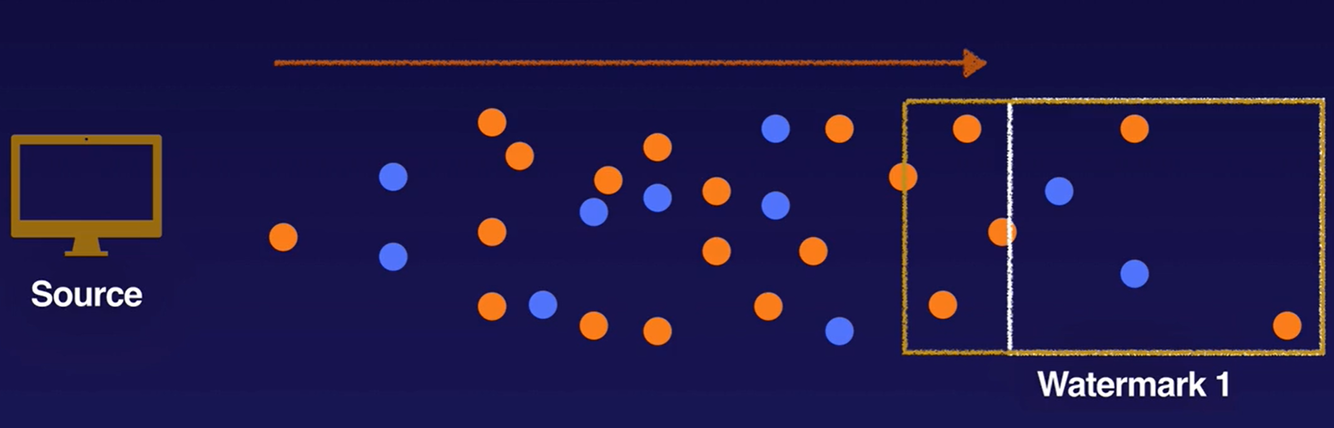
Apache Beam tracks a watermark, which is the system’s notion of when all data in a certain window can be expected to have arrived in the pipeline. Apache Beam tracks a watermark because data is not guaranteed to arrive in a pipeline in time order or at predictable intervals. In addition, there are no guarantees that data events will appear in the pipeline in the same order that they were generated.
Data that arrives with a timestamp that is inside the window but past the watermark is considered late data.
Triggers
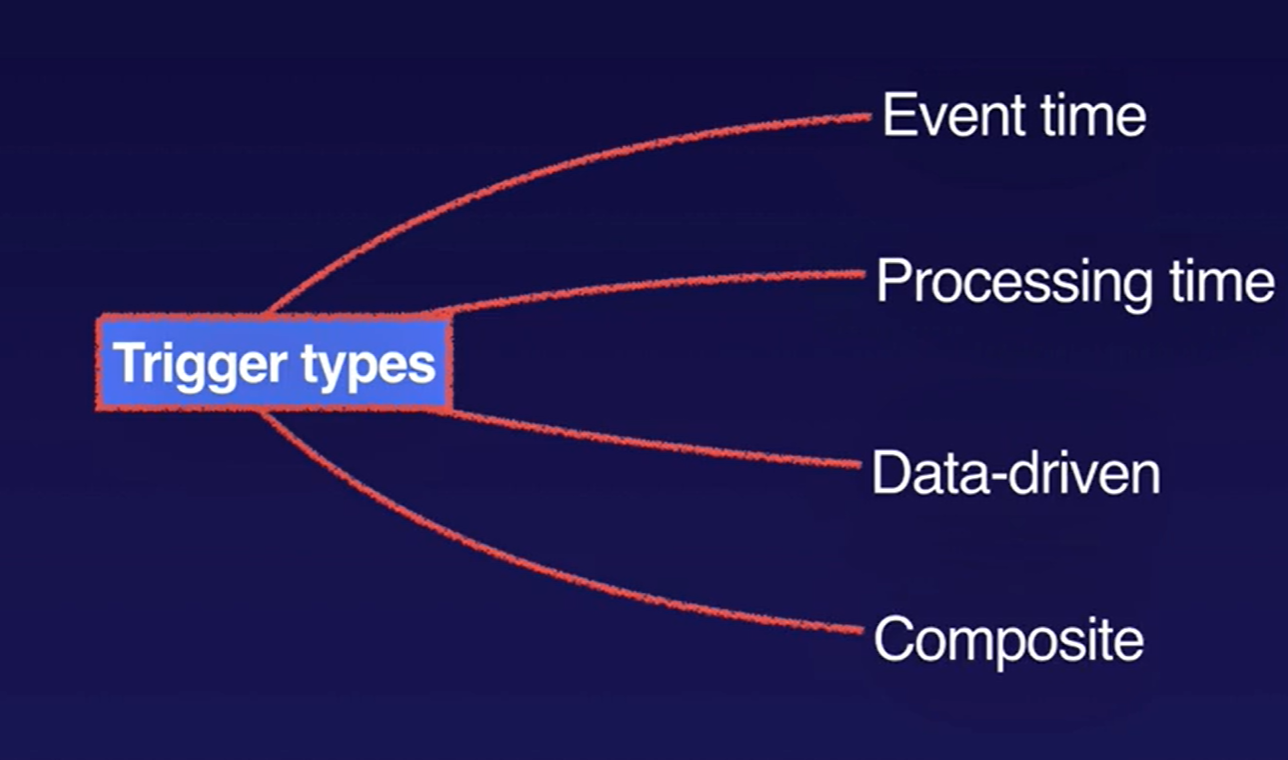
Triggers determine when to emit aggregated results as data arrives. For bounded data, results are emitted after all of the input has been processed. For unbounded data, results are emitted when the watermark passes the end of the window, indicating that the system believes all input data for that window has been processed. Apache Beam provides several predefined triggers and lets you combine them.
- Allow late-arriving data in allowed time window to re-aggregate previously submitted results
- Trigger can be based on (can be a combination):
- Event time, as indicated by the timestamp on each data element.
- Processing time, which is the time that the data element is processed at any given stage in the pipeline.
- Number of data elements in a collection.
Windows and Windowing functions
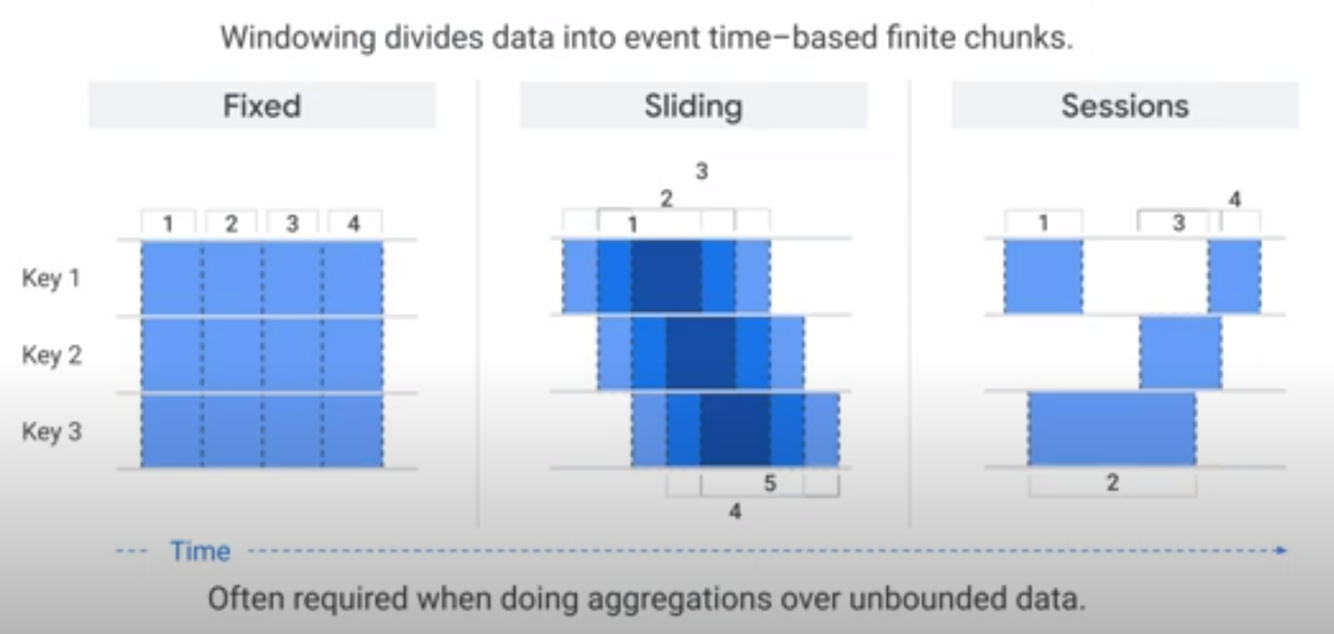
Windowing functions divide unbounded collections (i.e. streaming data) into logical components, or windows. Windowing functions group unbounded collections by the timestamps of the individual elements. Each window contains a finite number of elements.
You set the following windows with the Apache Beam SDK or Dataflow SQL streaming extensions:
- Tumbling windows (called fixed windows in Apache Beam)
- Hopping windows (called sliding windows in Apache Beam)
- Session windows
- Single Global: default, uses a single window for the entire pipeline.
Tumbling windows
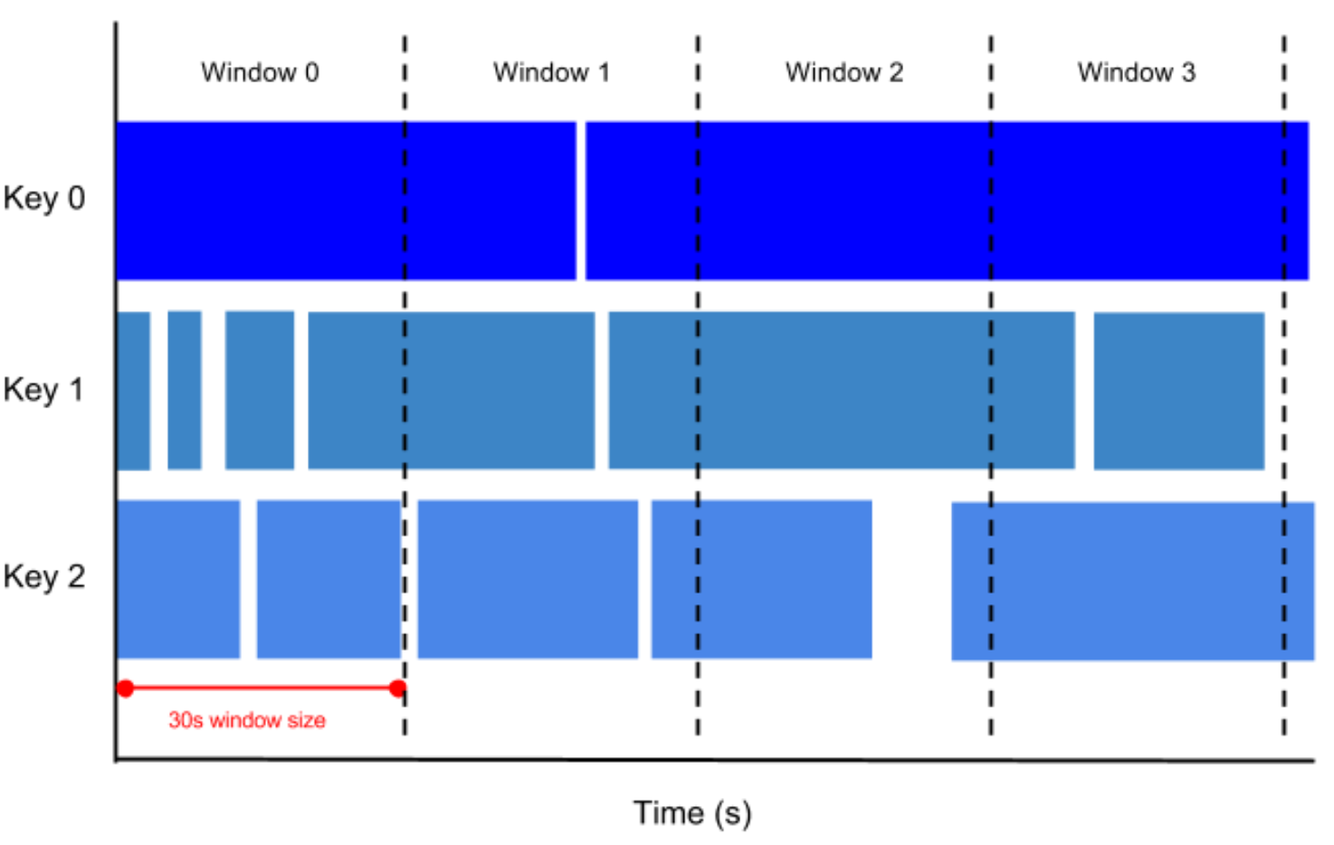
A tumbling window represents a consistent, disjoint time interval in the data stream.
For example, if you set to a thirty-second tumbling window, the elements with timestamp values [0:00:00-0:00:30) are in the first window. Elements with timestamp values [0:00:30-0:01:00) are in the second window.
Hopping windows
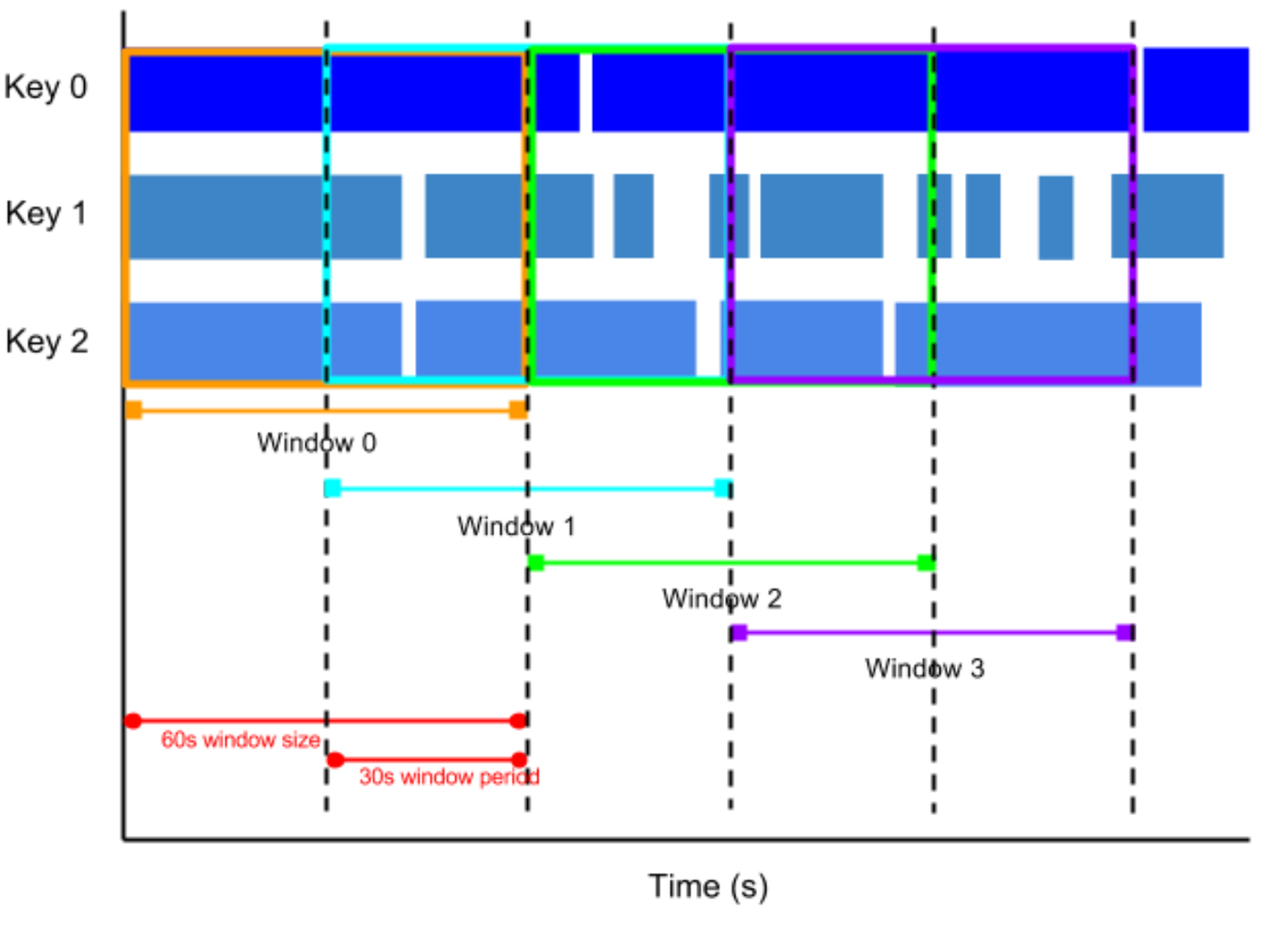
A hopping window represents a consistent time interval in the data stream. Hopping windows can overlap, whereas tumbling windows are disjoint.
For example, a hopping window can start every ten seconds and capture one minute of data and the window. The frequency with which hopping windows begin is called the period. This example has a one-minute window and thirty-second period.
To take running averages of data, use hopping windows. You can use one-minute hopping windows with a thirty-second period to compute a one-minute running average every thirty seconds.
Session windows
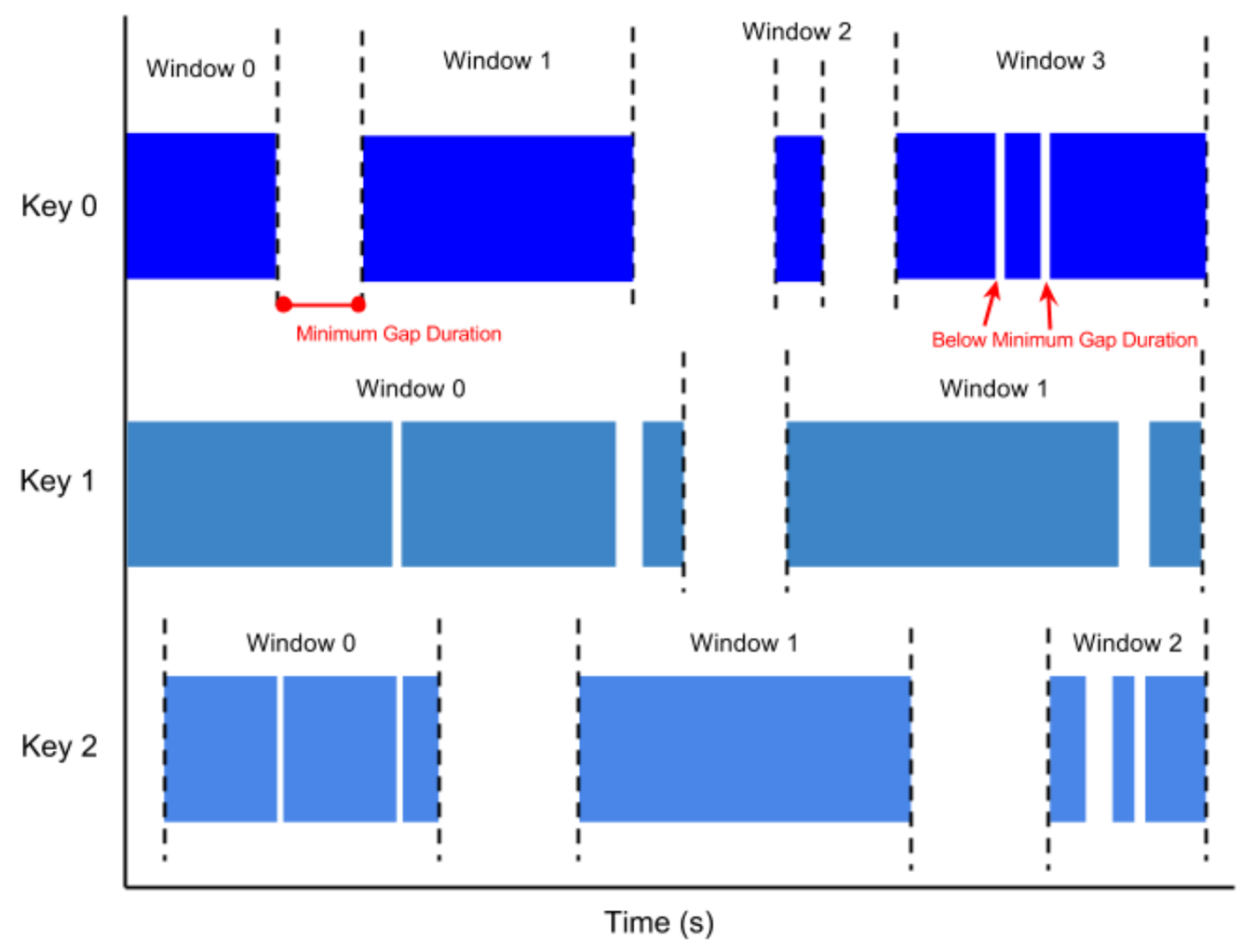
A session window contains elements within a gap duration of another element. The gap duration is an interval between new data in a data stream. If data arrives after the gap duration, the data is assigned to a new window.
For example, session windows can divide a data stream representing user mouse activity. This data stream might have long periods of idle time interspersed with many clicks. A session window can contain the data generated by the clicks.
Session windowing assigns different windows to each data key. Tumbling and hopping windows contain all elements in the specified time interval, regardless of data keys.
Beam - Global vs Non-Global Windowing
Beam’s default windowing behavior is to assign all elements of a PCollection to a single, global window and discard late data, even for unbounded PCollections. Before you use a grouping transform such as GroupByKey on an unbounded PCollection, you must do at least one of the following:
- Set a non-global windowing function.
- Set a non-default trigger. This allows the global window to emit results under other conditions, since the default windowing behavior (waiting for all data to arrive) will never occur.
If you don’t set a non-global windowing function or a non-default trigger for your unbounded PCollection and subsequently use a grouping transform such as GroupByKey or Combine, your pipeline will generate an error upon construction and your job will fail.
REF: https://beam.apache.org/documentation/programming-guide/#windowing
Side Inputs
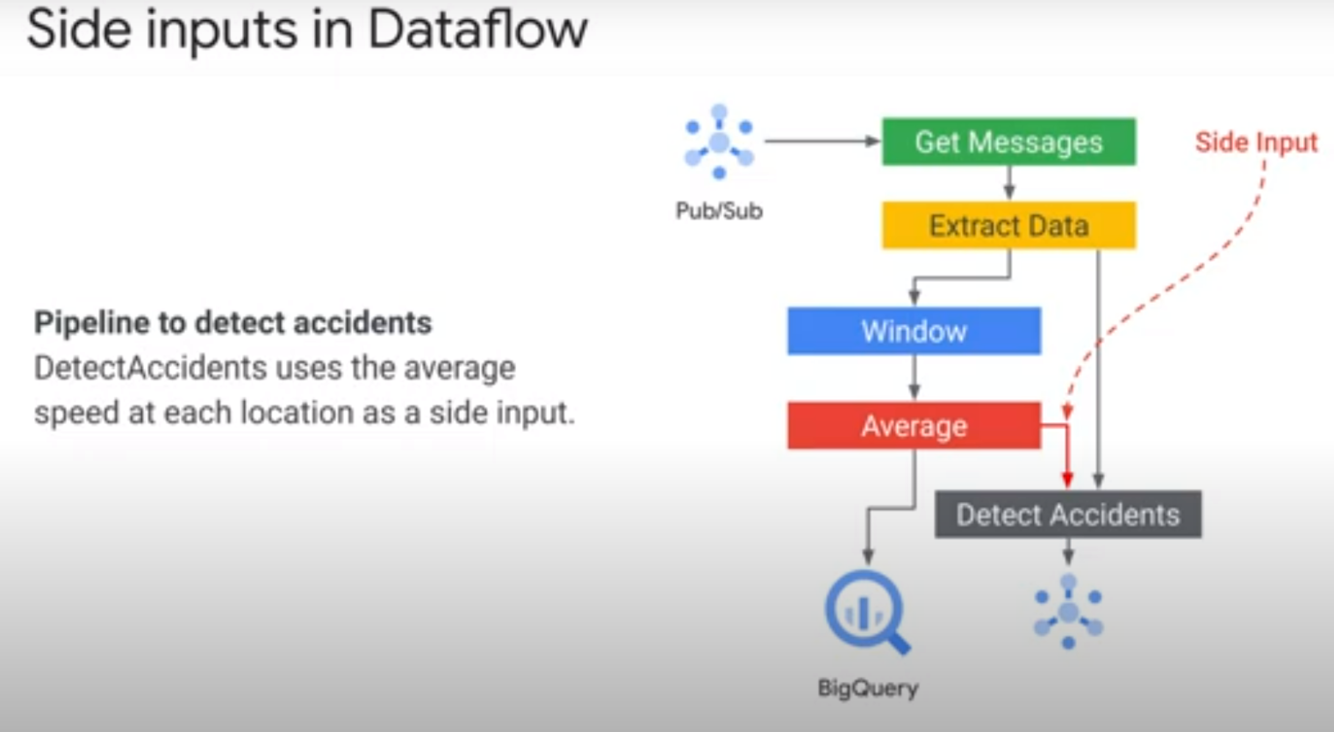
In streaming analytics applications, it is common to enrich data with additional information that might be useful for further analysis. For example, if you have the storeId for a transaction, you might want to add information about the store location. You would typically add this additional information by taking an element and “denormalizing” it by bringing in information from a lookup table.
A side input is an additional input that your DoFn can access each time it processes an element in the input PCollection.
Side inputs are loaded in memory and are therefore cached automatically.
NOTE: Side OUTPUTS are used for branching/testing/debugging
Updating Existing Pipeline
NOTE: Currently, updating batch pipelines is not supported.
When you update a job on the Dataflow service, you replace the existing job with a new job that runs your updated pipeline code. The Dataflow service retains the job name, but runs the replacement job with an updated Job ID.
The replacement job preserves any intermediate state data from the prior job, as well as any buffered data records or metadata currently “in-flight” from the prior job. For example, some records in your pipeline might be buffered while waiting for a window to resolve.
“In-flight” data will still be processed by the transforms in your new pipeline. However, additional transforms that you add in your replacement pipeline code may or may not take effect, depending on where the records are buffered.
NOTE: Draining a job. Draining a job enables the Dataflow service to finish processing the buffered data while simultaneously ceasing the ingestion of new data.
REF: https://cloud.google.com/dataflow/docs/guides/updating-a-pipeline
Updating Existing Pipeline - Transform Mapping
When you launch your replacement job, you’ll need to set the following pipeline options to perform the update process in addition to the job’s regular options:
- Pass the –update option.
- Set the –jobName option in PipelineOptions to the same name as the job you want to update.
- If any transform names in your pipeline have changed, you must supply a transform mapping and pass it using the --transformNameMapping option.
If your replacement pipeline has changed any transform names from those in your prior pipeline, the Dataflow service requires a transform mapping. The transform mapping maps the named transforms in your prior pipeline code to names in your replacement pipeline code.
You only need to provide mapping entries in –transformNameMapping for transform names that have changed between your prior pipeline and your replacement pipeline.
Updating Existing Pipeline - Change Windowing
You can change windowing and trigger strategies for the PCollections in your replacement pipeline, but use caution. Changing the windowing or trigger strategies does not affect data that is already buffered or otherwise in-flight.
We recommend that you attempt only smaller changes to your pipeline’s windowing, such as changing the duration of fixed- or sliding-time windows. Making major changes to windowing or triggers, like changing the windowing algorithm, might have unpredictable results on your pipeline output.
REF: https://cloud.google.com/dataflow/docs/guides/updating-a-pipeline#changing_windowing
Updating Existing Pipeline - Job Compatibility Check
When you launch your replacement job, the Dataflow service performs a compatibility check between your replacement job and your prior job. If the compatibility check passes, your prior job is stopped. Your replacement job then launches on the Dataflow service while retaining the same job name. If the compatibility check fails, your prior job continues running on the Dataflow service and your replacement job returns an error.
The compatibility check ensures that the Dataflow service can transfer intermediate state data from the steps in your prior job to your replacement job, as specified by the transform mapping that you provide.
Certain differences between your prior pipeline and your replacement pipeline can cause the compatibility to check to fail. These differences include:
- Changing the pipeline graph without providing a mapping. When you update a job, the Dataflow service attempts to match the transforms in your prior job to the transforms in the replacement job in order to transfer intermediate state data for each step. If you rename or remove any steps, you need to provide a transform mapping so that Dataflow can match state data accordingly.
REF: https://cloud.google.com/dataflow/docs/guides/updating-a-pipeline#CCheck
Updating Existing Pipeline - Drain a Job
When you drain a job, the Dataflow service finishes your job in its current state. If you want to prevent data loss as you bring down your streaming pipelines, the best option is to drain your job.
When you drain a streaming pipeline, Dataflow immediately closes any in-process windows and fires all triggers. The system does not wait for any outstanding time-based windows to finish in a drain operation.
REF: https://cloud.google.com/dataflow/docs/guides/stopping-a-pipeline#drain



