1
Q
journalctl
Help pages 1-2
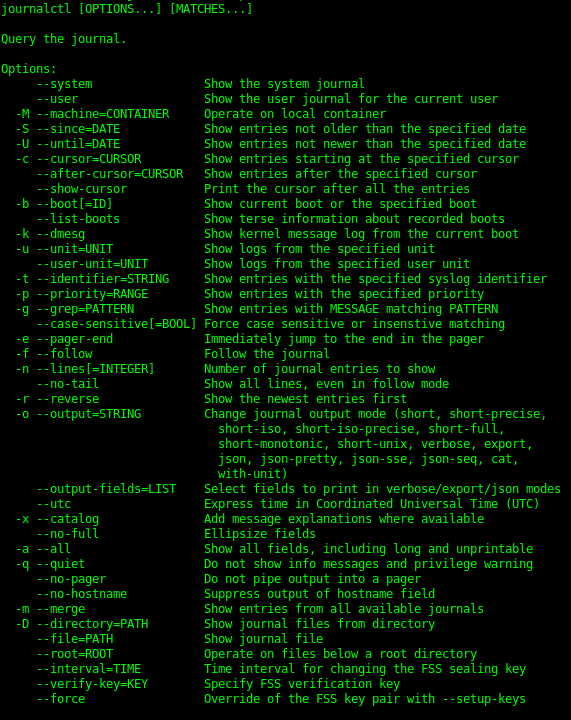
A
Used to query the contents of the systemd journal logs.
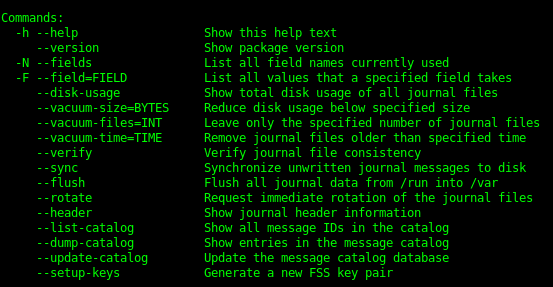
2
Q
journalctl -b [ID] [+- offset]
A
-b Show messages from a specific boot.
[ID]
boot ID can be entered
[+- offset]
- 1 would display last boot
- 2 would display boot before last
3
Q
journalctl -S -U
–since –until
A
-S –since
Shows logs with timestamps since the date chosen. The format can be in 00:00:00 or string format.
4
Q
journalctl –list-boots
A
–list-boots
Lists the previous boot numbers
5
Q
journalctl -u
A
-u
Shows logs filtered by systemd unit.
example: nginx.service
6
Q
journalctl -f
A
-f –follow
Shows only the most recent log entries
7
Q
journalctl -r
A
-r –reverse
Reverses output so newest entries are first.

Linux Commands and Utilities
flashcards
Decks in class (182)
# Cards
-
modprobe2
-
lsmod1
-
lspci6
-
lsusb4
-
dmesg4
-
journalctl7
-
shutdown2
-
telinit2
-
systemctl7
-
wall2
-
grub-install1
-
grub-mkconfig1
-
update-grub1
-
ldd2
-
ldconfig4
-
dpkg15
-
dpkg-reconfigure & debconf5
-
apt-get9
-
apt-cache4
-
rpm18
-
rpm2cpio2
-
yum16
-
zypper5
-
bash2
-
echo6
-
env7
-
export2
-
pwd3
-
set9
-
unset3
-
type4
-
which3
-
man7
-
uname4
-
history8
-
bzcat3
-
cat3
-
cut4
-
head2
-
less14
-
md5sum3
-
nl4
-
od5
-
paste3
-
sed7
-
sha256sum & sha512sum4
-
sort2
-
split8
-
tail2
-
tr4
-
uniq3
-
wc2
-
xzcat1
-
zcat2
-
cp4
-
find28
-
mkdir2
-
mv2
-
ls3
-
rm2
-
rmdir2
-
touch3
-
tar15
-
cpio7
-
dd5
-
file5
-
gzip & gunzip11
-
bzip2 & bunzip25
-
xz & unxz3
-
tee3
-
xargs5
-
bg & fg2
-
jobs4
-
kill & pkill & killall13
-
nohup1
-
ps14
-
top4
-
free4
-
uptime2
-
grep & egrep & fgrep & pgrep0
-
watch3
-
screen0
-
tmux0
-
nice & renice4
-
vi & Editors13
-
fdisk & gdisk7
-
parted7
-
mkfs4
-
mkswap3
-
du5
-
df4
-
fsck3
-
e2fsck5
-
mke2fs5
-
tune2fs3
-
xfs_repair & xfs_fsr & xfs_db0
-
mount & umount8
-
blkid & lsblk7
-
chmod3
-
umask3
-
chown3
-
chgrp2
-
ln4
-
locate11
-
updatedb1
-
whereis & which & type6
-
source1
-
function1
-
alias3
-
read2
-
seq2
-
exec2
-
xhost2
-
xauth4
-
chage3
-
getent2
-
groupadd2
-
groupdel2
-
groupmod2
-
passwd3
-
useradd4
-
userdel2
-
usermod4
-
crontab2
-
at2
-
atq1
-
atrm1
-
systemd-run5
-
tzselect2
-
timedatectl3
-
date3
-
iconv2
-
hwclock3
-
ntpdate1
-
chronyc1
-
logger3
-
logrotate7
-
systemd-cat3
-
newaliases1
-
mail2
-
mailq1
-
lpr & lprm & lpq8
-
nmcli3
-
hostnamectl2
-
ifup & ifdown4
-
ip4
-
hostname2
-
ss4
-
ping & ping64
-
traceroute & traceroute610
-
tracepath & tracepath62
-
netcat3
-
ifconfig3
-
netstat4
-
route2
-
host2
-
dig2
-
fuser0
-
lsof0
-
nmap0
-
sudo0
-
su0
-
ulimit0
-
who & w & last0
-
ssh0
-
ssh-keygen0
-
ssh-agent0
-
ssh-add0
-
gpg0
-
gpg-agent0
-
reboot & halt0
-
pmap & cmp0
-
wget0
-
clear0
-
scp0
-
sleep0
-
logout & exit0
-
shred0
-
finger0
-
curl0
-
awk0
-
service0



