ps
ps displays information about a selection of the active processes.
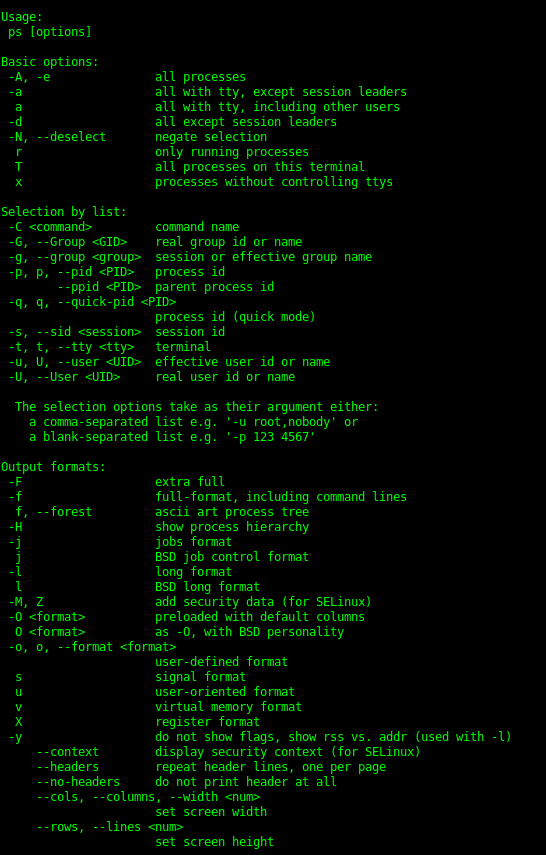
ps [SIMPLE PROCESS SELECTION]
a
- A, -e
- a
- d
g
a, BSD-style Lists all processes with a terminal (tty).
- A, -e, Select all processes.
- a, Select all processes except both session leaders and processes not associated with a terminal.
- d, Select all processes except session leaders.
g, List all, even session leaders, obsolete command.
ps [SIMPLE PROCESS SELECTION]
-N, –deselect
T
r
x
-N, –deselect, Select all processes except those that fulfill the specified condition. (Negates the selection)
T, Select all processes associate with this terminal.
r, Restrict the selection to only running processes.
x, List all processes owned by you.
ps [PROCESS SELECTION BY LIST]
- C
- G
- g
- p, p, -123, 123
–ppid
-q, q
- C cmdlist, Select by command name.
- G, –Group grplist, Select by real group ID (RGID) or name.
- g, –group grplist, Select by effective group ID (EGID) or name.
- p, p, -123, 123, –pid pidlist, Select by process ID.
–ppid pidlist, Select by parent process ID.
-q, q, –quick-pid pidlist, Select by PID (quick mode).
ps [PROCESS SELECTION BY LIST]
- s
- t, t
- u, U
- U
- s, –sid sesslist, Select by session ID.
- t, t, –tty ttylist, Select by terminal.
- u, U, –user userlist, Select by effective user ID (EUID) or name.
- U, –User userlist, Select by real user ID (RUID) or name.
ps -e –forest
This command prints all processes and displays them as a tree with the –forest option.
f, –forest, ASCII art process tree.
ps -fL -C httpd
-f, Do full-format listing. This can be used with additional options to add columns.
ps [THREAD DISPLAY]
H
-L
m, -m
-T
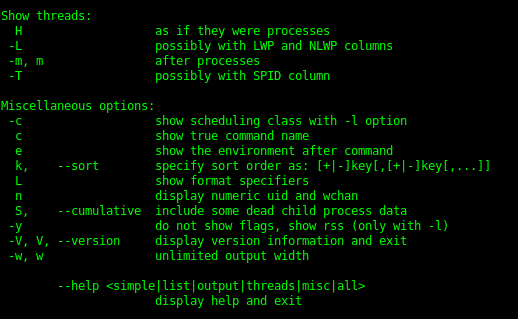
H, Show threads as if they were processes.
-L, Show threads, possibly with LWP and NLWP columns.
m, -m, Show threads after processes.
-T, Show threads, possibly with SPID column.
ps L
L, List all format specifiers.
ps -o
-o, o, –format format, User defined format. Format is a single argument in the form of a blank separated or comma separated list, which offers a way to specify different output columns.
Example:
pid,ppid,fgroup,ni,lstart,etime
ps -p 1154 -o comm=
-o comm=, Will make the ps command display the command that this process ID is running.
ps -eo comm,etime,user | grep httpd
These commands chain together checks the time of a process.
ps –context
This displays the security context format.
watch -n 1 ‘ps -eo pid,ppid,cmd,%mem,%cpu –sort=-%mem | head’
This sequence of commands sets watch to display a list of processes routinely.

-
modprobe2
-
lsmod1
-
lspci6
-
lsusb4
-
dmesg4
-
journalctl7
-
shutdown2
-
telinit2
-
systemctl7
-
wall2
-
grub-install1
-
grub-mkconfig1
-
update-grub1
-
ldd2
-
ldconfig4
-
dpkg15
-
dpkg-reconfigure & debconf5
-
apt-get9
-
apt-cache4
-
rpm18
-
rpm2cpio2
-
yum16
-
zypper5
-
bash2
-
echo6
-
env7
-
export2
-
pwd3
-
set9
-
unset3
-
type4
-
which3
-
man7
-
uname4
-
history8
-
bzcat3
-
cat3
-
cut4
-
head2
-
less14
-
md5sum3
-
nl4
-
od5
-
paste3
-
sed7
-
sha256sum & sha512sum4
-
sort2
-
split8
-
tail2
-
tr4
-
uniq3
-
wc2
-
xzcat1
-
zcat2
-
cp4
-
find28
-
mkdir2
-
mv2
-
ls3
-
rm2
-
rmdir2
-
touch3
-
tar15
-
cpio7
-
dd5
-
file5
-
gzip & gunzip11
-
bzip2 & bunzip25
-
xz & unxz3
-
tee3
-
xargs5
-
bg & fg2
-
jobs4
-
kill & pkill & killall13
-
nohup1
-
ps14
-
top4
-
free4
-
uptime2
-
grep & egrep & fgrep & pgrep0
-
watch3
-
screen0
-
tmux0
-
nice & renice4
-
vi & Editors13
-
fdisk & gdisk7
-
parted7
-
mkfs4
-
mkswap3
-
du5
-
df4
-
fsck3
-
e2fsck5
-
mke2fs5
-
tune2fs3
-
xfs_repair & xfs_fsr & xfs_db0
-
mount & umount8
-
blkid & lsblk7
-
chmod3
-
umask3
-
chown3
-
chgrp2
-
ln4
-
locate11
-
updatedb1
-
whereis & which & type6
-
source1
-
function1
-
alias3
-
read2
-
seq2
-
exec2
-
xhost2
-
xauth4
-
chage3
-
getent2
-
groupadd2
-
groupdel2
-
groupmod2
-
passwd3
-
useradd4
-
userdel2
-
usermod4
-
crontab2
-
at2
-
atq1
-
atrm1
-
systemd-run5
-
tzselect2
-
timedatectl3
-
date3
-
iconv2
-
hwclock3
-
ntpdate1
-
chronyc1
-
logger3
-
logrotate7
-
systemd-cat3
-
newaliases1
-
mail2
-
mailq1
-
lpr & lprm & lpq8
-
nmcli3
-
hostnamectl2
-
ifup & ifdown4
-
ip4
-
hostname2
-
ss4
-
ping & ping64
-
traceroute & traceroute610
-
tracepath & tracepath62
-
netcat3
-
ifconfig3
-
netstat4
-
route2
-
host2
-
dig2
-
fuser0
-
lsof0
-
nmap0
-
sudo0
-
su0
-
ulimit0
-
who & w & last0
-
ssh0
-
ssh-keygen0
-
ssh-agent0
-
ssh-add0
-
gpg0
-
gpg-agent0
-
reboot & halt0
-
pmap & cmp0
-
wget0
-
clear0
-
scp0
-
sleep0
-
logout & exit0
-
shred0
-
finger0
-
curl0
-
awk0
-
service0



