vi
vi (visual) utility is a screen-oriented text editor.
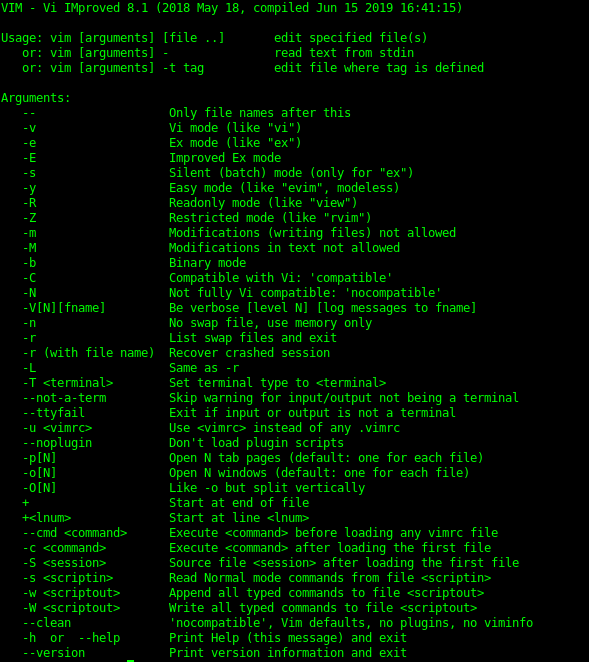
vi
- v
- e
- E
- s
- y
- R
- v, Vi mode.
- e, Ex mode
- E, Improved Ex mode.
- s, Silent (batch) mode (only for Ex mode)
- y, Easy mode.
- R, Read only mode.
vi
- Z
- m
- M
- b
- C
- N
- Z, Restricted mode.
- m, Modifications (writing files) not allowed.
- M, Modifications in text not allowed.
- b, Binary mode.
- C, Compatible with Vi: ‘compatible’.
- N, Not fully Vi compatible: ‘nocompatible’.
vi
- V[N][fname]
- n
- r, -L
- r (with file name)
- T <terminal></terminal>
–not-a-term
- V[N][fname], Be verbose [level N] [log messages to fname]
- n, No swap file, use memory only.
- r, -L, List swap files and exit.
- r (with file name), Recover crashed session.
- T <terminal>, Set terminal type to <terminal></terminal></terminal>
–not-a-term, Skip warning for input/output not being a terminal.
vi
–ttyfail
-u <vimrc></vimrc>
–noplugin
- p[N]
- o[N]
- O[N]
–ttyfail, Exit if input or output is not a terminal.
-u <vimrc>, Use <vimrc> instead of any .vimrc.</vimrc></vimrc>
–noplugin, Don’t load plugin scripts.
- p[N], Open N tab pages (default: one for each file).
- o[N], Open N windows (default: one for each file).
- O[N], Like -o but split vertically.
vi
+
+<lnum></lnum>
–cmd <command></command></command>
- c <command></command></command>
- S <session></session>
- s <scriptin></scriptin>
+, Start at end of file.
+<lnum>, Start at line <lnum>.</lnum></lnum>
–cmd <command></command>, Execute <command></command> before loading any vimrc file.</command></command>
- c <command></command>, Execute <command></command> after loading the first file.</command></command>
- S <session>, Source file <session> after loading the first file.</session></session>
- s <scriptin>, Read Normal mode commands from file <scriptin>.</scriptin></scriptin>
vi
- w <scriptout></scriptout>
- W <scriptout></scriptout>
–clean
- w <scriptout>, Append all typed commands to file <scriptout>.</scriptout></scriptout>
- W <scriptout>, Write all typed commands to file <scriptout></scriptout></scriptout>
–clean, ‘nocompatible’, Vim defaults, no plugins, no viminfo.
vi [INTERNAL COMMANDS]
/
?
/ = Repeat previous search forward
? = Repeat previous search backward
vi [INTERNAL COMMANDS]
h
j
k
l
h = Left
j = Down
k = Up
l = Right
vi [INTERNAL COMMANDS]
i
o
a
i = Insert text before cursor
o = Open new line for text below cursor
a = Insert text after cursor
vi [INTERNAL COMMANDS]
d
p
y
dd
yy
d = Deletes characters and lines in the direction of choice. Choices are h, j, k, l.
p = Paste buffer contents.
y = Copies(Yank) a single character after the cursor into the buffer.
dd = Deletes a current line.
yy = Copies a current line into the buffer.
vi [INTERNAL COMMANDS]
ZZ
:w!
:q!
ZZ = Write the file and quit.
\:w! = Write the file overriding protection.
\:q! = Quit the file overriding protection.
Editors
vi
vim
nano
emacs

-
modprobe2
-
lsmod1
-
lspci6
-
lsusb4
-
dmesg4
-
journalctl7
-
shutdown2
-
telinit2
-
systemctl7
-
wall2
-
grub-install1
-
grub-mkconfig1
-
update-grub1
-
ldd2
-
ldconfig4
-
dpkg15
-
dpkg-reconfigure & debconf5
-
apt-get9
-
apt-cache4
-
rpm18
-
rpm2cpio2
-
yum16
-
zypper5
-
bash2
-
echo6
-
env7
-
export2
-
pwd3
-
set9
-
unset3
-
type4
-
which3
-
man7
-
uname4
-
history8
-
bzcat3
-
cat3
-
cut4
-
head2
-
less14
-
md5sum3
-
nl4
-
od5
-
paste3
-
sed7
-
sha256sum & sha512sum4
-
sort2
-
split8
-
tail2
-
tr4
-
uniq3
-
wc2
-
xzcat1
-
zcat2
-
cp4
-
find28
-
mkdir2
-
mv2
-
ls3
-
rm2
-
rmdir2
-
touch3
-
tar15
-
cpio7
-
dd5
-
file5
-
gzip & gunzip11
-
bzip2 & bunzip25
-
xz & unxz3
-
tee3
-
xargs5
-
bg & fg2
-
jobs4
-
kill & pkill & killall13
-
nohup1
-
ps14
-
top4
-
free4
-
uptime2
-
grep & egrep & fgrep & pgrep0
-
watch3
-
screen0
-
tmux0
-
nice & renice4
-
vi & Editors13
-
fdisk & gdisk7
-
parted7
-
mkfs4
-
mkswap3
-
du5
-
df4
-
fsck3
-
e2fsck5
-
mke2fs5
-
tune2fs3
-
xfs_repair & xfs_fsr & xfs_db0
-
mount & umount8
-
blkid & lsblk7
-
chmod3
-
umask3
-
chown3
-
chgrp2
-
ln4
-
locate11
-
updatedb1
-
whereis & which & type6
-
source1
-
function1
-
alias3
-
read2
-
seq2
-
exec2
-
xhost2
-
xauth4
-
chage3
-
getent2
-
groupadd2
-
groupdel2
-
groupmod2
-
passwd3
-
useradd4
-
userdel2
-
usermod4
-
crontab2
-
at2
-
atq1
-
atrm1
-
systemd-run5
-
tzselect2
-
timedatectl3
-
date3
-
iconv2
-
hwclock3
-
ntpdate1
-
chronyc1
-
logger3
-
logrotate7
-
systemd-cat3
-
newaliases1
-
mail2
-
mailq1
-
lpr & lprm & lpq8
-
nmcli3
-
hostnamectl2
-
ifup & ifdown4
-
ip4
-
hostname2
-
ss4
-
ping & ping64
-
traceroute & traceroute610
-
tracepath & tracepath62
-
netcat3
-
ifconfig3
-
netstat4
-
route2
-
host2
-
dig2
-
fuser0
-
lsof0
-
nmap0
-
sudo0
-
su0
-
ulimit0
-
who & w & last0
-
ssh0
-
ssh-keygen0
-
ssh-agent0
-
ssh-add0
-
gpg0
-
gpg-agent0
-
reboot & halt0
-
pmap & cmp0
-
wget0
-
clear0
-
scp0
-
sleep0
-
logout & exit0
-
shred0
-
finger0
-
curl0
-
awk0
-
service0



