mount
The mount command serves to attach the filesystem found on some device to the big file tree.

Mount [OPTIONS]
- a, –all, Mount all filesystems mentioned in fstab
- c, –no canonicalize, Don’t canonicalize paths.
- f, –fake, Dry run
- F, –fork, Fork off for each device. Use with -a.
- T, –fstab <path>, Alternative file to /etc/fstab</path>
- i, –internal-only, Don’t call the mount.<type> helpers.</type>
- l, –show-labels, Show fs labels.
- o, –options <list>, comma sep. list of mount options.</list>
- O, –test-opts <list>, Limi the set of fs.</list>
- r, –read-only
- t, –types <list>, limit the set of fs types.</list>
- v, –verbose
- w, –rw, –read-write
mount
–source <src></src>
–target <target></target>
-n, –no-mtab
–source <src>, Specify source.</src>
–target <target>, Specify target.</target>
-n, –no-mtab, Don’t write to /etc/mtab
mount [SOURCE]
- L, –label <label>, Synonym for LABEL</label>
- U, –uuid <uuid>, Synonym for UUID</uuid>
LABEL=<label>, Specifies device by fs label.</label>
UUID=<uuid>, Specifies device by fs UUID.</uuid>
PARTLABEL=<label>, Specifies device by partition label.</label>
PARTUUID=<uuid>, Specifies device by partition UUID.</uuid>
<device>, Specifies device by path.</device>
<directory>, Mountpoint for bind mounts.</directory>
<file>, Regular file for loopdev setup.</file>
mount [OPERATIONS]
- B
- M
- R
- B, –bind, Mount a subtree somewhere else.
- M, –move, Move a subtree to somewhere else.
- R, –rbind, Mount a subtree and all submounts somewhere else.
mount [OPERATIONS]
–make-shared, mark a subtree as shared.
–make-slave, mark a subtree as slave.
–make-private, mark a subtree as private.
–make-unbindable, mark a subtree as unbindable.
–make-rshared, recursively mark a whole subtree as shared.
–make-rslave, recursively mark a whole subtree as slave.
–make-rprivate, recursively mark a whole subtree as private.
–make-runbindable, recursively mark a whole subtree as unbindable.
umount
The umount command detaches the mentioned file system(s) from the file hierarchy.
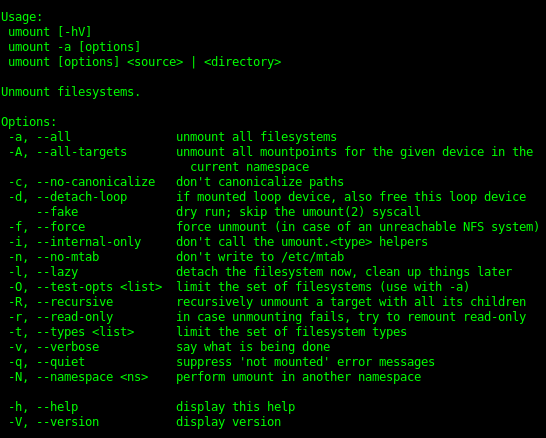
umount
- a, –all
- A, –all-targets
- c, –no-canonicalize
- d, –detach-loop
–fake
-f, –force
- i, –internal-only
- n, –no-mtab
- l, –lazy, Detach fs now, clean later.
- O, –test-opts <list></list>
- R, –recursive
- r, –read-only
- t, –types <list></list>
- v, –verbose
- q, –quiet
- N, –namespace <ns></ns>

-
modprobe2
-
lsmod1
-
lspci6
-
lsusb4
-
dmesg4
-
journalctl7
-
shutdown2
-
telinit2
-
systemctl7
-
wall2
-
grub-install1
-
grub-mkconfig1
-
update-grub1
-
ldd2
-
ldconfig4
-
dpkg15
-
dpkg-reconfigure & debconf5
-
apt-get9
-
apt-cache4
-
rpm18
-
rpm2cpio2
-
yum16
-
zypper5
-
bash2
-
echo6
-
env7
-
export2
-
pwd3
-
set9
-
unset3
-
type4
-
which3
-
man7
-
uname4
-
history8
-
bzcat3
-
cat3
-
cut4
-
head2
-
less14
-
md5sum3
-
nl4
-
od5
-
paste3
-
sed7
-
sha256sum & sha512sum4
-
sort2
-
split8
-
tail2
-
tr4
-
uniq3
-
wc2
-
xzcat1
-
zcat2
-
cp4
-
find28
-
mkdir2
-
mv2
-
ls3
-
rm2
-
rmdir2
-
touch3
-
tar15
-
cpio7
-
dd5
-
file5
-
gzip & gunzip11
-
bzip2 & bunzip25
-
xz & unxz3
-
tee3
-
xargs5
-
bg & fg2
-
jobs4
-
kill & pkill & killall13
-
nohup1
-
ps14
-
top4
-
free4
-
uptime2
-
grep & egrep & fgrep & pgrep0
-
watch3
-
screen0
-
tmux0
-
nice & renice4
-
vi & Editors13
-
fdisk & gdisk7
-
parted7
-
mkfs4
-
mkswap3
-
du5
-
df4
-
fsck3
-
e2fsck5
-
mke2fs5
-
tune2fs3
-
xfs_repair & xfs_fsr & xfs_db0
-
mount & umount8
-
blkid & lsblk7
-
chmod3
-
umask3
-
chown3
-
chgrp2
-
ln4
-
locate11
-
updatedb1
-
whereis & which & type6
-
source1
-
function1
-
alias3
-
read2
-
seq2
-
exec2
-
xhost2
-
xauth4
-
chage3
-
getent2
-
groupadd2
-
groupdel2
-
groupmod2
-
passwd3
-
useradd4
-
userdel2
-
usermod4
-
crontab2
-
at2
-
atq1
-
atrm1
-
systemd-run5
-
tzselect2
-
timedatectl3
-
date3
-
iconv2
-
hwclock3
-
ntpdate1
-
chronyc1
-
logger3
-
logrotate7
-
systemd-cat3
-
newaliases1
-
mail2
-
mailq1
-
lpr & lprm & lpq8
-
nmcli3
-
hostnamectl2
-
ifup & ifdown4
-
ip4
-
hostname2
-
ss4
-
ping & ping64
-
traceroute & traceroute610
-
tracepath & tracepath62
-
netcat3
-
ifconfig3
-
netstat4
-
route2
-
host2
-
dig2
-
fuser0
-
lsof0
-
nmap0
-
sudo0
-
su0
-
ulimit0
-
who & w & last0
-
ssh0
-
ssh-keygen0
-
ssh-agent0
-
ssh-add0
-
gpg0
-
gpg-agent0
-
reboot & halt0
-
pmap & cmp0
-
wget0
-
clear0
-
scp0
-
sleep0
-
logout & exit0
-
shred0
-
finger0
-
curl0
-
awk0
-
service0



